
 我要评论
我要评论mysql表的增删改查
crud : create(创建), retrieve(读取),update(更新),delete(删除)
create(创建)
语法:
insert [into] table_name
	[(column [, column] ...)]
	values (value_list) [, (value_list)] ...

value_list: value, [, value] ...
单行数据 + 全列插入
mysql> create table text(
    -> id int primary key auto_increment,
    -> pid int unique,
    -> name varchar(20),
    -> qq varchar(20) unique
    -> );
query ok, 0 rows affected (0.02 sec)

mysql> desc text;
+-------+-------------+------+-----+---------+----------------+
| field | type        | null | key | default | extra          |
+-------+-------------+------+-----+---------+----------------+
| id    | int(11)     | no   | pri | null    | auto_increment |
| pid   | int(11)     | yes  | uni | null    |                |
| name  | varchar(20) | yes  |     | null    |                |
| qq    | varchar(20) | yes  | uni | null    |                |
+-------+-------------+------+-----+---------+----------------+
4 rows in set (0.01 sec)
插入数据,value_list的顺序和数量必须跟定义表时的顺序,数量一致
table_name后面的column可以不要,这样就是默认的定义表的顺序
mysql> insert into text (id,pid,name,qq) values (10,100,'无敌','123123');
query ok, 1 row affected (0.00 sec)

mysql> insert into text values (11,101,'kk','123456');
query ok, 1 row affected (0.00 sec)

mysql> select * from text;
+----+------+--------+--------+
| id | pid  | name   | qq     |
+----+------+--------+--------+
| 10 |  100 | 无敌   | 123123 |
| 11 |  101 | kk     | 123456 |
+----+------+--------+--------+
2 rows in set (0.00 sec)
多行数据 + 指定列插入
插入数据,value_list的顺序和数量必须跟指定列的顺序,数量一致
写好一个数据后,加个’,'就可以写下一个数据,这样就可以一次插入多行数据
mysql> insert into text(pid,name,qq) values(102, 'aa', '123789'), (103, 'bb', '123999');
query ok, 2 rows affected (0.01 sec)
records: 2  duplicates: 0  warnings: 0

mysql> select * from text;
+----+------+--------+--------+
| id | pid  | name   | qq     |
+----+------+--------+--------+
| 10 |  100 | 无敌   | 123123 |
| 11 |  101 | kk     | 123456 |
| 12 |  102 | aa     | 123789 |
| 13 |  103 | bb     | 123999 |
+----+------+--------+--------+
4 rows in set (0.00 sec)
插入否则更新
由于 主键 或者 唯一键 对应的值已经存在而导致插入失败
mysql> insert into text(id,pid,name,qq) values(13,104, 'aaaa', '1237890');
error 1062 (23000): duplicate entry '13' for key 'primary'
mysql> insert into text(id,pid,name,qq) values(14,103, 'aaaa', '1237890');
error 1062 (23000): duplicate entry '103' for key 'pid'
可以选择性的进行同步更新操作
语法:
insert ... on duplicate key update
	column = value [, column = value] ...
mysql> insert into text(id,pid,name,qq) values(12,110, 'aaaa', '1237890') on duplicate key update pid = 110 , name = 'aaaa',qq = '1237890';
query ok, 2 rows affected (0.00 sec)

mysql> select row_count();
+-------------+
| row_count() |
+-------------+
|           2 |
+-------------+
1 row in set (0.00 sec)

mysql> select * from text;
+----+------+--------+---------+
| id | pid  | name   | qq      |
+----+------+--------+---------+
| 10 |  100 | 无敌   | 123123  |
| 11 |  101 | kk     | 123456  |
| 12 |  110 | aaaa   | 1237890 |
| 13 |  103 | bb     | 123999  |
+----+------+--------+---------+
4 rows in set (0.00 sec)
通过 mysql 函数获取受到影响的数据行数
select row_count();
- 0 row affected: 表中有冲突数据,但冲突数据的值和 update 的值相等
- 1 row affected: 表中没有冲突数据,数据被 插入
- 2 row affected: 表中有冲突数据,并且数据已经被更新
替换
将insert 换成replace 即可
- 主键 或者 唯一键没有冲突,直接插入
- 主键 或者 唯一键发生冲突,删除旧的数据,在插入
mysql> replace into text (pid,name,qq) values (104,'cc','123000');
query ok, 1 row affected (0.01 sec)

mysql> select * from text;
+----+------+--------+---------+
| id | pid  | name   | qq      |
+----+------+--------+---------+
| 10 |  100 | 无敌   | 123123  |
| 11 |  101 | kk     | 123456  |
| 12 |  110 | aaaa   | 1237890 |
| 13 |  103 | bb     | 123999  |
| 14 |  104 | cc     | 123000  |
+----+------+--------+---------+
5 rows in set (0.00 sec)

mysql> replace into text(pid,name,qq) values(104,'cccc','12000');
query ok, 2 rows affected (0.01 sec)

mysql> select * from text;
+----+------+--------+---------+
| id | pid  | name   | qq      |
+----+------+--------+---------+
| 10 |  100 | 无敌   | 123123  |
| 11 |  101 | kk     | 123456  |
| 12 |  110 | aaaa   | 1237890 |
| 13 |  103 | bb     | 123999  |
| 15 |  104 | cccc   | 12000   |
+----+------+--------+---------+
5 rows in set (0.00 sec)
retrieve(读取)
语法:
select
	[distinct] {* | {column [, column] ...}
	[from table_name]
	[where ...]
	[order by column [asc | desc], ...]
	limit ...
例子:
mysql> create table result( id int primary key auto_increment, name varchar(20), chinese int, math int, english int );
query ok, 0 rows affected (0.01 sec)

mysql> desc result;
+---------+-------------+------+-----+---------+----------------+
| field   | type        | null | key | default | extra          |
+---------+-------------+------+-----+---------+----------------+
| id      | int(11)     | no   | pri | null    | auto_increment |
| name    | varchar(20) | yes  |     | null    |                |
| chinese | int(11)     | yes  |     | null    |                |
| math    | int(11)     | yes  |     | null    |                |
| english | int(11)     | yes  |     | null    |                |
+---------+-------------+------+-----+---------+----------------+
5 rows in set (0.01 sec)

mysql> insert into result(name,chinese,math,english) values ('aa', 80, 90, 95);
query ok, 1 row affected (0.00 sec)

mysql> insert into result(name,chinese,math,english) values ('bb', 80, 90, 95);
query ok, 1 row affected (0.01 sec)

mysql> insert into result(name,chinese,math,english) values ('cc', 90, 100, 91);
query ok, 1 row affected (0.00 sec)

mysql> insert into result(name,chinese,math,english) values ('dd', 70, 60, 77);
query ok, 1 row affected (0.00 sec)

mysql> insert into result(name,chinese,math,english) values ('ee', 66, 59, 60);
query ok, 1 row affected (0.00 sec)

mysql> select * from result;
+----+------+---------+------+---------+
| id | name | chinese | math | english |
+----+------+---------+------+---------+
|  1 | aa   |      80 |   90 |      95 |
|  2 | bb   |      80 |   90 |      95 |
|  3 | cc   |      90 |  100 |      91 |
|  4 | dd   |      70 |   60 |      77 |
|  5 | ee   |      66 |   59 |      60 |
+----+------+---------+------+---------+
5 rows in set (0.00 sec)
select 列
全列查询
通常情况下不建议使用 * 进行全列查询
- 查询的列越多,意味着需要传输的数据量越大;
- 可能会影响到索引的使用。
mysql> select * from result;
+----+------+---------+------+---------+
| id | name | chinese | math | english |
+----+------+---------+------+---------+
|  1 | aa   |      80 |   90 |      95 |
|  2 | bb   |      80 |   90 |      95 |
|  3 | cc   |      90 |  100 |      91 |
|  4 | dd   |      70 |   60 |      77 |
|  5 | ee   |      66 |   59 |      60 |
+----+------+---------+------+---------+
5 rows in set (0.00 sec
指定列查询
指定列的顺序不需要按定义表的顺序来
mysql> select id from result;
+----+
| id |
+----+
|  1 |
|  2 |
|  3 |
|  4 |
|  5 |
+----+
5 rows in set (0.00 sec)

mysql> select id,math from result;
+----+------+
| id | math |
+----+------+
|  1 |   90 |
|  2 |   90 |
|  3 |  100 |
|  4 |   60 |
|  5 |   59 |
+----+------+
5 rows in set (0.00 sec)
查询字段为表达式
表达式不包含字段
mysql> select id,name,60 from result;
+----+------+----+
| id | name | 60 |
+----+------+----+
|  1 | aa   | 60 |
|  2 | bb   | 60 |
|  3 | cc   | 60 |
|  4 | dd   | 60 |
|  5 | ee   | 60 |
+----+------+----+
5 rows in set (0.00 sec)
表达式包含一个或者多个字段
mysql> select id,name,chinese+math+english  from result;
+----+------+----------------------+
| id | name | chinese+math+english |
+----+------+----------------------+
|  1 | aa   |                  265 |
|  2 | bb   |                  265 |
|  3 | cc   |                  281 |
|  4 | dd   |                  207 |
|  5 | ee   |                  185 |
+----+------+----------------------+
5 rows in set (0.00 sec)
为查询结果指定别名
select column [as] alias_name [...] from table_name;
mysql> select id,name,chinese+math+english as 总分 from result;
+----+------+--------+
| id | name | 总分   |
+----+------+--------+
|  1 | aa   |    265 |
|  2 | bb   |    265 |
|  3 | cc   |    281 |
|  4 | dd   |    207 |
|  5 | ee   |    185 |
+----+------+--------+
5 rows in set (0.00 sec)

mysql> select id,name,chinese+math+english  总分 from result;
+----+------+--------+
| id | name | 总分   |
+----+------+--------+
|  1 | aa   |    265 |
|  2 | bb   |    265 |
|  3 | cc   |    281 |
|  4 | dd   |    207 |
|  5 | ee   |    185 |
+----+------+--------+
5 rows in set (0.00 sec)
结果去重
select distinct ...
mysql> select english from result;
+---------+
| english |
+---------+
|      95 |
|      95 |
|      91 |
|      77 |
|      60 |
+---------+
5 rows in set (0.00 sec)

mysql> select distinct english from result;
+---------+
| english |
+---------+
|      95 |
|      91 |
|      77 |
|      60 |
+---------+
4 rows in set (0.01 sec)
where 条件
语法:
select 列名1, 列名2, ...
from 表名
where 条件表达式;
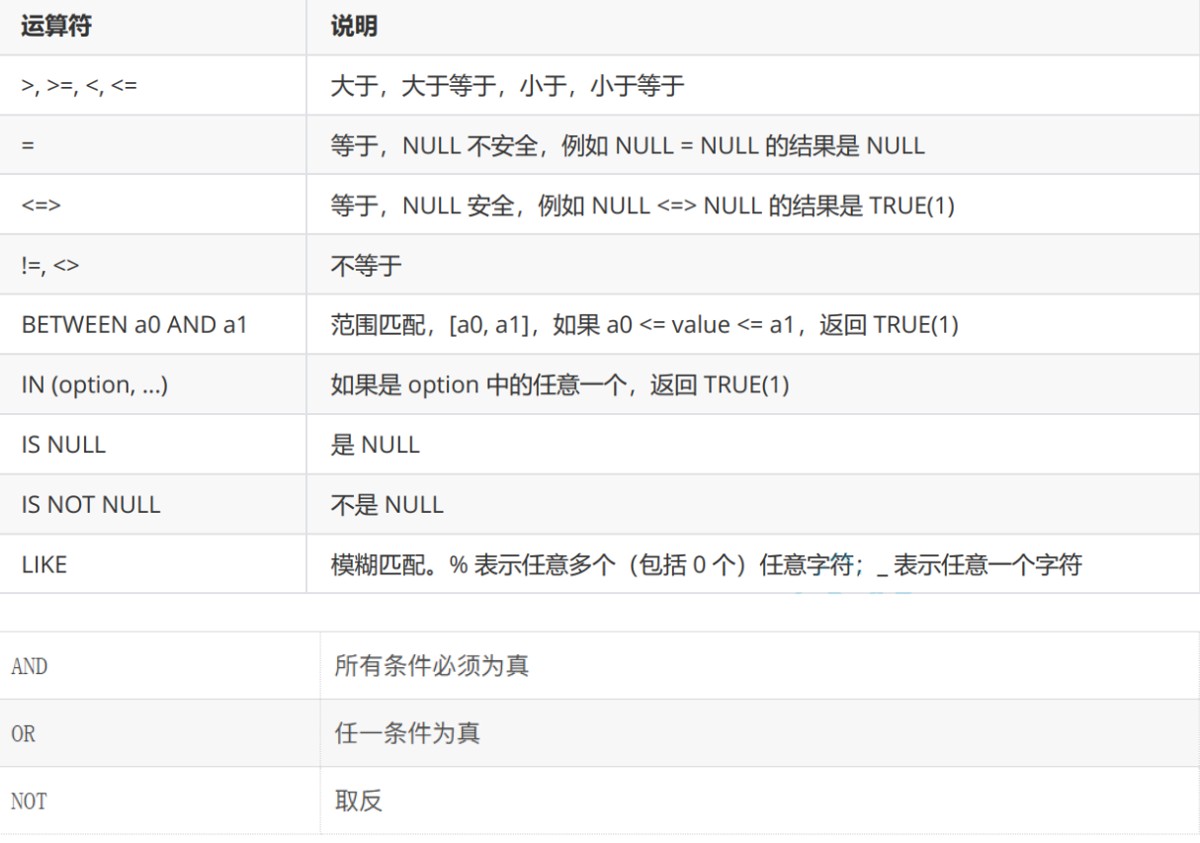
注意:null和0不一样。
null=null结果还是null,因为null不可以用=比较,而是用<=>。通常用is null,is not null来区分是不是null。
示例:
数学不及格的
mysql> select name,math from result where math < 60;
+------+------+
| name | math |
+------+------+
| ee   |   59 |
+------+------+
1 row in set (0.00 sec)
语文在[80,90]的
mysql> select name,chinese from result where chinese>=80 and chinese <= 90;
+------+---------+
| name | chinese |
+------+---------+
| aa   |      80 |
| bb   |      80 |
| cc   |      90 |
+------+---------+
3 rows in set (0.00 sec)
或者
mysql> select name,chinese from result where chinese between 80 and 90;
+------+---------+
| name | chinese |
+------+---------+
| aa   |      80 |
| bb   |      80 |
| cc   |      90 |
+------+---------+
3 rows in set (0.00 sec)
数学是58,59,60,90的
mysql> select name,math from result where math=58 or math=59 or math=60 or math=90;
+------+------+
| name | math |
+------+------+
| aa   |   90 |
| bb   |   90 |
| dd   |   60 |
| ee   |   59 |
+------+------+
4 rows in set (0.00 sec)
或者
mysql> select name,math from result where math in(58,59,60,90);
+------+------+
| name | math |
+------+------+
| aa   |   90 |
| bb   |   90 |
| dd   |   60 |
| ee   |   59 |
+------+------+
4 rows in set (0.00 sec)
姓名是a的同学及姓名是a某
mysql> select name from result where name like 'a%';
+------+
| name |
+------+
| aa   |
| aaa  |
+------+
2 rows in set (0.00 sec)

mysql> select name from result where name like 'a_';
+------+
| name |
+------+
| aa   |
+------+
1 row in set (0.00 sec)
语文大于英语的
mysql> select name,chinese,english from result where chinese > english;
+------+---------+---------+
| name | chinese | english |
+------+---------+---------+
| ee   |      66 |      60 |
+------+---------+---------+
1 row in set (0.00 sec)
总分在200以下的
mysql> select name,chinese+math+english from result where chinese+math+english < 200;
+------+----------------------+
| name | chinese+math+english |
+------+----------------------+
| ee   |                  185 |
| aaa  |                   60 |
+------+----------------------+
2 rows in set (0.00 sec)

mysql> select name,chinese+math+english total from result where chinese+math+english < 200;
+------+-------+
| name | total |
+------+-------+
| ee   |   185 |
| aaa  |    60 |
+------+-------+
2 rows in set (0.00 sec)

mysql> select name,chinese+math+english total from result where toatl < 200;
error 1054 (42s22): unknown column 'toatl' in 'where clause'
注意:
where 条件中可以使用表达式
别名不能用在 where 条件中
语文大于80并且不姓a的
mysql> select name,chinese from result where chinese > 80 and name not like 'a%';
+------+---------+
| name | chinese |
+------+---------+
| cc   |      90 |
+------+---------+
1 row in set (0.00 sec)
aa某人,否则总分大于260 并且语文大于80并且数学大于90
mysql> select name,chinese,math,chinese+math+english from result where name like 'aa_' or (chinese+math+engllish > 260 and chinese > 80 and math > 90);
+------+---------+------+----------------------+
| name | chinese | math | chinese+math+english |
+------+---------+------+----------------------+
| cc   |      90 |  100 |                  281 |
| aaa  |      10 |   20 |                   60 |
+------+---------+------+----------------------+
2 rows in set (0.00 sec)
null的查询
mysql> select * from test;
+------+------+
| id   | name |
+------+------+
|   10 | aaa  |
|   20 | null |
| null | null |
| null | pp   |
|   40 |      |
+------+------+
5 rows in set (0.00 sec)
mysql> select id,name from test where id is null;
+------+------+
| id   | name |
+------+------+
| null | null |
| null | pp   |
+------+------+
2 rows in set (0.00 sec)

mysql> select id,name from test where id is not null;
+------+------+
| id   | name |
+------+------+
|   10 | aaa  |
|   20 | null |
|   40 |      |
+------+------+
3 rows in set (0.00 sec)
mysql> select 1=2
    -> ;
+-----+
| 1=2 |
+-----+
|   0 |
+-----+
1 row in set (0.00 sec)

mysql> select null=null;
+-----------+
| null=null |
+-----------+
|      null |
+-----------+
1 row in set (0.00 sec)

mysql> select null is null;
+--------------+
| null is null |
+--------------+
|            1 |
+--------------+
1 row in set (0.00 sec)


mysql> select null<=>null;
+-------------+
| null<=>null |
+-------------+
|           1 |
+-------------+
1 row in set (0.00 sec)
结果排序(order by)
-- asc 为升序(从小到大)
-- desc 为降序(从大到小)
-- 默认为 asc

select ... from table_name [where ...]
        order by column [asc|desc], [...];
注意:没有带asc或desc的排序查询,返回的顺序是未定义的。
数学升序
mysql> select name,math from result order by math;
+------+------+
| name | math |
+------+------+
| ee   |   59 |
| dd   |   60 |
| aa   |   90 |
| bb   |   90 |
| cc   |  100 |
+------+------+
5 rows in set (0.00 sec)

mysql> select name,math from result order by math asc;
+------+------+
| name | math |
+------+------+
| ee   |   59 |
| dd   |   60 |
| aa   |   90 |
| bb   |   90 |
| cc   |  100 |
+------+------+
5 rows in set (0.00 sec)
按照语文升序,降序
null是最小,升序在最上面,降序在最下面
mysql> select name,chinese from result order by chinese asc;
+------+---------+
| name | chinese |
+------+---------+
| wu   |    null |
| ee   |      66 |
| dd   |      70 |
| aa   |      80 |
| bb   |      80 |
| cc   |      90 |
+------+---------+
6 rows in set (0.01 sec)

mysql> select name,chinese from result order by chinese desc;
+------+---------+
| name | chinese |
+------+---------+
| cc   |      90 |
| aa   |      80 |
| bb   |      80 |
| dd   |      70 |
| ee   |      66 |
| wu   |    null |
+------+---------+
6 rows in set (0.00 sec)
数学降序,语文升序,英语升序
mysql> select * from result;
+----+------+---------+------+---------+
| id | name | chinese | math | english |
+----+------+---------+------+---------+
|  1 | aa   |      80 |   90 |      95 |
|  2 | bb   |      80 |   90 |      95 |
|  3 | cc   |      90 |  100 |      91 |
|  4 | dd   |      70 |   60 |      77 |
|  5 | ee   |      66 |   59 |      60 |
|  6 | wu   |    null | null |    null |
|  7 | gg   |      81 |   90 |      94 |
+----+------+---------+------+---------+
7 rows in set (0.00 sec)
mysql> select name,math,chinese,english from result order by math desc,chinese asc,english;
+------+------+---------+---------+
| name | math | chinese | english |
+------+------+---------+---------+
| cc   |  100 |      90 |      91 |
| aa   |   90 |      80 |      95 |
| bb   |   90 |      80 |      95 |
| gg   |   90 |      81 |      94 |
| dd   |   60 |      70 |      77 |
| ee   |   59 |      66 |      60 |
| wu   | null |    null |    null |
+------+------+---------+---------+
7 rows in set (0.00 sec)
查询总分,降序
注意: 这里的order by 可以使用别名
mysql> select name,chinese+math+english from result order by chinese+math+english desc;
+------+----------------------+
| name | chinese+math+english |
+------+----------------------+
| cc   |                  281 |
| aa   |                  265 |
| bb   |                  265 |
| gg   |                  265 |
| dd   |                  207 |
| ee   |                  185 |
| wu   |                 null |
+------+----------------------+
7 rows in set (0.00 sec)

mysql> select name,chinese+math+english total from result order by total  desc;
+------+-------+
| name | total |
+------+-------+
| cc   |   281 |
| aa   |   265 |
| bb   |   265 |
| gg   |   265 |
| dd   |   207 |
| ee   |   185 |
| wu   |  null |
+------+-------+
7 rows in set (0.00 sec)
查询姓a或者姓e的,按照数学降序
mysql> select name,math from result where name like 'a%' or name like 'e%' order by math desc;
+------+------+
| name | math |
+------+------+
| aa   |   90 |
| ee   |   59 |
+------+------+
2 rows in set (0.00 sec)
筛选分页结果
语法:
-- 起始下标为 0
-- 从 s 开始,筛选 n 条结果
select ... from table_name [where ...] [order by ...] limit s, n
-- 从 0 开始,筛选 n 条结果
select ... from table_name [where ...] [order by ...] limit n;
;
-- 从 s 开始,筛选 n 条结果,比第二种用法更明确,建议使用
select ... from table_name [where ...] [order by ...] limit n offset s;
建议:对未知表进行查询时,最好加一条 limit 1,避免因为表中数据过大,查询全表数据导致数据库卡死。
按 id 进行分页,每页 3 条记录,分别显示 第 1、2、3 页
从开始(下标为0)展示3页
mysql> select name,math from result limit 3;
+------+------+
| name | math |
+------+------+
| aa   |   90 |
| bb   |   90 |
| cc   |  100 |
+------+------+
3 rows in set (0.00 sec)
从第三页(下标为3)开始展示4页
mysql> select name,math from result limit 4 offset 3;
+------+------+
| name | math |
+------+------+
| dd   |   60 |
| ee   |   59 |
| wu   | null |
| gg   |   90 |
+------+------+
4 rows in set (0.00 sec)

mysql> select name,math from result limit 3,4;
+------+------+
| name | math |
+------+------+
| dd   |   60 |
| ee   |   59 |
| wu   | null |
| gg   |   90 |
+------+------+
4 rows in set (0.01 sec)
update(更新)
语法:
update table_name set column = expr [, column = expr ...]
        [where ...] [order by ...] [limit ...]
用于对查询到的值进行更新。
将dd的数学改为70
mysql> update result set math=70 where name='dd';
query ok, 1 row affected (0.00 sec)
rows matched: 1  changed: 1  warnings: 0

mysql> select * from result;
+----+------+---------+------+---------+
| id | name | chinese | math | english |
+----+------+---------+------+---------+
|  1 | aa   |      80 |   90 |      95 |
|  2 | bb   |      80 |   90 |      95 |
|  3 | cc   |      90 |  100 |      91 |
|  4 | dd   |      70 |   70 |      77 |
|  5 | ee   |      66 |   59 |      60 |
|  6 | wu   |    null | null |    null |
|  7 | gg   |      81 |   90 |      94 |
+----+------+---------+------+---------+
7 rows in set (0.00 sec)
将gg语文英语改成98
mysql> update result set chinese=98,english=98 where name = 'gg';
query ok, 1 row affected (0.01 sec)
rows matched: 1  changed: 1  warnings: 0

mysql> select * from result;
+----+------+---------+------+---------+
| id | name | chinese | math | english |
+----+------+---------+------+---------+
|  1 | aa   |      80 |   90 |      95 |
|  2 | bb   |      80 |   90 |      95 |
|  3 | cc   |      90 |  100 |      91 |
|  4 | dd   |      70 |   70 |      77 |
|  5 | ee   |      66 |   59 |      60 |
|  6 | wu   |    null | null |    null |
|  7 | gg   |      98 |   90 |      98 |
+----+------+---------+------+---------+
后三名数学+30
mysql> select name,chinese+math+english total from result order by total asc limit 3;
+------+-------+
| name | total |
+------+-------+
| wu   |  null |
| ee   |   185 |
| dd   |   217 |
+------+-------+
3 rows in set (0.00 sec)

mysql> update result set math=math+30 order by chinese+math+english limit 3;
query ok, 2 rows affected (0.00 sec)
rows matched: 3  changed: 2  warnings: 0

mysql> select name,chinese+math+english total from result order by total asc limit 3;
+------+-------+
| name | total |
+------+-------+
| wu   |  null |
| ee   |   215 |
| dd   |   247 |
+------+-------+
3 rows in set (0.00 sec)
所有语文成绩 * 2
mysql> update result set chinese=chinese*2 ;
query ok, 6 rows affected (0.00 sec)
rows matched: 7  changed: 6  warnings: 0

mysql> select * from result;
+----+------+---------+------+---------+
| id | name | chinese | math | english |
+----+------+---------+------+---------+
|  1 | aa   |     160 |   90 |      95 |
|  2 | bb   |     160 |   90 |      95 |
|  3 | cc   |     180 |  100 |      91 |
|  4 | dd   |     140 |  100 |      77 |
|  5 | ee   |     132 |   89 |      60 |
|  6 | wu   |    null | null |    null |
|  7 | gg   |     196 |   90 |      98 |
+----+------+---------+------+---------+
7 rows in set (0.00 sec)
delete(删除)
删除数据
语法:
delete from table_name [where ...] [order by ...] [limit ...]
删除一行
mysql> select * from t1;
+----+------+------+
| id | name | uid  |
+----+------+------+
|  1 | aa   | 1111 |
|  2 | bb   | 2222 |
|  3 | cc   | 3333 |
+----+------+------+
3 rows in set (0.00 sec)

mysql> delete from t1 where name='aa';
query ok, 1 row affected (0.00 sec)

mysql> select * from t1;
+----+------+------+
| id | name | uid  |
+----+------+------+
|  2 | bb   | 2222 |
|  3 | cc   | 3333 |
+----+------+------+
2 rows in set (0.00 sec)
删除所有数据
mysql> select * from t1;
+----+------+------+
| id | name | uid  |
+----+------+------+
|  2 | bb   | 2222 |
|  3 | cc   | 3333 |
+----+------+------+
2 rows in set (0.00 sec)

mysql> delete from t1;
query ok, 2 rows affected (0.00 sec)

mysql> select * from t1;
empty set (0.00 sec)
查看表结构,会有 auto_increment=n 项
mysql> show create table t1;
+-------+---------------------------------------------------------------------------------------------------------------------------------------------------------------------------------------------------------+
| table | create table                                                                                                                                                                                            |
+-------+---------------------------------------------------------------------------------------------------------------------------------------------------------------------------------------------------------+
| t1    | create table `t1` (
  `id` int(11) not null auto_increment,
  `name` varchar(20) default null,
  `uid` int(11) default null,
  primary key (`id`)
) engine=innodb auto_increment=4 default charset=utf8 |
+-------+---------------------------------------------------------------------------------------------------------------------------------------------------------------------------------------------------------+
1 row in set (0.00 sec)
裁断表
truncate [table] table_name
注意:这个裁断只能删除所有数据,它会清空auto_increment的数据,并且它不像delete,它的删除不走事务,操作更快,无法恢复。
mysql> select * from t1;
+----+------+------+
| id | name | uid  |
+----+------+------+
|  4 | aa   | 1111 |
|  5 | bb   | 2222 |
|  6 | cc   | 3333 |
+----+------+------+
3 rows in set (0.00 sec)

mysql> truncate table t1 where name ='aa';
error 1064 (42000): you have an error in your sql syntax; check the manual that corresponds to your mysql server version for the right syntax to use near 'where name ='aa'' at line 1
mysql> truncate table t1;
query ok, 0 rows affected (0.03 sec)

mysql> truncate table t1 where name ='aa';
error 1064 (42000): you have an error in your sql syntax; check the manual that corresponds to your mysql server version for the right syntax to use near 'where name ='aa'' at line 1
mysql> truncate table t1;
query ok, 0 rows affected (0.03 sec)
查看表结构,没有auto_increment
mysql> show create table t1\g;
*************************** 1. row ***************************
       table: t1
create table: create table `t1` (
  `id` int(11) not null auto_increment,
  `name` varchar(20) default null,
  `uid` int(11) default null,
  primary key (`id`)
) engine=innodb default charset=utf8
1 row in set (0.00 sec)

error:
no query specified
再次插入数据,看到id重新从1开始
mysql> insert into t1(name,uid) values ('dd', 55555);
query ok, 1 row affected (0.00 sec)

mysql> select * from t1;
+----+------+-------+
| id | name | uid   |
+----+------+-------+
|  1 | dd   | 55555 |
+----+------+-------+
1 row in set (0.00 sec)
插入查询结果
insert into table_name [(column [, column ...])] select ...
删除表中重复数据
mysql> select * from t1;
+------+------+
| id   | name |
+------+------+
|  111 | aaa  |
|  111 | aaa  |
|  222 | bbb  |
|  222 | bbb  |
|  333 | ccc  |
|  333 | ccc  |
+------+------+
6 rows in set (0.00 sec)
- 先创建一份一样的表
mysql> desc t1;
+-------+----------+------+-----+---------+-------+
| field | type     | null | key | default | extra |
+-------+----------+------+-----+---------+-------+
| id    | int(11)  | yes  |     | null    |       |
| name  | char(10) | yes  |     | null    |       |
+-------+----------+------+-----+---------+-------+
2 rows in set (0.00 sec)

mysql> create table t2 like t1;
query ok, 0 rows affected (0.02 sec)

mysql> desc t2;
+-------+----------+------+-----+---------+-------+
| field | type     | null | key | default | extra |
+-------+----------+------+-----+---------+-------+
| id    | int(11)  | yes  |     | null    |       |
| name  | char(10) | yes  |     | null    |       |
+-------+----------+------+-----+---------+-------+
2 rows in set (0.00 sec)
- 这个表插入去重的数据
mysql> insert into t2 select distinct * from t1;
query ok, 3 rows affected (0.00 sec)
records: 3  duplicates: 0  warnings: 0

mysql> select * from t2;
+------+------+
| id   | name |
+------+------+
|  111 | aaa  |
|  222 | bbb  |
|  333 | ccc  |
+------+------+
3 rows in set (0.00 sec)
- 把原来的表改名字,用新的表改回来名字
mysql> rename table t1 to old_t1,t2 to t1;
query ok, 0 rows affected (0.02 sec)

mysql> select * from t1;
+------+------+
| id   | name |
+------+------+
|  111 | aaa  |
|  222 | bbb  |
|  333 | ccc  |
+------+------+
3 rows in set (0.00 sec)

mysql> show tables;
+--------------+
| tables_in_d1 |
+--------------+
| old_t1       |
| t1           |
+--------------+
2 rows in set (0.00 sec)
聚合函数
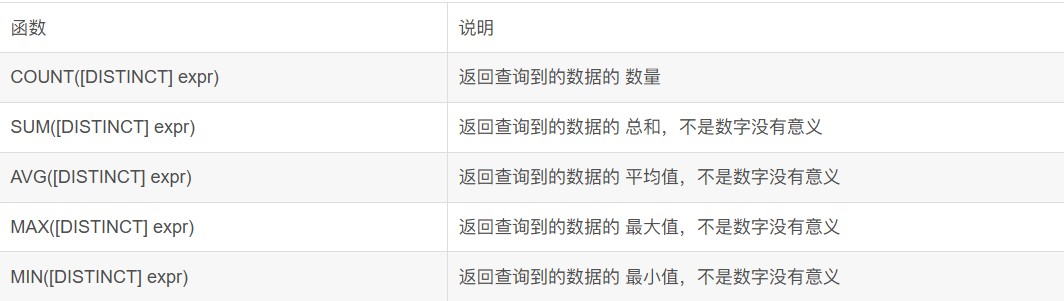
统计表几个数据
mysql> select * from t1;
+------+------+
| id   | name |
+------+------+
|  111 | aaa  |
|  222 | bbb  |
|  333 | ccc  |
+------+------+
3 rows in set (0.00 sec)

mysql> select count(*) from t1;
+----------+
| count(*) |
+----------+
|        3 |
+----------+
1 row in set (0.00 sec)

mysql> select count(1) from t1;
+----------+
| count(1) |
+----------+
|        3 |
+----------+
1 row in set (0.00 sec)

mysql> select count(1) 总结 from t1;
+--------+
| 总结   |
+--------+
|      3 |
+--------+
1 row in set (0.00 sec)
统计数学成绩的个数
mysql> select * from t3;
+------+---------+------+---------+
| name | chinese | math | english |
+------+---------+------+---------+
| a    |      80 |   80 |      80 |
| b    |      82 |   83 |      84 |
| c    |      40 |   89 |      87 |
| d    |      60 |   70 |      70 |
| dd   |      60 |   70 |      70 |
+------+---------+------+---------+
5 rows in set (0.00 sec)

mysql> select count(math) from t3;
+-------------+
| count(math) |
+-------------+
|           5 |
+-------------+
1 row in set (0.00 sec)
去重的个数
mysql> select count(distinct math) from t3;
+----------------------+
| count(distinct math) |
+----------------------+
|                    4 |
+----------------------+
1 row in set (0.00 sec)
数学总分
mysql> select sum(math) from t3;
+-----------+
| sum(math) |
+-----------+
|       392 |
+-----------+
1 row in set (0.00 sec)
平均总分
mysql> select avg(chinese+math+english) from t3;
+---------------------------+
| avg(chinese+math+english) |
+---------------------------+
|                  221.0000 |
+---------------------------+
1 row in set (0.00 sec)
英语最高分
mysql> select max(english) from t3;
+--------------+
| max(english) |
+--------------+
|           87 |
+--------------+
1 row in set (0.00 sec)
80以上的数学最低分
mysql> select min(math) from t3 where math > 80;
+-----------+
| min(math) |
+-----------+
|        83 |
+-----------+
1 row in set (0.00 sec)
group by句子的使用
语法:
select column1, column2, .. from table group by column;
分组:把一组按条件拆分成多个组 。然后在各自组能做统计。在逻辑上相当于拆分成多张"表"。
mysql> select * from emp;
+--------+--------+-----------+------+---------------------+---------+---------+--------+
| empno  | ename  | job       | mgr  | hiredate            | sal     | comm    | deptno |
+--------+--------+-----------+------+---------------------+---------+---------+--------+
| 007369 | smith  | clerk     | 7902 | 1980-12-17 00:00:00 |  800.00 |    null |     20 |
| 007499 | allen  | salesman  | 7698 | 1981-02-20 00:00:00 | 1600.00 |  300.00 |     30 |
| 007521 | ward   | salesman  | 7698 | 1981-02-22 00:00:00 | 1250.00 |  500.00 |     30 |
| 007566 | jones  | manager   | 7839 | 1981-04-02 00:00:00 | 2975.00 |    null |     20 |
| 007654 | martin | salesman  | 7698 | 1981-09-28 00:00:00 | 1250.00 | 1400.00 |     30 |
| 007698 | blake  | manager   | 7839 | 1981-05-01 00:00:00 | 2850.00 |    null |     30 |
| 007782 | clark  | manager   | 7839 | 1981-06-09 00:00:00 | 2450.00 |    null |     10 |
| 007788 | scott  | analyst   | 7566 | 1987-04-19 00:00:00 | 3000.00 |    null |     20 |
| 007839 | king   | president | null | 1981-11-17 00:00:00 | 5000.00 |    null |     10 |
| 007844 | turner | salesman  | 7698 | 1981-09-08 00:00:00 | 1500.00 |    0.00 |     30 |
| 007876 | adams  | clerk     | 7788 | 1987-05-23 00:00:00 | 1100.00 |    null |     20 |
| 007900 | james  | clerk     | 7698 | 1981-12-03 00:00:00 |  950.00 |    null |     30 |
| 007902 | ford   | analyst   | 7566 | 1981-12-03 00:00:00 | 3000.00 |    null |     20 |
| 007934 | miller | clerk     | 7782 | 1982-01-23 00:00:00 | 1300.00 |    null |     10 |
+--------+--------+-----------+------+---------------------+---------+---------+--------+
14 rows in set (0.00 sec)
显示每个部门的平均工资和最高工资
select deptno,avg(sal),max(sal) from emp group by deptno;
+--------+-------------+----------+
| deptno | avg(sal)    | max(sal) |
+--------+-------------+----------+
|     10 | 2916.666667 |  5000.00 |
|     20 | 2175.000000 |  3000.00 |
|     30 | 1566.666667 |  2850.00 |
+--------+-------------+----------+
3 rows in set (0.00 sec)
显示每个部门的每种岗位的平均工资和最低工资
select avg(sal),min(sal),job, deptno from emp group by deptno, job;
+-------------+----------+-----------+--------+
| avg(sal)    | min(sal) | job       | deptno |
+-------------+----------+-----------+--------+
| 1300.000000 |  1300.00 | clerk     |     10 |
| 2450.000000 |  2450.00 | manager   |     10 |
| 5000.000000 |  5000.00 | president |     10 |
| 3000.000000 |  3000.00 | analyst   |     20 |
|  950.000000 |   800.00 | clerk     |     20 |
| 2975.000000 |  2975.00 | manager   |     20 |
|  950.000000 |   950.00 | clerk     |     30 |
| 2850.000000 |  2850.00 | manager   |     30 |
| 1400.000000 |  1250.00 | salesman  |     30 |
+-------------+----------+-----------+--------+
9 rows in set (0.00 sec)
显示平均工资低于2000的部门和它的平均工资。having和group by配合使用,对group by结果进行过滤
select avg(sal) as myavg from emp group by deptno having myavg<2000;
mysql> select avg(sal) as myavg from emp group by deptno having myavg < 2000;
+-------------+
| myavg       |
+-------------+
| 1566.666667 |
+-------------+
1 row in set (0.00 sec)

mysql> select avg(sal) as myavg from emp group by deptno where myavg < 2000;
error 1064 (42000): you have an error in your sql syntax; check the manual that corresponds to your mysql server version for the right syntax to use near 'where myavg < 2000' at line 1
having与where的使用方法相同,但它们使用在不同的场景。
- where:对具体任意列进行统计筛选。
- having:对分组聚合后的结果进行条件筛选。
总结
以上为个人经验,希望能给大家一个参考,也希望大家多多支持代码网。





发表评论