
 我要评论
我要评论一、多表查询
1.1 数据准备
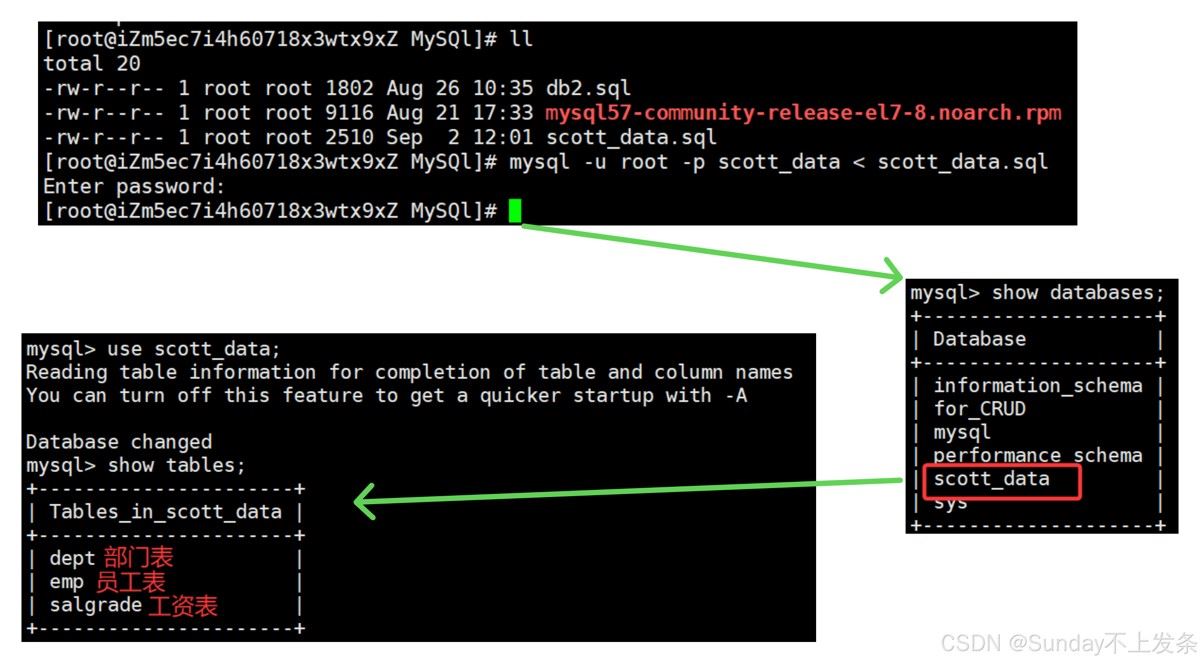
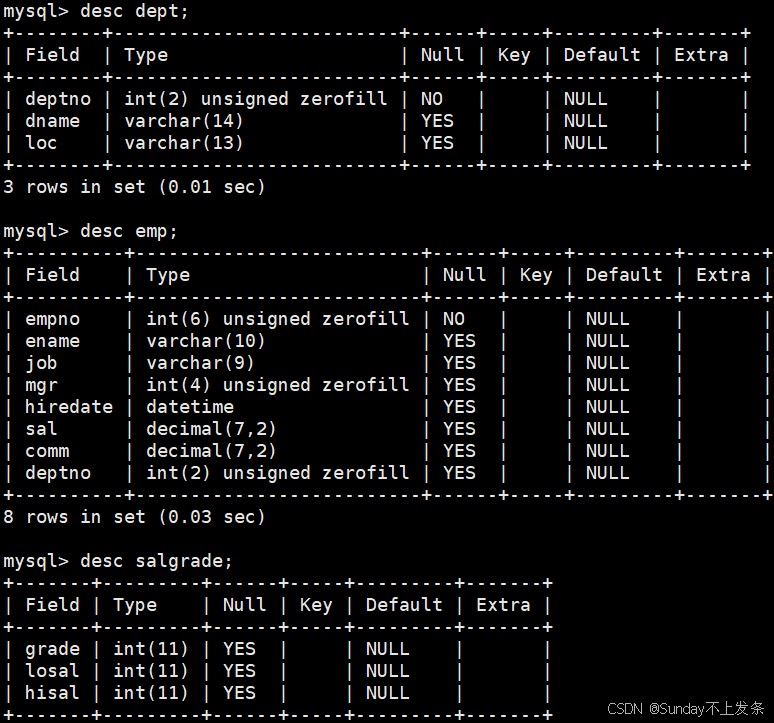
准备三张表:
- 部门表
- 员工表
- 工资表
create database if not exists `scott_data` default character set utf8 collate utf8_general_ci;
use `scott_data`;
drop table if exists `dept`;
create table `dept` (
  `deptno` int(2) unsigned zerofill not null comment '部门编号',
  `dname` varchar(14) default null comment '部门名称',
  `loc` varchar(13) default null comment '部门所在地点'
);
drop table if exists `emp`;
create table `emp` (
  `empno` int(6) unsigned zerofill not null comment '雇员编号',
  `ename` varchar(10) default null comment '雇员姓名',
  `job` varchar(9) default null comment '雇员职位',
  `mgr` int(4) unsigned zerofill default null comment '雇员领导编号',
  `hiredate` datetime default null comment '雇佣时间',
  `sal` decimal(7,2) default null comment '工资月薪',
  `comm` decimal(7,2) default null comment '奖金',
  `deptno` int(2) unsigned zerofill default null comment '部门编号'
);
drop table if exists `salgrade`;
create table `salgrade` (
  `grade` int(11) default null comment '等级',
  `losal` int(11) default null comment '此等级最低工资',
  `hisal` int(11) default null comment '此等级最高工资'
);
insert into dept (deptno, dname, loc)
values (10, 'accounting', 'new york')
,(20, 'research', 'dallas')
,(30, 'sales', 'chicago')
,(40, 'operations', 'boston');
insert into emp (empno, ename, job, mgr, hiredate, sal, comm, deptno)
values (7369, 'smith', 'clerk', 7902, '1980-12-17', 800, null, 20)
,(7499, 'allen', 'salesman', 7698, '1981-02-20', 1600, 300, 30)
,(7521, 'ward', 'salesman', 7698, '1981-02-22', 1250, 500, 30)
,(7566, 'jones', 'manager', 7839, '1981-04-02', 2975, null, 20)
,(7654, 'martin', 'salesman', 7698, '1981-09-28', 1250, 1400, 30)
,(7698, 'blake', 'manager', 7839, '1981-05-01', 2850, null, 30)
,(7782, 'clark', 'manager', 7839, '1981-06-09', 2450, null, 10)
,(7788, 'scott', 'analyst', 7566, '1987-04-19', 3000, null, 20)
,(7839, 'king', 'president', null, '1981-11-17', 5000, null, 10)
,(7844, 'turner', 'salesman', 7698,'1981-09-08', 1500, 0, 30)
,(7876, 'adams', 'clerk', 7788, '1987-05-23', 1100, null, 20)
,(7900, 'james', 'clerk', 7698, '1981-12-03', 950, null, 30)
,(7902, 'ford', 'analyst', 7566, '1981-12-03', 3000, null, 20)
,(7934, 'miller', 'clerk', 7782, '1982-01-23', 1300, null, 10);
insert into salgrade (grade, losal, hisal) values (1, 700, 1200)
,(2, 1201, 1400)
,(3, 1401, 2000)
,(4, 2001, 3000)
,(5, 3001, 9999);
可以先在 linux 中创建 scott_data.sql 文件,将上面的代码拷贝进去,然后,mysql -u root -p scott_data < ./scott_data.sql 在mysql 中创建scott_data数据库并建表。
1.2 笛卡尔积
select ... from student, class;
对 student 和 class 作笛卡尔积,即让 student 的每一行与 class 每一行进行拼接。
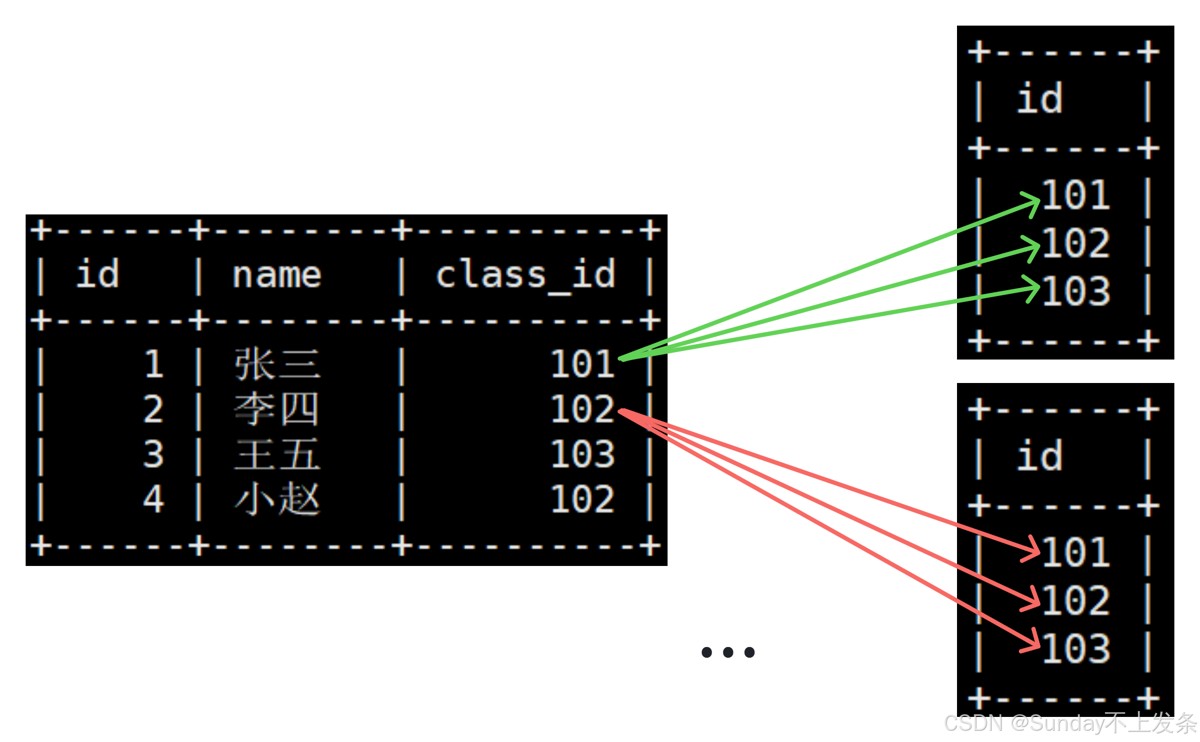
对于需要进行多表查询的场景,通过笛卡尔积可以更方便的解决问题。
1.3 多表查询
案例:
(1)显示雇员名、雇员工资以及所在部门的名字
select ename, sal, dname from emp, dept where emp.deptno = dept.deptno;
(2)显示部门号为 10 的部门名,员工名和工资
select dept.dname, ename, sal from emp, dept where emp.deptno = dept.deptno and emp.deptno = 10;
(3)显示各个员工的姓名,工资,及工资级别
select ename, sal, grade from emp, salgrade where sal between losal and hisal;
1.4 自连接
自连接是指同一张表进行笛卡尔积。
注意:直接进行笛卡尔积不行,需要对表取不同的别名!
select ... from student t1, student t2;
案例:显示员工 ford 的上级领导的编号和姓名
+--------+-------+
| empno  | ename |
+--------+-------+
| 007566 | jones |
+--------+-------+
- 使用子查询
select empno, ename from emp where empno = (select mgr from emp where ename = 'ford');
- 使用多表查询
select t2.empno, t2.ename from emp t1, emp t2 where t1.ename = 'ford' and t1.mgr = t2.empno;
二、子查询
子查询是指嵌入在其他sql语句中的select语句,也叫嵌套查询,即把 select 查询的结果作为筛选条件。
2.1 单行子查询
子查询的结果为一行。
- 显示 smith 同一部门的员工
select * from emp where deptno = (select deptno from emp where ename = 'smith');
将 select deptno from emp where ename = 'smith' 的结果作为筛选条件。
2.2 多行子查询
子查询返回多条记录。
- in 关键字;查询和10号部门的工作岗位相同的雇员的名字,岗位,工资,部门号,但是不包含10自己的
select ename, job, sal, deptno from emp where job in(select job from emp where deptno = 10)
and deptno <> 10;
- all 关键字;显示工资比部门30的所有员工的工资高的员工的姓名、工资和部门号
select ename, sal, deptno from emp where sal > all(select sal from emp where deptno = 30);
- any 关键字;显示工资比部门30的任意员工的工资高的员工的姓名、工资和部门号(包含自己部门的员工)
select ename, sal, deptno from emp where sal > any(select sal from emp where deptno = 30);
2.3 多列子查询
单行和多行子查询的返回值都是单列的,多列子查询的返回值为多列数据。
- 查询和smith的部门和岗位完全相同的所有雇员,不含smith本人
select ename from emp where (deptno, job) = (select deptno, job from emp where ename = 'smith')
and ename <> 'smith';
2.4 在from子句中使用子查询
在 from 子句中使用子查询,即将子查询的结果作为一张临时表使用。
案例:
- 显示每个高于自己部门平均工资的员工的姓名、部门、工资、平均工资
select ename, emp.deptno, sal, tmp.平均工资 from emp,
(select deptno, avg(sal) 平均工资 from emp group by deptno) tmp
where emp.deptno = tmp.deptno and emp.sal > tmp.平均工资;
+-------+--------+---------+--------------+
| ename | deptno | sal     | 平均工资      |
+-------+--------+---------+--------------+
| allen |     30 | 1600.00 |  1566.666667 |
| jones |     20 | 2975.00 |  2175.000000 |
| blake |     30 | 2850.00 |  1566.666667 |
| scott |     20 | 3000.00 |  2175.000000 |
| king  |     10 | 5000.00 |  2916.666667 |
| ford  |     20 | 3000.00 |  2175.000000 |
+-------+--------+---------+--------------+
为了方便操作,可以对子查询得到的临时表进行重命名
- 查找每个部门工资最高的人的姓名、工资、部门、最高工资
select ename, sal, emp.deptno, tmp.最高工资 from emp,
(select deptno, max(sal) 最高工资 from emp group by deptno) tmp
where emp.deptno = tmp.deptno and emp.sal = tmp.最高工资;
- 显示每个部门的信息(部门名,编号,地址)和人员数量
- 使用子查询
select dname, dept.deptno, loc, tmp.人员数量 from dept,
(select deptno, count(*) 人员数量 from emp groupby deptno) tmp
where dept.deptno = tmp.deptno;
- 使用多表查询
select dept.deptno, dname, loc, count(*) from dept, emp
where emp.deptno = dept.deptno group by dept.deptnno, dname, loc;
2.5 合并查询
在实际应用中,为了合并多个 select 的执行结果,可以使用集合操作符 union,union all。
(1)union
该操作符用于取得两个结果集的并集。当使用该操作符时,会自动去掉结果集中的重复行。
- 将工资大于2500或职位是manager的人找出来
mysql> select ename, sal, job from emp where sal > 2500 union
    -> select ename, sal, job from emp where job = 'manager';
(2)union all
该操作符用于取得两个结果集的并集。当使用该操作符时,不会去掉结果集中的重复行。
select ename, sal, job from emp where sal > 2500 union all
select ename, sal, job from emp where job = 'managanager';
三、表的内外连接
3.1 内连接
内连接就是“笛卡尔积”,也是开发过程中使用最多的连接查询方式。
语法:
select ... from 表1 inner join 表2 on 连接条件 and 其他条件;
案例:显示smith的名字和部门名称
-- 之前的写法:
select ename, dname from emp, dept
where emp.deptno = dept.deptno and emp.ename = 'smith';
-- 标准写法:
select ename, dname from emp inner join dept
on emp.deptno = dept.deptno and emp.ename = 'smith';
3.2 外连接
外连接分为左外连接和右外连接。
准备两张表对外连接进行测试:
- student
- exam
3.2.1 左外连接
左外连接在两张表进行连接时会保留左表全部数据去匹配右表数据,右表缺失列补 null。
语法:
select ... from 左表 left join 右表 on 连接条件;
案例:student 作为左表匹配 exam。
select * from student left join exam on student.id = exam.id;
+------+------+------+-------+
| id   | name | id   | grade |
+------+------+------+-------+
|    1 | jack |    1 |    56 |
|    2 | tom  |    2 |    76 |
|    3 | kity | null |  null |
|    4 | nono | null |  null |
+------+------+------+-------+
3.2.2 右外连接
右外连接在两张表进行连接时会保留右表全部数据去匹配左表数据,左表缺失列补 null。
语法:
select ... from 左表 right join 右表 on 连接条件;
案例:把所有的成绩都显示出来,即使这个成绩没有学生与它对应,也要显示出来
select * from student right join exam on student.id = exam.id;
+------+------+------+-------+
| id   | name | id   | grade |
+------+------+------+-------+
|    1 | jack |    1 |    56 |
|    2 | tom  |    2 |    76 |
| null | null |   11 |     8 |
+------+------+------+-------+
内连接与外连接的区别为:
- 内连接只会返回两张表中同时满足条件的行
- 外连接对于指定表,全部显示,未匹配到的补
null。
到此这篇关于mysql复合查询、表的连接的文章就介绍到这了,更多相关mysql内容请搜索代码网以前的文章或继续浏览下面的相关文章希望大家以后多多支持代码网!




发表评论