
 我要评论
我要评论sql 调优是一个系统性工程,需要从发现问题到解决问题的全流程掌握。下面从方法论到具体技巧详细讲解。
一、调优流程图
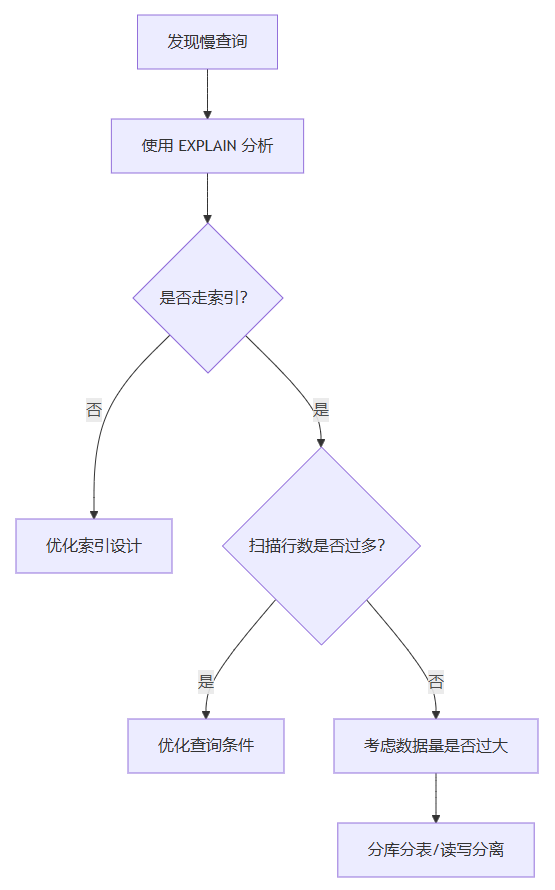
二、发现问题:定位慢查询
1. 开启慢查询日志
-- 查看慢查询配置
show variables like 'slow_query%';
show variables like 'long_query_time';

-- 开启慢查询日志
set global slow_query_log = on;
set global long_query_time = 1;  -- 超过1秒的记录

-- 查看慢查询日志
mysqldumpslow -s t -t 10 /var/lib/mysql/slow-query.log
2. 查看正在执行的慢查询
-- 查看当前正在执行的所有查询
show processlist;

-- 找出执行时间长的
select * from information_schema.processlist
where time > 5 and command != 'sleep'
order by time desc;
三、分析问题:使用 explain
1. explain 基本用法
explain select * from users where name = '张三'\g

-- 输出关键字段
| 字段 | 说明 | 好的信号 | 坏的信号 |
|---|---|---|---|
| type | 访问类型 | const/ref/range | all(全表扫描) |
| possible_keys | 可能用的索引 | 有候选 | null |
| key | 实际用的索引 | 有值 | null |
| rows | 扫描行数 | 小 | 大 |
| extra | 额外信息 | using index | using filesort |
2. 关注 extra 字段
-- ✅ 好
using index          -- 覆盖索引,不需要回表
using index condition -- 索引下推

-- ⚠️ 需要优化
using filesort       -- 需要额外排序
using temporary      -- 用了临时表
四、解决问题:核心优化技巧
1. 索引优化
-- 为 where 条件建索引
create index idx_name on users(name);

-- 为 order by 建索引
create index idx_create_time on orders(create_time);

-- 复合索引注意最左前缀
create index idx_name_age on users(name, age);
2. 避免 select *
-- ❌ 不好
select * from users where name = '张三';

-- ✅ 好(只查需要的字段)
select id, name from users where name = '张三';
3. 避免在索引列上使用函数
-- ❌ 无法使用索引
select * from orders where year(create_time) = 2024;

-- ✅ 可以走索引
select * from orders
where create_time >= '2024-01-01'
and create_time < '2025-01-01';
4. 分页优化
-- ❌ 深分页问题
select * from orders order by id limit 100000, 10;

-- ✅ 使用游标分页
select * from orders
where id > 100000
order by id
limit 10;
5. join 优化
-- 小表驱动大表
-- 为 join 字段建索引
create index idx_user_id on orders(user_id);
五、高级优化技巧
1. 使用覆盖索引
-- 创建包含所有查询字段的索引
create index idx_covering on users(name, age, id);

-- 查询可以直接从索引获取数据
select id, name, age from users where name = '张三';
-- extra: using index
2. 合理使用 exists 替代 in
-- in 在大数据量时可能慢
select * from users
where id in (select user_id from orders where amount > 1000);

-- exists 可能更快
select * from users u
where exists (select 1 from orders o
              where o.user_id = u.id and o.amount > 1000);
3. 批量操作优化
-- 批量插入
insert into users (name) values
('张三'), ('李四'), ('王五');  -- 一次插入多条

-- 批量更新使用临时表
create temporary table temp_updates (
    id int primary key,
    age int
);
六、监控和验证
1. 查看索引使用情况
-- 查看索引使用次数
select
    index_name,
    rows_selected,
    rows_inserted
from performance_schema.table_io_waits_summary_by_index_usage
where object_schema = 'db_name';

-- 查看从未使用的索引
select * from sys.schema_unused_indexes;
2. 查看查询缓存命中率
show status like 'qcache%';
show status like 'handler_read%';
七、总结:sql 调优 checklist
- 是否开启了慢查询日志?
- 是否用 explain 分析了问题 sql?
- where 条件字段是否有索引?
- order by 字段是否有索引?
- 是否避免了 select *?
- 是否避免了在索引列上使用函数?
- join 字段是否有索引?
- 是否小表驱动大表?
- 分页是否过深?
- 是否有冗余或未用的索引?
一句话理解:sql 调优就像医生看病,先查症状(慢查询日志),再诊断病因(explain),最后对症下药(索引优化、sql重写)。
到此这篇关于mysql sql调优的方法及具体技巧详细讲解的文章就介绍到这了,更多相关mysql sql调优内容请搜索代码网以前的文章或继续浏览下面的相关文章希望大家以后多多支持代码网!




发表评论