
 我要评论
我要评论django + docker完成es全文检锁
使用docker安装elasticsearch
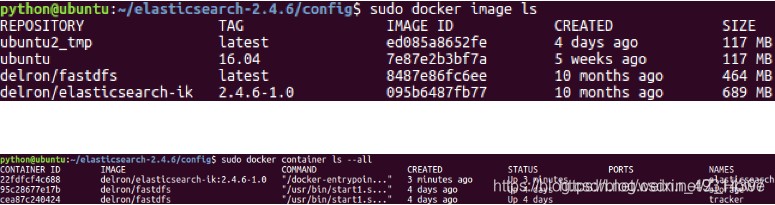
1.获取elasticsearch-ik镜像
#从仓库拉取镜像
$ sudo docker image pull delron/elasticsearch-ik:2.4.6-1.0
#解压教学资料中本地镜像
$ sudo docker load -i elasticsearch-ik-2.4.6_docker.tar
2.配置elasticsearch-ik
将教学资料中的elasticsearc-2.4.6目录拷贝到home目录下。
修改/home/python/elasticsearc-2.4.6/config/elasticsearch.yml第54行。
更改ip地址为本机真实ip地址。

3.使用docker运行elasticsearch-ik
$ sudo docker run -dti --name=elasticsearch --network=host -v /home/python/elasticsearch-2.4.6/config:/usr/share/elasticsearch/config delron/elasticsearch-ik:2.4.6-1.0
haystack介绍和安装配置
1.haystack介绍
haystack 是在django中对接搜索引擎的框架,搭建了用户和搜索引擎之间的沟通桥梁。
我们在django中可以通过使用 haystack 来调用 elasticsearch 搜索引擎。
haystack 可以在不修改代码的情况下使用不同的搜索后端(比如 elasticsearch、whoosh、solr等等)。
2.haystack安装
$ pip install django-haystack
$ pip install elasticsearch==2.4.1
3.haystack注册应用和路由
# settings.py中配置
installed_apps = [
    'haystack', # 全文检索
]
path('search/', include('haystack.urls')),
4.haystack配置在配置文件中配置haystack为搜索引擎后端
#haystack
haystack_connections = {
    'default': {
        'engine': 'haystack.backends.elasticsearch_backend.elasticsearchsearchengine',
        'url': 'http://192.168.103.158:9200/', # elasticsearch服务器ip地址,端口号固定为9200
        'index_name': 'meiduo_mall', # elasticsearch建立的索引库的名称
    },
}
#额外的配置,可加可以不加
#当添加、修改、删除数据时,自动生成索引
haystack_signal_processor = ‘haystack.signals.realtimesignalprocessor'
重要提示:
haystack_signal_processor 配置项保证了在django运行起来后,有新的数据产生时,haystack仍然可以让elasticsearch实时生成新数据的索引
haystack建立数据索引
1.创建索引类
通过创建索引类,来指明让搜索引擎对哪些字段建立索引,也就是可以通过哪些字段的关键字来检索数据。
本项目中对sku信息进行全文检索,所以在goods应用中新建search_indexes.py文件(注意名字必须相同),用于存放索引类。
代码:
from haystack import indexes

from .models import  模型名称


class  模型名称index(indexes.searchindex, indexes.indexable):


 """模型名称索引数据模型类"""

 text = indexes.charfield(document=true, use_template=true)


 def get_model(self):

  """返回建立索引的模型类"""

return 模型名称


  def index_queryset(self, using=none):

  """返回要建立索引的数据查询集"""

 return self.get_model().objects.filter(is_launched=true)
索引类skuindex说明:
在skuindex建立的字段,都可以借助haystack由elasticsearch搜索引擎查询。
其中text字段我们声明为document=true,表名该字段是主要进行关键字查询的字段。
text字段的索引值可以由多个数据库模型类字段组成,具体由哪些模型类字段组成,我们用use_template=true表示后续通过模板来指明。
2.创建text字段索引值模板文件
在templates目录中创建text字段使用的模板文件
具体在templates/search/indexes/goods/sku_text.txt文件(需要创建的文件夹,注意文件名相同)中定义
{{ object.id }}
{{ object.name }}
{{ object.caption }}
模板文件说明:当将关键词通过text参数名传递时
此模板指明sku的id、name、caption作为text字段的索引值来进行关键字索引查询。
3.手动生成初始索引
#先再数据库中添加数据,再执行生成索引
python manage.py rebuild_index
在view视图中的实现es查询的视图
#调用时需要用get传入q=查询的内容
from django.shortcuts import render
#create your views here.
import json
from django.conf import settings
from django.core.paginator import invalidpage, paginator
from django.http import http404, httpresponse, jsonresponse
from haystack.forms import modelsearchform
from haystack.query import emptysearchqueryset

results_per_page = getattr(settings, 'haystack_search_results_per_page', 20)


def basic_search(request, load_all=true, form_class=modelsearchform, searchqueryset=none, extra_context=none,
                 results_per_page=none):
    query = ''
    results = emptysearchqueryset()
    if request.get.get('q'):
        form = form_class(request.get, searchqueryset=searchqueryset, load_all=load_all)

        if form.is_valid():
            query = form.cleaned_data['q']
            results = form.search()
    else:
        form = form_class(searchqueryset=searchqueryset, load_all=load_all)

    paginator = paginator(results, results_per_page or results_per_page)
    try:
        page = paginator.page(int(request.get.get('page', 1)))
    except invalidpage:
        result = {"code": 404, "msg": 'no file found!', "data": []}
        return httpresponse(json.dumps(result), content_type="application/json")

    context = {
        'form': form,
        'page': page,
        'paginator': paginator,
        'query': query,
        'suggestion': none,
    }
    if results.query.backend.include_spelling:
        context['suggestion'] = form.get_suggestion()

    if extra_context:
        context.update(extra_context)

    jsondata = []
    print(len(page.object_list))
    for result in page.object_list:
        data = {
            'pk': result.object.pk,
            'title': result.object.title,
            'desc': result.object.desc,
        }
        jsondata.append(data)
    result = {"code": 200, "msg": 'search successfully!', "data": jsondata}
    return jsonresponse(result, content_type="application/json")
总结
以上为个人经验,希望能给大家一个参考,也希望大家多多支持代码网。


发表评论