
 我要评论
我要评论
1. 基本概念深度解析
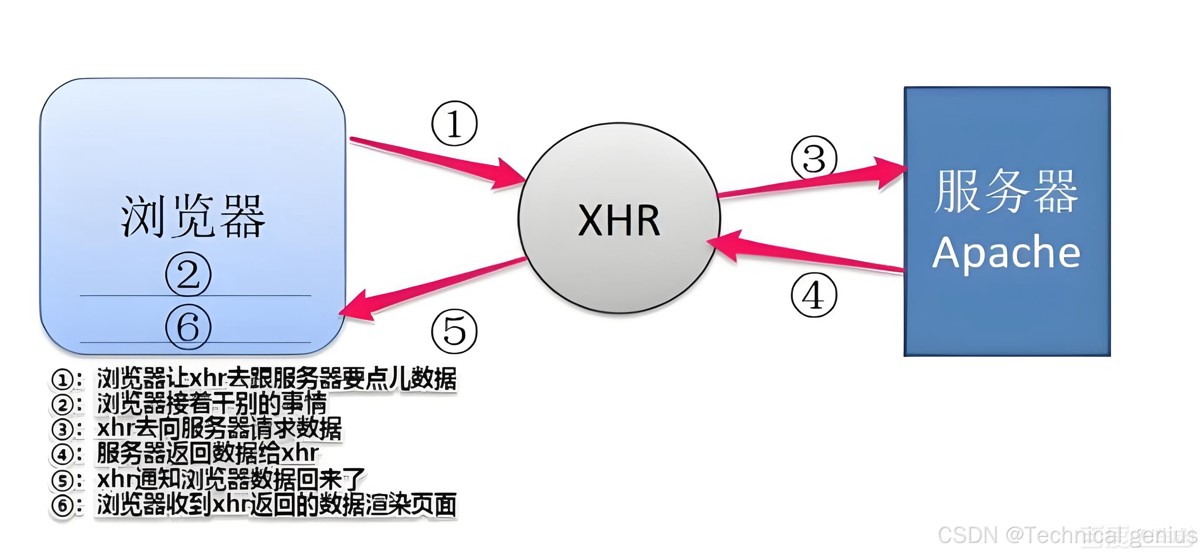
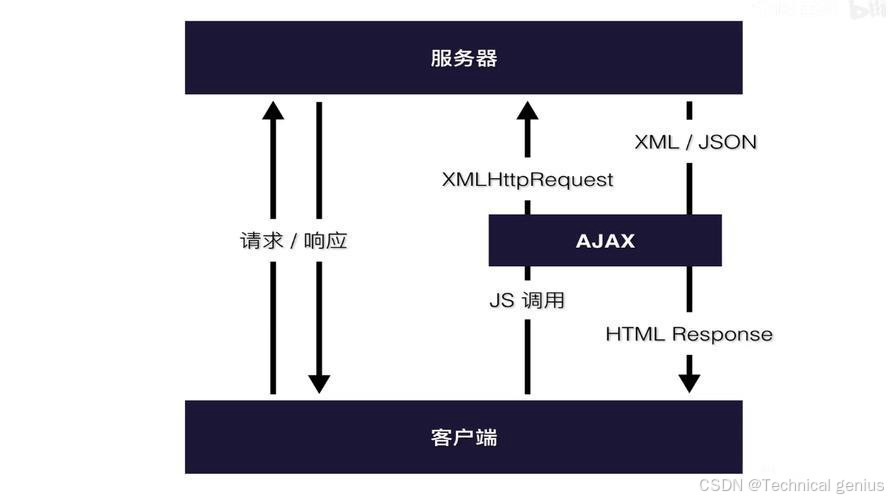
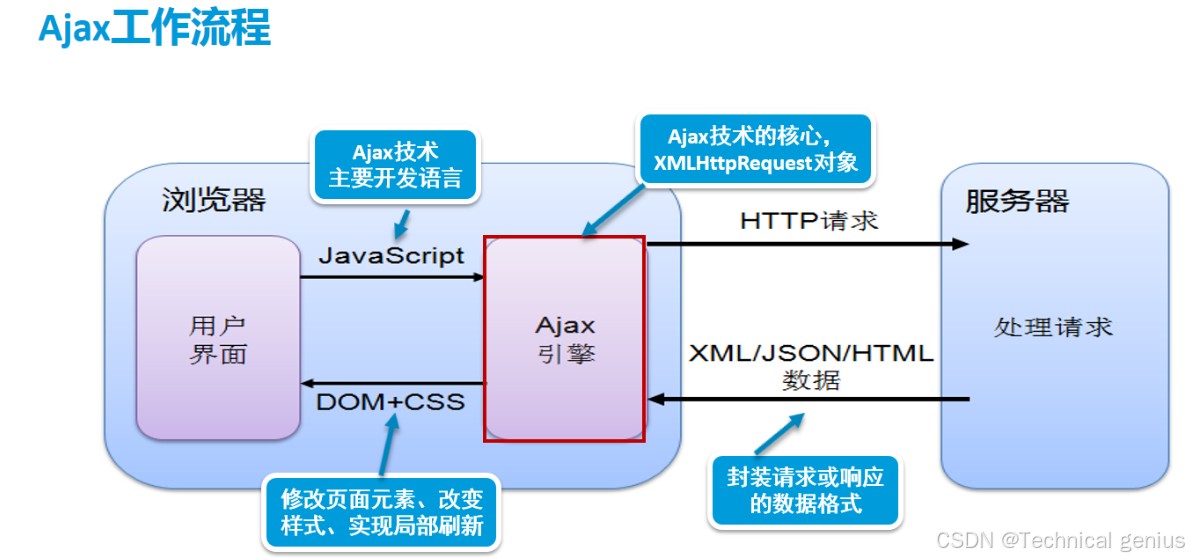
1.1 ajax技术本质
ajax(asynchronous javascript and xml)不是单一技术,而是一组技术的集合,包括:
- xmlhttprequest对象:核心通信接口
- javascript/dom:信息显示与交互
- css:美化页面样式
// 原生ajax实现示例
function makeajaxrequest(url, method = 'get', data = null) {
    return new promise((resolve, reject) => {
        const xhr = new xmlhttprequest();

        xhr.open(method, url, true);
        xhr.setrequestheader('content-type', 'application/json');

        xhr.onreadystatechange = function() {
            if (xhr.readystate === 4) {
                if (xhr.status === 200) {
                    resolve(json.parse(xhr.responsetext));
                } else {
                    reject(new error(`请求失败: ${xhr.status}`));
                }
            }
        };

        xhr.onerror = function() {
            reject(new error('网络错误'));
        };

        xhr.send(data ? json.stringify(data) : null);
    });
}
1.2 axios技术定位
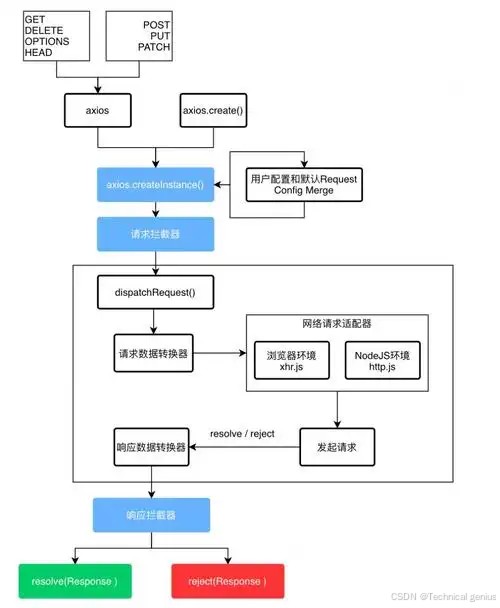
axios是基于promise的现代化http客户端,具有以下特性:
- 浏览器端:基于xmlhttprequest
- node.js端:基于http模块
- 统一api:跨环境一致性
- 拦截器系统:请求/响应处理管道
2. 技术实现对比
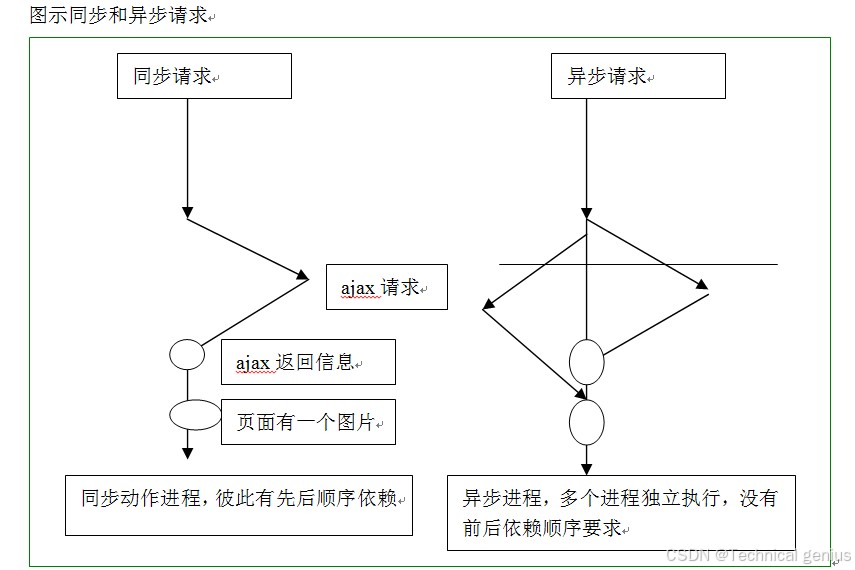
2.1 原生ajax完整实现
class ajaxclient {
    constructor(baseurl = '') {
        this.baseurl = baseurl;
    }

    request(config) {
        return new promise((resolve, reject) => {
            const xhr = new xmlhttprequest();
            const url = config.url.startswith('http') ? config.url : this.baseurl + config.url;

            xhr.open(config.method || 'get', url, true);

            // 设置请求头
            if (config.headers) {
                object.keys(config.headers).foreach(key => {
                    xhr.setrequestheader(key, config.headers[key]);
                });
            }

            xhr.timeout = config.timeout || 0;
            xhr.responsetype = config.responsetype || 'json';

            xhr.onload = function() {
                if (xhr.status >= 200 && xhr.status < 300) {
                    resolve({
                        data: xhr.response,
                        status: xhr.status,
                        statustext: xhr.statustext
                    });
                } else {
                    reject(new error(`请求失败: ${xhr.status}`));
                }
            };

            xhr.onerror = function() {
                reject(new error('网络错误'));
            };

            xhr.ontimeout = function() {
                reject(new error('请求超时'));
            };

            xhr.send(config.data ? json.stringify(config.data) : null);
        });
    }

    get(url, config = {}) {
        return this.request({ ...config, url, method: 'get' });
    }

    post(url, data, config = {}) {
        return this.request({ ...config, url, method: 'post', data });
    }
}
2.2 axios核心架构

// axios简化实现原理
class axios {
    constructor(config) {
        this.defaults = config;
        this.interceptors = {
            request: new interceptormanager(),
            response: new interceptormanager()
        };
    }

    request(config) {
        // 创建请求链
        const chain = [this.dispatchrequest, undefined];

        // 添加请求拦截器
        this.interceptors.request.foreach(interceptor => {
            chain.unshift(interceptor.fulfilled, interceptor.rejected);
        });

        // 添加响应拦截器
        this.interceptors.response.foreach(interceptor => {
            chain.push(interceptor.fulfilled, interceptor.rejected);
        });

        let promise = promise.resolve(config);

        while (chain.length) {
            promise = promise.then(chain.shift(), chain.shift());
        }

        return promise;
    }

    dispatchrequest(config) {
        // 实际的请求发送逻辑
        return adapter(config);
    }
}
3. 功能特性详细对比
3.1 请求配置能力
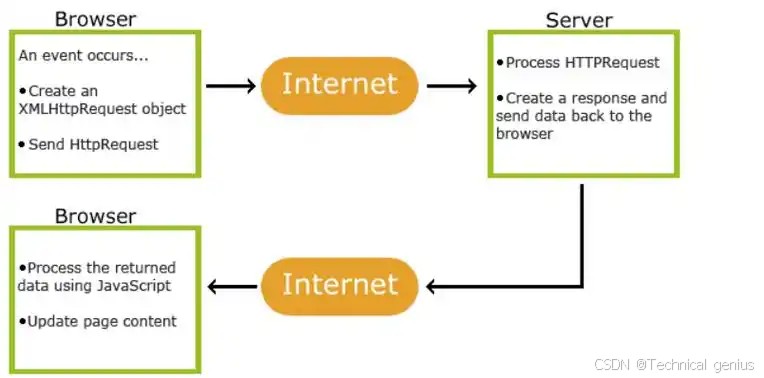
ajax配置选项有限:
const xhr = new xmlhttprequest();
xhr.open('post', '/api/users');
xhr.setrequestheader('content-type', 'application/json');
xhr.setrequestheader('authorization', 'bearer token');
xhr.timeout = 5000;
xhr.send(json.stringify({ name: 'john' }));
axios丰富配置:
// axios完整配置示例
const config = {
    url: '/api/users',
    method: 'post',
    baseurl: 'https://api.example.com',
    headers: {
        'x-custom-header': 'value',
        'authorization': 'bearer token'
    },
    timeout: 10000,
    withcredentials: true,
    responsetype: 'json',
    transformrequest: [function(data, headers) {
        // 转换请求数据
        return json.stringify(data);
    }],
    params: {
        page: 1,
        limit: 10
    },
    data: {
        name: 'john',
        email: 'john@example.com'
    }
};

axios.request(config);
3.2 拦截器机制对比
ajax无内置拦截器:
// 需要手动实现类似功能
function addrequestinterceptor(callback) {
    const originalopen = xmlhttprequest.prototype.open;
    xmlhttprequest.prototype.open = function(...args) {
        callback(this);
        return originalopen.apply(this, args);
    };
}
axios拦截器系统:
// 请求拦截器
axios.interceptors.request.use(
    config => {
        // 添加认证token
        const token = localstorage.getitem('token');
        if (token) {
            config.headers.authorization = `bearer ${token}`;
        }
        console.log('发送请求:', config);
        return config;
    },
    error => {
        return promise.reject(error);
    }
);

// 响应拦截器
axios.interceptors.response.use(
    response => {
        // 统一处理响应数据
        return response.data;
    },
    error => {
        // 统一错误处理
        if (error.response?.status === 401) {
            window.location.href = '/login';
        }
        return promise.reject(error);
    }
);
4. 实际应用场景对比
4.1 简单get请求
ajax实现:
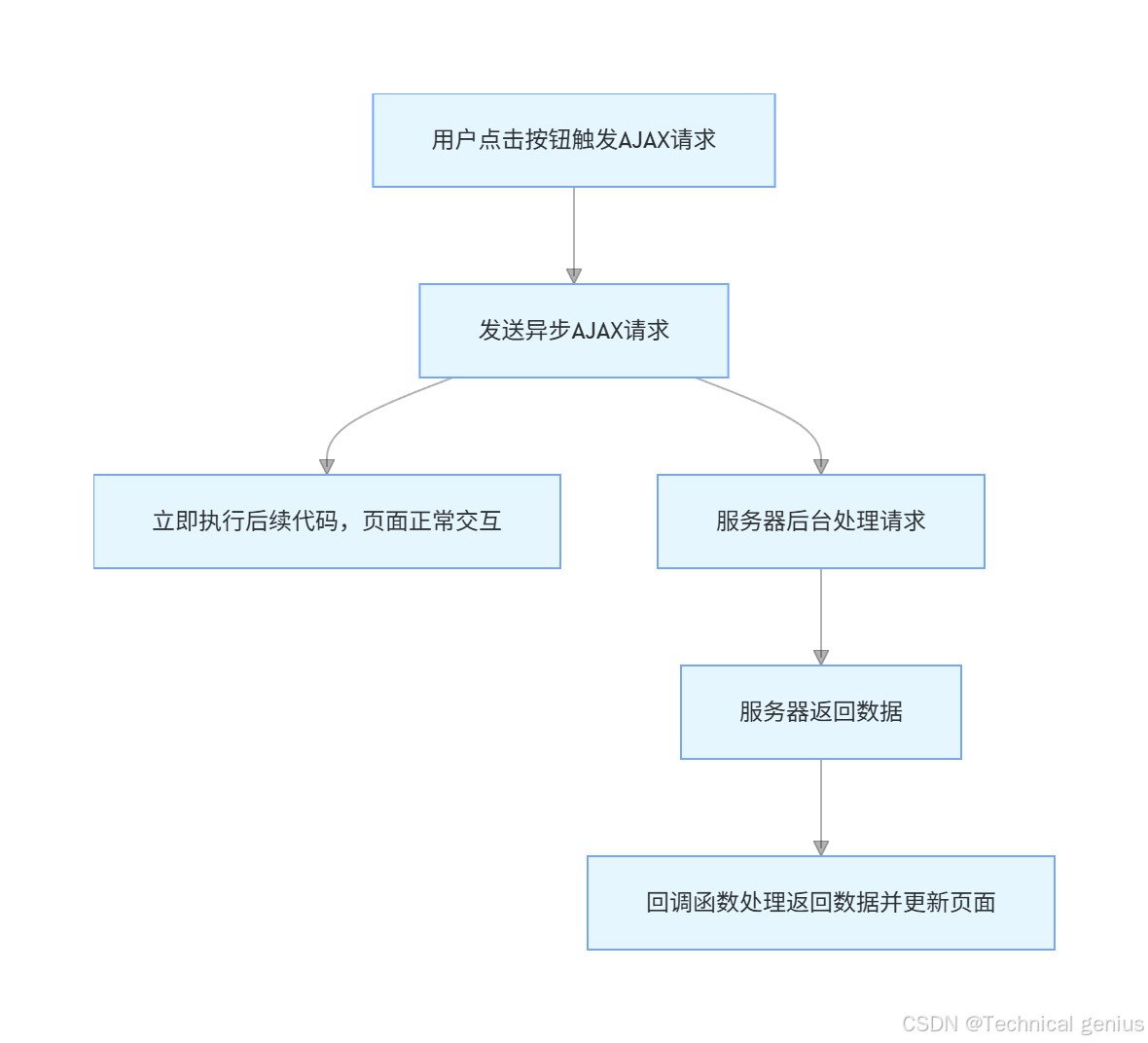
function ajaxget(url) {
    return new promise((resolve, reject) => {
        const xhr = new xmlhttprequest();
        xhr.open('get', url, true);
        xhr.onreadystatechange = function() {
            if (xhr.readystate === 4) {
                if (xhr.status === 200) {
                    resolve(json.parse(xhr.responsetext));
                } else {
                    reject(new error(`get请求失败: ${xhr.status}`));
            }
        };
        xhr.send();
    });
}
axios实现:
// 多种调用方式
axios.get('/api/users')
    .then(response => console.log(response.data))
    .catch(error => console.error('请求失败:', error));

// 或使用async/await
async function fetchusers() {
    try {
        const response = await axios.get('/api/users');
        return response.data;
    } catch (error) {
        console.error('获取用户失败:', error);
        throw error;
    }
}
4.2 复杂post请求
ajax复杂实现:
function ajaxpost(url, data) {
    return new promise((resolve, reject) => {
        const xhr = new xmlhttprequest();
        xhr.open('post', url, true);
        xhr.setrequestheader('content-type', 'application/json');

        xhr.onload = function() {
            if (xhr.status === 200 || xhr.status === 201) {
                resolve({
                    data: json.parse(xhr.responsetext),
                    status: xhr.status,
                    headers: xhr.getallresponseheaders()
                });
            } else {
                reject(new error(`post请求失败: ${xhr.status}`));
            }
        };

        xhr.onerror = function() {
            reject(new error('网络错误'));
        };

        xhr.ontimeout = function() {
            reject(new error('请求超时'));
        };

        xhr.send(json.stringify(data));
    });
}
axios简化实现:
// 上传文件示例
const formdata = new formdata();
formdata.append('file', file);
formdata.append('name', 'document');

axios.post('/api/upload', formdata, {
    headers: {
        'content-type': 'multipart/form-data'
    },
    onuploadprogress: progressevent => {
        const percentcompleted = math.round(
            (progressevent.loaded * 100) / progressevent.total
    );
    console.log(`上传进度: ${percentcompleted}%`);
    }
});
5. 性能与兼容性分析
5.1 性能对比
| 指标 | ajax | axios |
|---|---|---|
| 请求速度 | 原生最快 | 轻微封装开销 |
| 内存占用 | 最低 | 稍高 |
| 包大小 | 0kb(原生) | 13kb(压缩后) |
| 并发处理 | 手动管理 | 自动promise.all |
5.2 浏览器兼容性
ajax兼容性处理:
function createxhr() {
    if (typeof xmlhttprequest !== 'undefined') {
        return new xmlhttprequest();
    } else if (typeof activexobject !== 'undefined') {
        // ie6及以下版本
        return new activexobject('microsoft.xmlhttp');
    } else {
        throw new error('浏览器不支持ajax');
    }
}
axios自动兼容:
// axios自动处理兼容性
function getdefaultadapter() {
    let adapter;

    if (typeof xmlhttprequest !== 'undefined') {
        // 浏览器环境
        adapter = require('./adapters/xhr');
    } else if (typeof process !== 'undefined') {
        // node.js环境
        adapter = require('./adapters/http');
    }

    return adapter;
}
6. 错误处理机制对比
6.1 ajax错误处理
function ajaxwitherrorhandling(url) {
    const xhr = new xmlhttprequest();

    xhr.addeventlistener('error', handlenetworkerror);
    xhr.addeventlistener('timeout', handletimeouterror);
    xhr.addeventlistener('load', function() {
        if (this.status >= 400) {
            handlehttperror(this.status, this.statustext);
        }
    });

    // 需要手动处理各种错误状态
    if (xhr.status === 0) {
        console.error('网络连接失败');
    } else if (xhr.status === 404) {
        console.error('请求的资源不存在');
    }
}
6.2 axios错误处理
// 统一错误处理
axios.get('/api/data')
    .then(response => {
        // 处理成功响应
    })
    .catch(error => {
        if (error.response) {
            // 服务器返回错误状态码
            console.error('服务器错误:', error.response.status);
        } else if (error.request) {
            // 请求发送失败
            console.error('网络错误:', error.message);
        } else {
            // 其他错误
            console.error('请求配置错误:', error.message);
        }
    });
7. 现代化项目中的应用
7.1 vue项目中axios封装
// api/client.js
import axios from 'axios';

const service = axios.create({
    baseurl: process.env.vue_app_api_base_url,
    timeout: 10000
});

// 响应错误统一处理
service.interceptors.response.use(
    response => response,
    error => {
        const { status, data } = error.response;

        switch (status) {
            case 400:
                showerror(data.message || '请求参数错误');
                break;
            case 401:
                redirecttologin();
                break;
            case 500:
                showerror('服务器内部错误');
                break;
            default:
                showerror('网络请求失败');
        }

        return promise.reject(error);
    }
);
7.2 react hooks中的使用
// hooks/useapi.js
import { usestate, useeffect } from 'react';
import axios from 'axios';

export function useapi(url) {
    const [data, setdata] = usestate(null);
    const [loading, setloading] = usestate(true);
    const [error, seterror] = usestate(null);

    useeffect(() => {
        const source = axios.canceltoken.source();

        axios.get(url, {
            canceltoken: source.token
        })
        .then(response => {
            setdata(response.data);
            setloading(false);
        })
        .catch(err => {
            if (!axios.iscancel(err)) {
                seterror(err);
                setloading(false);
            }
        });

        return () => {
            source.cancel('组件卸载,取消请求');
        };
    }, [url]);

    return { data, loading, error };
}
8. 总结与选择建议
8.1 技术选型矩阵
| 场景 | 推荐方案 | 理由 |
|---|---|---|
| 学习http基础 | 原生ajax | 理解底层原理 |
| 小型项目 | 原生ajax | 减少依赖 |
| 大中型项目 | axios | 功能完善,开发高效 |
| 需要拦截器 | axios | 内置支持 |
| 跨环境项目 | axios | 统一api |
| 性能极致要求 | 原生ajax | 无额外开销 |
8.2 发展趋势分析
ajax:作为底层技术将持续存在,但在新项目中直接使用频率下降。
axios:在现代化前端生态中已成为事实标准,持续迭代优化。
8.3 最佳实践建议
- 学习阶段:掌握原生ajax实现原理
- 项目开发:优先选择axios提高效率
- 性能优化:在关键路径可考虑原生实现
- 团队协作:建立统一的http请求规范
ajax作为前端异步通信的基石技术,axios作为其现代化封装,两者在前端技术栈中各有定位。理解ajax有助于深入掌握网络请求本质,使用axios则能显著提升开发效率和代码质量。在实际项目中,建议根据具体需求和团队技术栈做出合理选择。

到此这篇关于ajax与axios的基本概念及终极全方位对比解析的文章就介绍到这了,更多相关ajax与axios对比解析内容请搜索代码网以前的文章或继续浏览下面的相关文章希望大家以后多多支持代码网!




发表评论