
 我要评论
我要评论环境
系统平台:microsoft windows (64-bit) 10
版本:5.6.4
文档用途
当表中的数据量不断增大,查询数据的速度就会变慢,应用程序的性能就会下降,这时就应该考虑对表进行分区。
表进行分区后,逻辑上表仍然是一张完整的表,只是将表中的数据分类存放到多个表空间的物理文件上,
这样查询数据时,不至于每次都扫描整张表。
分区类型分为范围分区(range partition)、列表分区(list partition)、哈希分区(hash partition)等。
本次主要介绍mysql和瀚高数据库的范围分区。
mysql的范围分区:
含义:基于属于一个给定连续区间的列值,把多行分配给分区。主键、约束、索引在分区表中创建。
关键字:range、values less than
range又可分为原生range和range columns。
对于原生range分区,分区字段必须是整型或者转换为整型,如果分区字段是日期类型的字段,那么就必须将日期类型的字段转换成整型类型。对于日期类型的转换,优化器只支持year(),to_days,to_seconds,unix_timestamp()函数的转换,其他的并不支持,也就是说,在按日期字段分区的时候,如果不是使用上述几个函数转换的,查询优化器将无法对相关查询进行优化。
对于range columns分区,不可以使用表达式,只能使用列名;接受一个或多个字段的列表;分区列是不限制于数字列的;字符串、date和datetime列也可以使用在分区列。
注:分区字段必须包含在主键内
语法:
原生range分区语法:
c
reate table table_name(column_name data_type)
partition by range(整型column_list|整型转换函数(column_list)) (
    partition partition_name values less than (value_list)[,
    partition partition_name values less than (value_list)][,
    ...]
)
column_list:
    column_name[, column_name][, ...]
value_list:
    value[, value][, ...]
column_list是一个或多个列名, value_list是和column_list相对应的一个或多个值
range columns分区语法:
create table table_name(column_name data_type)
partition by range columns(column_list) (
    partition partition_name values less than (value_list)[,
    partition partition_name values less than (value_list)][,
    ...]
)
column_list:
    column_name[, column_name][, ...]
value_list:
    value[, value][, ...]
column_list是一个或多个列名, value_list是和column_list相对应的一个或多个值
注:在value_list中有一个最大值maxvalue,可以创建maxvalue的分区,存储超出范围的数据
删除分区语法:
alter table table_name drop partition partition_name;
瀚高数据库的范围分区:
含义:支持单列、多列分区,例如:range(x,y)
关键字:range、for values from(……) to(……)
注:主键、约束、索引等不能在分区表中创建,目前只能在各个分区中创建。分区表只是一个表结构。
语法:
-- 主表
create table table_name ( column_name data_type )
    partition by range ( { column_name } [, ... ] )
-- 子表
create table table_name
    partition of parent_table
for values
    from ( { numeric_literal | string_literal | true | false | minvalue | maxvalue } [, ...] )
      to ( { numeric_literal | string_literal | true | false | minvalue | maxvalue } [, ...] )
注:minvalue是最小值,maxvalue是最大值,为了防止插入范围以外的数据时报错,可以创建两个分区,
分别是minvalue和maxvalue的分区。分区字段的值不能为null。
删除分区语法:
-- 把分区修改成普通表
alter table table_name detach partition partition_name;
-- 删除分区
drop table partition_name;
详细信息
下面通过实例进行详细说明:
mysql的范围分区实例:
测试环境:win10+mysql5.7
- 原生range分区实例
- 使用整型字段score作为分区key
create table student(
           sid integer auto_increment,
           sname varchar(20),
           score integer,
           birthday datetime,
           ssex varchar(10),
           primary key(sid,score)  -- score是分区字段,必须作为主键
       )
partition by range(score)(
           partition p0 values less than(10),-- 分区p0
           partition p1 values less than(20),-- 分区p1
           partition p2 values less than(30),-- 分区p2
           partition p3 values less than(40),-- 分区p3
           partition p4 values less than(50),-- 分区p4
           partition p5 values less than(60),-- 分区p5
           partition p6 values less than(70),-- 分区p6
           partition p7 values less than(80) -- 分区p7
);- 使用日期类型字段birthday作为分区key,需要转换成整型值使用
create table student_birthday(
           sid integer auto_increment,
           sname varchar(20),
           score integer,
           birthday datetime,
           ssex varchar(10),
           primary key(sid,birthday)
       )
partition by range(year(birthday))(
           partition p1981 values less than(1983),-- 分区p1981
           partition p1983 values less than(1985),-- 分区p1983
           partition p1985 values less than(1987),-- 分区p1985
           partition p1987 values less than(1989) -- 分区p1987
);
注:以year(birthday)表达式(计算学生的出生日期)作为范围分区依据,需要注意的是表达式必须有返回值。
- 插入数据
-- student表中插入数据
insert into student(sname,score,birthday,ssex)values('小赵',5,'19830101','男');
insert into student(sname,score,birthday,ssex)values('小钱',10,'19830101','女');
insert into student(sname,score,birthday,ssex)values('小孙',15,'19840101','男');
insert into student(sname,score,birthday,ssex)values('小李',25,'19850101','女');
insert into student(sname,score,birthday,ssex)values('小周',35,'19860101','男');
insert into student(sname,score,birthday,ssex)values('小吴',45,'19870101','女');
insert into student(sname,score,birthday,ssex)values('小郑',55,'19870101','男');
insert into student(sname,score,birthday,ssex)values('小王',75,'19840101','男');
insert into student(sname,score,birthday,ssex)values('小冯',79,'19850101','女');
-- student_birthday表中插入数据
insert into student_birthday(sname,score,birthday,ssex)values('小赵',5,'19830101','男');
insert into student_birthday(sname,score,birthday,ssex)values('小钱',10,'19830101','女');
insert into student_birthday(sname,score,birthday,ssex)values('小孙',15,'19840101','男');
insert into student_birthday(sname,score,birthday,ssex)values('小李',25,'19850101','女');
insert into student_birthday(sname,score,birthday,ssex)values('小周',35,'19860101','男');
insert into student_birthday(sname,score,birthday,ssex)values('小吴',45,'19870101','女');
insert into student_birthday(sname,score,birthday,ssex)values('小郑',55,'19870101','男');
insert into student_birthday(sname,score,birthday,ssex)values('小王',75,'19840101','男');
insert into student_birthday(sname,score,birthday,ssex)values('小冯',79,'19850101','女');
4) 检索各个分区中的记录数
-- student表中各分区的记录数
select table_name,partition_name,partition_description,table_rows from information_schema.partitions
where partition_name is not null and table_schema = 'testpar'
and table_name='student';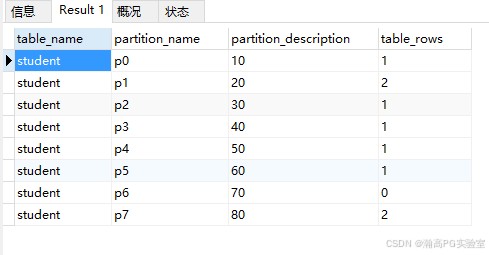
注:table_rows是每个分区的记录数
-- student_birthday表中各分区的记录数
select table_name,partition_name,partition_description,table_rows from information_schema.partitions
where partition_name is not null and table_schema = 'testpar'
and table_name='student_birthday';
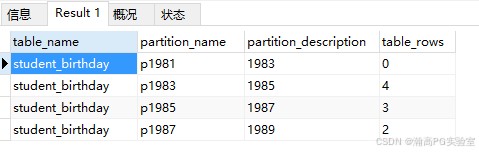
注:table_rows是每个分区的记录数
- range columns分区实例
- 使用日期型字段birthday作为分区key
create table student_birthday_range(
           sid integer auto_increment,
           sname varchar(20),
           score integer,
           birthday datetime,
           ssex varchar(10),
           primary key(sid,birthday)
       )
partition by range columns(birthday)(
           partition p19830101 values less than('19840101'),-- 分区p19830101
           partition p19840101 values less than('19850101'),-- 分区p19840101
           partition p19850101 values less than('19860101'),-- 分区p19850101
           partition p19860101 values less than('19870101'),-- 分区p19860101
           partition p19870101 values less than('19880101') -- 分区p19870101
);- 插入数据
insert into student_birthday_range(sname,score,birthday,ssex)values('小赵',5,'19830101','男');
insert into student_birthday_range(sname,score,birthday,ssex)values('小钱',10,'19830101','女');
insert into student_birthday_range(sname,score,birthday,ssex)values('小孙',15,'19840101','男');
insert into student_birthday_range(sname,score,birthday,ssex)values('小李',25,'19850101','女');
insert into student_birthday_range(sname,score,birthday,ssex)values('小周',35,'19860101','男');
insert into student_birthday_range(sname,score,birthday,ssex)values('小吴',45,'19870101','女');
insert into student_birthday_range(sname,score,birthday,ssex)values('小郑',55,'19870101','男');
insert into student_birthday_range(sname,score,birthday,ssex)values('小王',75,'19840101','男');
insert into student_birthday_range(sname,score,birthday,ssex)values('小冯',79,'19850101','女');- 检索各个分区的记录数
select table_name,partition_name,partition_description,table_rows from information_schema.partitions
where partition_name is not null and table_schema = 'testpar'
and table_name='student_birthday_range';
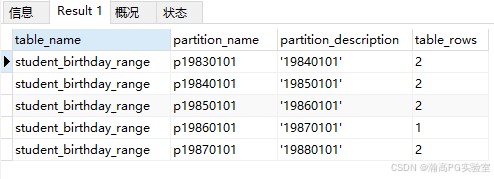
3. maxvalue的使用
- 在表中插入一条超出范围的数据(19880101超出分区的最大值),报下面错误
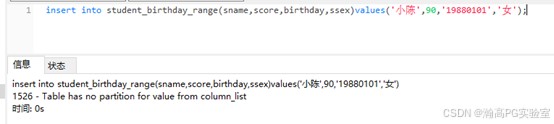
- 添加maxvalue的分区
alter table student_birthday_range add partition(partition pmaxvalue values less than maxvalue);
- 再次执行上面的插入语句,执行成功
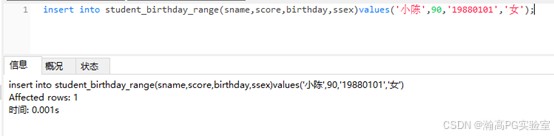
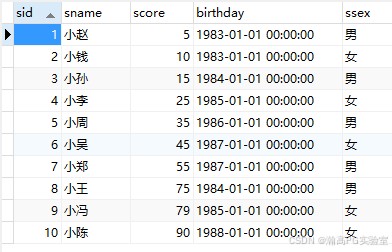
- 查询表数据,19880101的数据正常插入了
瀚高数据库的范围分区实例:
测试环境:win10+hgdb企业版5.6.4
- 用表字段直接作为分区key
- 直接使用字段score作为分区key
-- 创建分区表
create table student(
           sid serial,
           sname varchar(20),
           score integer,
           birthday timestamp(0),
           ssex varchar(10)
)partition by range(score);
-- 创建分区
create table p0 partition of student for values from(0) to(10);
create table p1 partition of student for values from(10) to(20);
create table p2 partition of student for values from(20) to(30);
create table p3 partition of student for values from(30) to(40);
create table p4 partition of student for values from(40) to(50);
create table p5 partition of student for values from(50) to(60);
create table p6 partition of student for values from(60) to(70);
create table p7 partition of student for values from(70) to(80);
-- 各个分区添加主键(有约束、索引等的情况,也要添加)
alter table p0 add constraint p0_pkey_sid primary key(sid);
alter table p1 add constraint p1_pkey_sid primary key(sid);
alter table p2 add constraint p2_pkey_sid primary key(sid);
alter table p3 add constraint p3_pkey_sid primary key(sid);
alter table p4 add constraint p4_pkey_sid primary key(sid);
alter table p5 add constraint p5_pkey_sid primary key(sid);
alter table p6 add constraint p6_pkey_sid primary key(sid);
alter table p7 add constraint p7_pkey_sid primary key(sid);
-- 插入数据
insert into student(sname,score,birthday,ssex)values('小赵',5,'19830101','男');
insert into student(sname,score,birthday,ssex)values('小钱',10,'19830101','女');
insert into student(sname,score,birthday,ssex)values('小孙',15,'19840101','男');
insert into student(sname,score,birthday,ssex)values('小李',25,'19850101','女');
insert into student(sname,score,birthday,ssex)values('小周',35,'19860101','男');
insert into student(sname,score,birthday,ssex)values('小吴',45,'19870101','女');
insert into student(sname,score,birthday,ssex)values('小郑',55,'19870101','男');
insert into student(sname,score,birthday,ssex)values('小王',75,'19840101','男');
insert into student(sname,score,birthday,ssex)values('小冯',79,'19850101','女');- 检索student表数据
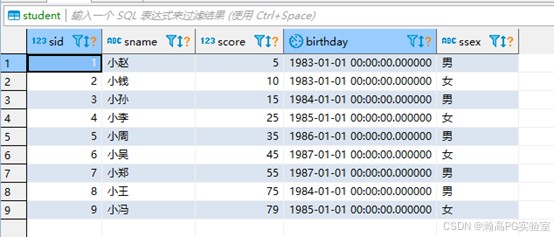
- 使用表达式作为分区key
- 用date_part(‘year’,birthday)表达式取得年作为分区key
-- 创建分区表,用date_part('year',birthday)表达式取得年
create table student_birthday(
           sid serial,
           sname varchar(20),
           score integer,
           birthday timestamp(0),
           ssex varchar(10)
)partition by range(date_part('year',birthday));
-- 创建分区
create table p1981 partition of student_birthday for values from(1981) to(1983);
create table p1983 partition of student_birthday for values from(1983) to(1985);
create table p1985 partition of student_birthday for values from(1985) to(1987);
create table p1987 partition of student_birthday for values from(1987) to(1989);
-- 各个分区添加主键(有约束、索引等的情况,也要添加)
alter table p1981 add constraint p1981_pkey_sid primary key(sid);
alter table p1983 add constraint p1983_pkey_sid primary key(sid);
alter table p1985 add constraint p1985_pkey_sid primary key(sid);
alter table p1987 add constraint p1987_pkey_sid primary key(sid);
-- 插入数据
insert into student_birthday(sname,score,birthday,ssex)values('小赵',5,'19830101','男');
insert into student_birthday(sname,score,birthday,ssex)values('小钱',10,'19830101','女');
insert into student_birthday(sname,score,birthday,ssex)values('小孙',15,'19840101','男');
insert into student_birthday(sname,score,birthday,ssex)values('小李',25,'19850101','女');
insert into student_birthday(sname,score,birthday,ssex)values('小周',35,'19860101','男');
insert into student_birthday(sname,score,birthday,ssex)values('小吴',45,'19870101','女');
insert into student_birthday(sname,score,birthday,ssex)values('小郑',55,'19870101','男');
insert into student_birthday(sname,score,birthday,ssex)values('小王',75,'19840101','男');
insert into student_birthday(sname,score,birthday,ssex)values('小冯',79,'19850101','女');- 检索student_birthday表数据
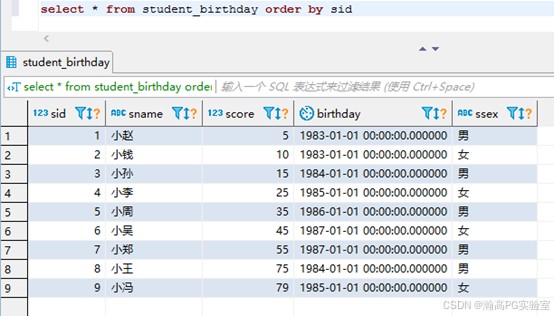
- minvalue的使用
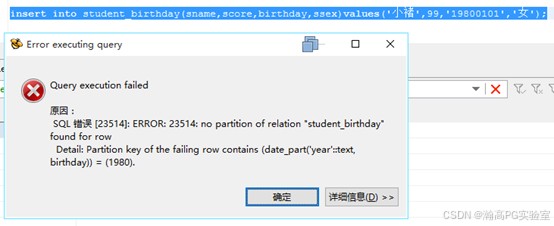
- 插入19800101的数据,最小分区的最小值是1981,1980在范围之外,报错
- 添加minvalue的分区
create table pminvalue partition of student_birthday for values from(minvalue) to(1981);
- 再次执行上面的插入语句,19800101的数据插入成功
至此,范围分区的详细实例介绍完毕。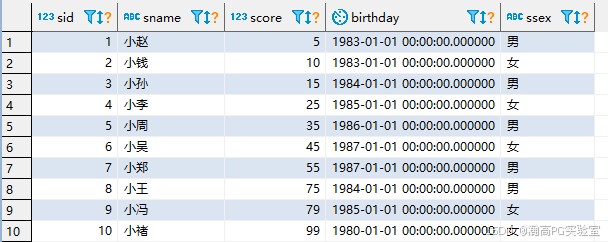
总结
到此这篇关于mysql与瀚高数据库的范围分区语法及实例代码的文章就介绍到这了,更多相关mysql与瀚高数据库范围分区内容请搜索代码网以前的文章或继续浏览下面的相关文章希望大家以后多多支持代码网!






发表评论