
 我要评论
我要评论在自动化文档处理流程中,pdf 文件可能因导出错误、内容重复或格式转换问题而包含多余页面。手动删除不仅耗时,而且处理大批量文件时容易导致文件损坏。
通过 c# 调用 .net 组件实现程序化删除 pdf 页面,可以将功能无缝集成到桌面应用、web 服务中,实现自动化、批量化处理。本文演示如何使用免费库 free spire.pdf for .net 删除 pdf 文件中的单个或多个页面。
1. 安装
打开 visual studio,进入 工具 → nuget 包管理器 → 程序包管理器控制台,执行:
install-package freespire.pdf
或者,在 管理 nuget 程序包 界面中搜索 freespire.pdf 并安装最新版本。
2. 加载 pdf 文档
使用 pdfdocument 类。该库提供了多种加载方式:
using spire.pdf;

// 从文件路径加载
pdfdocument pdf = new pdfdocument();
pdf.loadfromfile(@"c:\input.pdf");

// 从流加载
using (filestream fs = new filestream(@"c:\input.pdf", filemode.open))
{
    pdf.loadfromstream(fs);
}

// 从字节数组加载
byte[] data = file.readallbytes(@"c:\input.pdf");
pdf.loadfromstream(new memorystream(data));
注意:loadfromfile 内部会检查文件是否存在,若不存在则抛出 filenotfoundexception。建议用 file.exists 预判。
3. 删除单个 pdf 页面
关键规则:free spire.pdf 的页面索引为 0 开头(0-based),日常使用的页码是 1 开头(1-based)
删除前需要转换:
目标页码(1-based) - 1 = 代码索引(0-based)
// 示例:删除第 3 页,对应索引 2
pdf.pages.removeat(2);
返回值和影响:removeat 方法没有返回值。删除后,后续页面的索引会自动减 1。例如原本有 5 页,删除索引 2 后,原索引 3 变成新的索引 2
4. 删除多个 pdf 页面
删除多页时,删除靠前的页面会导致后续页面索引自动前移,直接删除会引发索引错误。
最佳方案:先将页码转为索引,再按【降序】删除
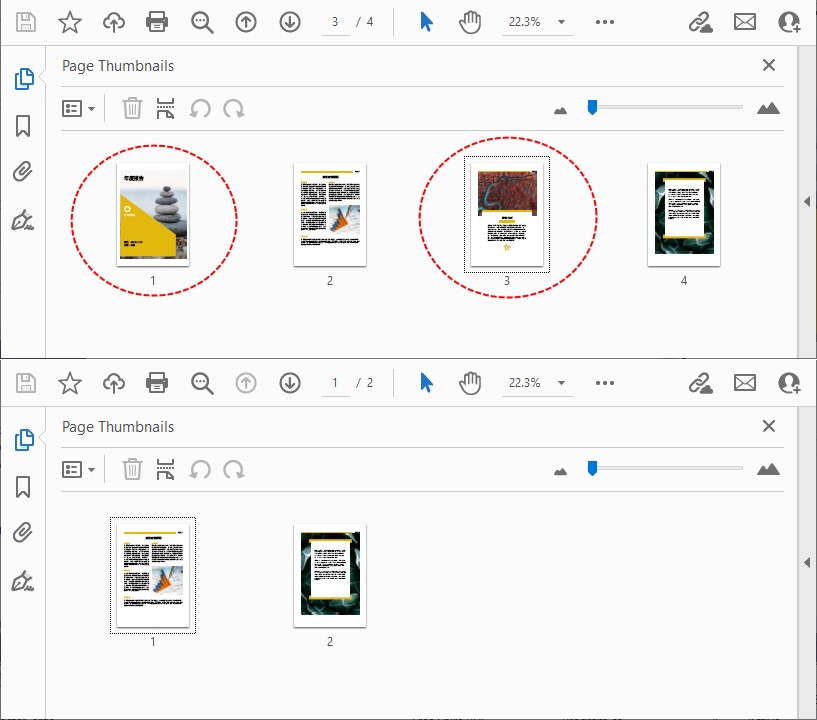
以下示例使用 1‑based 页码删除第 1 页和第 3 页:
// 定义需要删除的页码(1-based,直接填日常看到的页码即可)
int[] pagestodelete = new int[] { 1, 3 };

// 转换为 0‑based 索引并降序排列
var deleteindices = pagestodelete
   .select(page => page - 1)
   .where(index => index >= 0 && index < pdf.pages.count) // 过滤无效索引
   .orderbydescending(index => index);

// 循环删除页面
foreach (int index in deleteindices)
{
   pdf.pages.removeat(index);
}
注意: 删除前务必使用 pdf.pages.count 验证页码的有效性。
效果预览:
5. 保存修改后的 pdf 文件
删除完成后,调用 savetofile 保存文件,支持覆盖原文件或生成新文件:
// 保存到新文件
pdf.savetofile("output.pdf");

// 覆盖原文件(谨慎使用)
pdf.savetofile(@"c:\input.pdf");

// 保存到流
using (filestream fs = new filestream(@"output.pdf", filemode.create))
{
    pdf.savetostream(fs);
}

pdf.close();
6. 完整可运行代码(含异常处理)
整合所有功能,加入异常捕获,适配文件损坏、页码无效、权限不足等场景:
using system;
using system.linq;
using system.io;
using spire.pdf;

class pdfpagedeleter
{
    static void main(string[] args)
    {
        string inputpath = @"c:\docs\input.pdf";
        string outputpath = @"c:\docs\output.pdf";
        int[] pagestodelete = { 2, 4 }; // 1‑based: 删除第 2 页和第 4 页

        try
        {
            using (pdfdocument pdf = new pdfdocument())
            {
                // 检查文件是否存在
                if (!file.exists(inputpath))
                {
                    console.writeline($"文件不存在: {inputpath}");
                    return;
                }

                pdf.loadfromfile(inputpath);
                int originalpagecount = pdf.pages.count;
                console.writeline($"原始页数: {originalpagecount}");

                // 过滤有效页码
                var indices = pagestodelete
                    .select(p => p - 1)
                    .where(i => i >= 0 && i < originalpagecount)
                    .orderbydescending(i => i)
                    .tolist();

                if (indices.count == 0)
                {
                    console.writeline("没有有效的页码需要删除。");
                    return;
                }

                foreach (int index in indices)
                {
                    pdf.pages.removeat(index);
                }

                console.writeline($"删除后页数: {pdf.pages.count}");
                pdf.savetofile(outputpath);
                console.writeline($"已保存到: {outputpath}");
            }
        }
        catch (system.io.ioexception)
        {
            console.writeline("错误:pdf 文件被其他程序占用或无文件读写权限!");
        }
        catch (exception ex)
        {
            console.writeline($"操作失败: {ex.message}");
        }
    }
}
7. 常见异常处理
开发中常见的异常场景,直接套用以下处理逻辑:
| 场景 | 处理方式 |
|---|---|
| 页码超出范围 | 通过 index < pdf.pages.count 过滤无效索引,避免报错 |
| 空 pdf 文件 | 判断 pdf.pages.count == 0,直接终止操作 |
| 文件损坏 / 无法读取 | 使用 try-catch 捕获加载异常 |
| 删除全部页面 | 免费库支持该操作,最终会生成一个空白 pdf 文件 |
| 文件权限不足 | 捕获 ioexception,提示用户管理员权限运行程序 |
8. 页面集合操作
pdfdocument.pages 属性返回 pdfpagecollection 对象。其他常用方法:
count: 获取总页数。insert(int index):在指定位置插入页面。add():在末尾追加页面。
如果需要条件删除(例如删除包含指定关键词文本的页面),可以结合 pdftextfinder 使用:
using spire.pdf.texts;

pdftextfinder finder = new pdftextfinder(pdf.pages[0]);
var found = finder.find("机密"); // 返回文本位置列表
本文介绍了删除单页、多页和条件删除的 pdf 页面管理方案,可轻松集成到自动化工作流中,无需依赖 adobe acrobat 等外部软件。
到此这篇关于c#实现批量删除pdf页面(单页/多页)的实战技巧的文章就介绍到这了,更多相关c#删除pdf页面内容请搜索代码网以前的文章或继续浏览下面的相关文章希望大家以后多多支持代码网!





发表评论