
 我要评论
我要评论一、背景
最近在看 shiro 的过滤器,是基于springboot + spring mvc + shiro + jsp 构建的一个小工程,我想在 jsp 的页面中加载 js 、css 和一些图片资源,遇到的一些小的问题,在此记录一下。
二、标签
先看下 application.properties 里面的两个标签,下面的这个标签,只有静态资源的访问路径为为 /static/** 时,才会处理该请求。
比如:访问http://localhost:8080/static/css/index.css,处理的方式是根据模式匹配后的文件名查找本地文件。按照 spring.resources.static-locations 指定的位置查找本地文件。
spring.mvc.static-path-pattern=/static/**
再看下面这个标签,这个标签是自定义 springboot 前端静态资源的位置,如果不配置,则默认将从如下位置,按照优先级查找静态资源文件,从左向右是由高到低
spring.resources.static-locations = classpath:/static,classpath:/public,classpath:/resources,classpath:/meta-inf/resources
spring.resources.static-locations = classpath:/static,classpath:/public,classpath:/resources,classpath:/meta-inf/resources
三、示例工程
我的 jsp 文件放在了 webapp 文件夹的 page 文件夹下,而我的 js、image 和 css 文件则放在了 resources 的 static 文件夹下,如下所示:
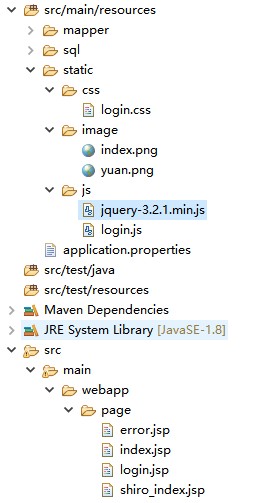
我的初始化登录界面 login.jsp 的内容如下所示,如果此时不引入 shiro ,则下面的界面可以正常显示,即可以正常的显示和加载所有的资源。
<%@ page language="java" contenttype="text/html; charset=utf-8"%>
<!doctype html>
<html>
<head>
<meta charset="iso-8859-1">
<title>一路发咨询网站</title>
</head>
<body>
<script type="text/javascript" src="/static/js/jquery-3.2.1.min.js"></script>
<script type="text/javascript" src="/static/js/login.js"></script>
<link rel="stylesheet" type="text/css" href="/static/css/login.css" rel="external nofollow" />
<h1>欢迎登录一路发咨询网站</h1>

<form action="/login" method="post">
	<div id="father" style="background-image: url('/static/image/index.png');">
		<div style="width:300px;height:100px;">
			<div style="width:150px;float:left">
				<span>用户名:<span></span>
			</div>
			<div style="width:150px;float:left;">
				<input  style="height:34px" type="text" name="username"/>
			</div>
		</div>
		<div style="width:300px;height:100px;">
			<div style="width:150px;float:left;">
				<span>密码:<span></span>
			</div>
			<div style="width:150px;float:left;">
				<input  style="height:34px" type="password" name="password"/>
			</div>
		</div>
		<div style="width:300px;height:100px;">
			<div style="width:64px;float:left;margin-left:280px">
				<input style="height:34px;width:34px;" type="checkbox" name="rememberme" />
			</div>
			 <div style="width:150px;float:left;margin-top:-4px">
					<span>记住我<span></span>
			</div>
		</div>
		 <div style="margin-left:190px">
				<input style="height:50px;width:90px;font-size:34px;font-weight:bold" type="submit" value="提交"/>
		</div>
	</div>
</form>
</body>
</html>
四、引入shiro
由于 shiro 拥有过滤器的功能,如果按照下面的这种方式配置,则上面的 login.jsp 里面所需要的 js、css和图片资源都无法正常加载。
@bean
	public shirofilterfactorybean shirofilterfactorybean(securitymanager securitymanager) {
		shirofilterfactorybean shirofilter = new shirofilterfactorybean();
		// shiro的核心安全接口,这个属性是必须的
		shirofilter.setsecuritymanager(securitymanager);
		//身份认证失败,则跳转到登录页面的配置 没有登录的用户请求需要登录的页面时自动跳转到登录页面,不是必须的属性,
        //不输入地址的话会自动寻找项目web项目的根目录下的”/login.jsp”页面。
		shirofilter.setloginurl("/page/login.jsp");
		//自定义过滤
		map<string, string> map = new linkedhashmap<>();
		// 不能对login方法进行拦截,若进行拦截的话,这辈子都登录不上去了,这个login是logincontroller里面登录校验的方法
		map.put("/login", "anon");
		//对所有请求进行拦截
		map.put("/**", "authc");
		shirofilter.setfilterchaindefinitionmap(map);
		return shirofilter;
	}
五、解决方式
只需要在上面的这个方法中,加一个过滤条件即可,如下所示,千万记得map.put("/**", "authc")这个拦截条件要放在最后。
@bean
	public shirofilterfactorybean shirofilterfactorybean(securitymanager securitymanager) {
		shirofilterfactorybean shirofilter = new shirofilterfactorybean();
		// shiro的核心安全接口,这个属性是必须的
		shirofilter.setsecuritymanager(securitymanager);
		//身份认证失败,则跳转到登录页面的配置 没有登录的用户请求需要登录的页面时自动跳转到登录页面,不是必须的属性,
        //不输入地址的话会自动寻找项目web项目的根目录下的”/login.jsp”页面。
		shirofilter.setloginurl("/page/login.jsp");
		//自定义过滤
		map<string, string> map = new linkedhashmap<>();
		// 不能对login方法进行拦截,若进行拦截的话,这辈子都登录不上去了,这个login是logincontroller里面登录校验的方法
		map.put("/login", "anon");
		map.put("/static/**", "anon");
		//对所有请求进行拦截
		map.put("/**", "authc");
		shirofilter.setfilterchaindefinitionmap(map);
		return shirofilter;
	}
总结
以上为个人经验,希望能给大家一个参考,也希望大家多多支持代码网。



发表评论