
 我要评论
我要评论需求
有如下由word.shape拼接九宫格图表,通过模拟解析html文本可实现字体的设置,如图中所示匹配度为9的标识为颜色为白色、字体加粗显示,具体实现可参照我的文章《c# 操作word模拟解析html标记输出带格式的文本》。新需求是需要改变文字range对象所在的父对象的背景色,如下图中匹配度为9的表格。
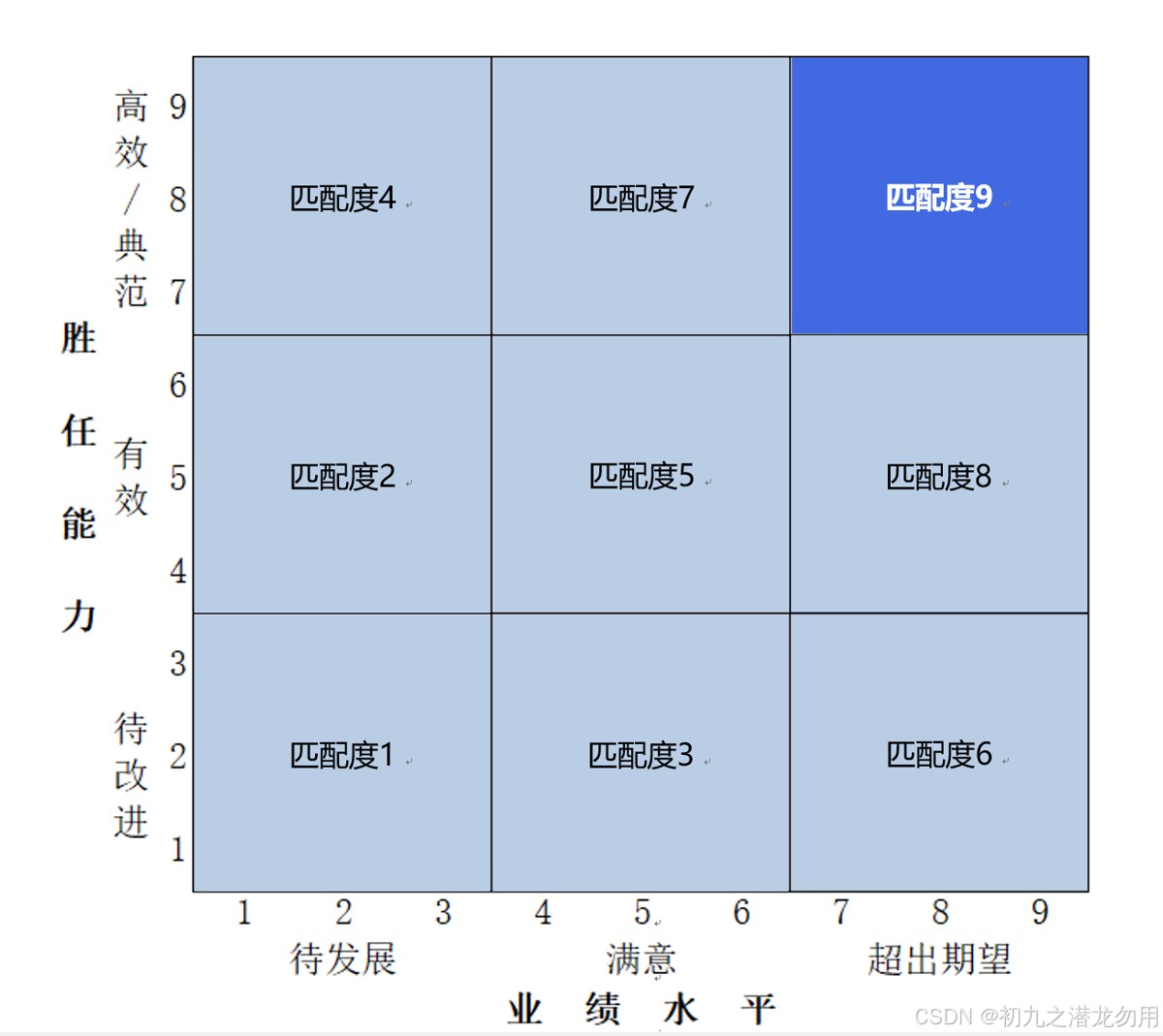
因此需要对html模拟解析进行进一步的改造设计,增加自定义属性。
解决方案
目前主要针对如下两个 range 对象进行操作:
| 序号 | 对象 | 说明 |
| 1 | word.shape | 形状对象,填充其背景色 |
基本的实现的思路如下:
一、将原始输出文本按照指定的定义进行 html 标记化,如将 “匹配度9” 文本更改为 “<span style='font-weight:bold;color:#ffffff;parent-background-color:#4169e1;'>匹配度9</span>” (html 部分使用标准的 span + style ),这样可以同时兼容标准的网页版输出。对 range 的文本(text)使用正则表达式提取 html 标记间的所有查找关键字。
二、对 range 的字符集对象(word.characters)进行逐字操作,提取 html 标记的 style 属性部分,分隔各种 style 进行解析,增加 background-color 背景色设置,重刷每一个字符的格式。并新增 parent-background-color 属性,通过传递的参数对象,改变参数对象的背景填充色。
三、处理完格式设置,调用 range.find 对象替换掉 “多余” 的 html 标记文本,完成最终输出效果。
范例运行环境
操作系统: windows server 2019 datacenter
操作系统上安装 office word 2016
数据库:microsoft sql server 2016
.net版本: .netframework4.7.1 或以上
开发工具:vs2019 c#
配置office dcom
配置方法可参照我的文章《c# 读取word表格到dataset》进行处理和配置。
设计实现
组件库引入
方法实现
processwordchars 方法基本说明如下表:
| 序号 | 参数名称 | 参数类型 | 说明 |
|---|---|---|---|
| 1 | chars | word.characters | word.range的字符集对象 |
| 2 | ws | word.shape | 传递需要填充背景的形状对象,默认值为 null |
方法示例代码如下:
void processwordchars(word.characters chars,word.shape ws=null)
{

  string content = chars.parent.text;
  if (content == null || content == "") { return; }
  word.find fnd = chars.parent.find;

  arraylist paras2 = new arraylist();
  paras2.add(new string[] { "<span style=", "</span>" });
  foreach (string[] p in paras2)
  {
      string pattern = string.format(@"{0}(.*?){1}", p[0], p[1]);
      system.text.regularexpressions.matchcollection matches = system.text.regularexpressions.regex.matches(content, pattern);
      foreach (system.text.regularexpressions.match match in matches)
      {
         string key = match.groups[1].value;  //提取的内容
         string vkey = key.substring(key.indexof('>') + 1); //最终有效内容

         string vstyle = key.substring(1, key.length - vkey.length - 3); //截取 style 值
         string findkey = p[0] + key + "</span>";  //最终替换部分
         int fk = content.indexof(findkey);
         if (fk != -1)
         {
             for (int i = 1; i <= findkey.length; i++)
             {
                 foreach (string kv in vstyle.split(';'))
                 {
                     string[] style = kv.split(':');
                     if (style[0] == "color")
                     {
                         chars[fk + i].font.color =(word.wdcolor)colortranslator.toole(colortranslator.fromhtml(style[1]));
                                        // 获取argb值
                     }
                     else if(style[0]== "font-weight")
                     {
                         if (style[1] == "bold") {
                             chars[fk + i].font.bold=1;
                         }
                     }
                     else if (style[0] == "font-family")
                     {
                         chars[fk + i].font.name=style[1];
                     }
                     else if (style[0] == "background-color")
                     {
                         chars[fk + i].font.shading.backgroundpatterncolor = (word.wdcolor)colortranslator.toole(colortranslator.fromhtml(style[1]));
                     }
                     else if (style[0] == "parent-background-color")
                     {
                         if (ws != null)
                         {
                             ws.fill.forecolor.rgb = colortranslator.toole(colortranslator.fromhtml(style[1]));
                         }
                     }

                 }
              }
          fnd.clearformatting();
          object findtext = findkey;
          object matchcase = false; object matchwholeword = type.missing; object matchwildcards = false; object matchsoundslike = false; object matchallwordforms = false;
          object forward = true; object wrap = word.wdfindwrap.wdfindcontinue; object format = false;
          object replacewith = vkey;
          object replace = word.wdreplace.wdreplaceall; object matchkashida = type.missing; object matchdiacritics = type.missing; object matchalefhamza = type.missing; object matchcontrol = type.missing;
          fnd.execute(ref findtext, ref matchcase, ref matchwholeword, ref matchwildcards, ref matchsoundslike, ref matchallwordforms,ref forward, ref wrap, ref format, ref replacewith, ref replace, ref matchkashida, ref matchdiacritics, ref matchalefhamza, ref matchcontrol);
          content = chars.parent.text;
         }
      }
   }
}
小结
1、parent-background-color为自定义特殊属性,不属于标准属性,代码增加了对该属性值的处理,并配合传递的 word.shape 对象。
2、背景颜色请参照十六进制表示输入(如 #00ff00)。
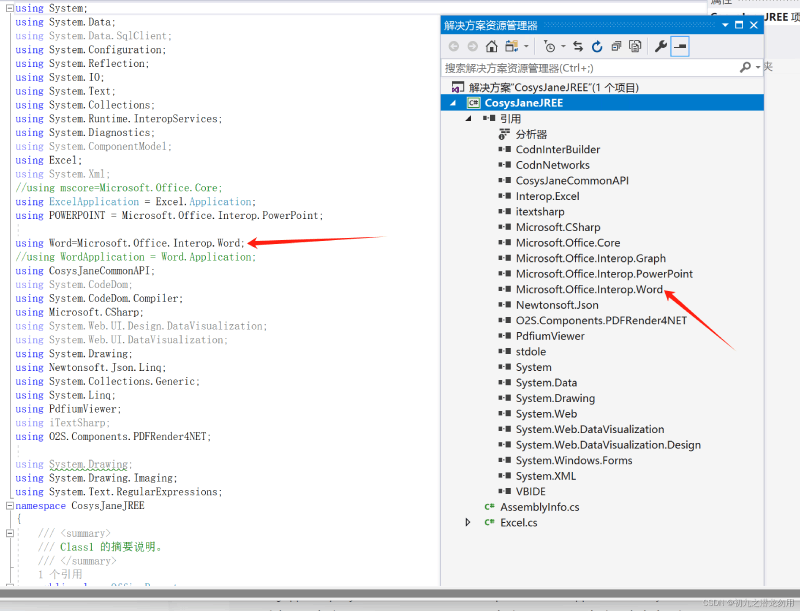
3、示例代码中 word 表示 using word=microsoft.office.interop.word; 的引用。
到此这篇关于c#操作word模拟解析html标记设置背景色详解的文章就介绍到这了,更多相关c#设置word背景色内容请搜索代码网以前的文章或继续浏览下面的相关文章希望大家以后多多支持代码网!






发表评论