
 我要评论
我要评论前言
表的增删改查:
crud : create(创建), retrieve(读取),update(更新),delete(删除)
一、create
语法:
insert [into] table_name
[(column [, column] ...)]
values (value_list) [, (value_list)] ...
value_list: value, [, value] ...
创建一张表:
mysql> create table students(
    -> id int unsigned primary key auto_increment,
    -> sn int not null unique key comment "学号",
    ->  name varchar(20) not null,
    -> qq varchar(32) unique key
    -> );
query ok, 0 rows affected (0.02 sec)
- 单行数据 + 全列插入
value_list 数量必须和定义表的列的数量及顺序一致
mysql> insert into students values (66, 123, '刘备', 111111);
query ok, 1 row affected (0.00 sec)
- 多行数据 + 指定列插入
这里可以灵活插入
mysql> insert into students (sn, name) values (124, '关羽');
query ok, 1 row affected (0.00 sec)
mysql> insert into students (name, sn) values ('张飞', 125), ('曹操', 126), ('貂蝉', 128);
query ok, 1 row affected (0.00 sec)
mysql> select * from students;
+----+-----+--------+--------+
| id | sn  | name   | qq     |
+----+-----+--------+--------+
| 66 | 123 | 刘备   | 111111 |
| 67 | 124 | 关羽   | null   |
| 68 | 125 | 张飞   | null   |
| 69 | 126 | 曹操   | null   |
| 70 | 128 | 貂蝉   | null   |
+----+-----+--------+--------+
5 rows in set (0.00 sec)- 插入否则更新
由于 主键 或者 唯一键 对应的值已经存在而导致插入失败:
mysql> insert into students values (70, 129, '西施', 22);
error 1062 (23000): duplicate entry '70' for key 'students.primary'
mysql> insert into students values (71, 129, '西施', 111111);
error 1062 (23000): duplicate entry '70' for key 'students.primary'
可以选择性的进行同步更新操作
语法:
insert ... on duplicate key update
	column = value [, column = value] ...
mysql> insert into students values (71 ,129, '西施', 111111) on duplicate key update id = 71, name = '西施', qq = 222222;
query ok, 2 rows affected (0.00 sec)
mysql> select * from students;
+----+-----+--------+--------+
| id | sn  | name   | qq     |
+----+-----+--------+--------+
| 67 | 124 | 关羽   | null   |
| 68 | 125 | 张飞   | null   |
| 69 | 126 | 曹操   | null   |
| 70 | 128 | 貂蝉   | null   |
| 71 | 123 | 西施   | 222222 |
+----+-----+--------+--------+
5 rows in set (0.00 sec)
- 替换
主键 或者 唯一键 没有冲突,则直接插入;
主键 或者 唯一键 如果冲突,则删除后再插入
mysql> replace into students (sn, name, qq) values (130, '吕布', 333333);
query ok, 1 row affected (0.00 sec)
mysql> replace into students (sn, name, qq) values (130, '吕布2', 333333);
query ok, 2 rows affected (0.00 sec)
-- 1 row affected: 表中没有冲突数据,数据被插入
-- 2 row affected: 表中有冲突数据,删除后重新插入
mysql> select * from students;
+----+-----+---------+--------+
| id | sn  | name    | qq     |
+----+-----+---------+--------+
| 67 | 124 | 关羽    | null   |
| 68 | 125 | 张飞    | null   |
| 69 | 126 | 曹操    | null   |
| 70 | 128 | 貂蝉    | null   |
| 71 | 123 | 西施    | 222222 |
| 73 | 130 | 吕布2   | 333333 |
+----+-----+---------+--------+
6 rows in set (0.00 sec)
二、retrieve
新建学生成绩表:
mysql> create table exam_result (
    -> id int unsigned primary key auto_increment,
    -> name varchar(20) not null comment '姓名',
    -> chinese float default 0.0 comment '语文成绩',
    -> math float default 0.0 comment '数学成绩',
    -> english float default 0.0 comment '英语成绩'
    -> );
query ok, 0 rows affected (0.01 sec)
mysql> insert into exam_result (name, chinese, math, english) values
    -> ('唐三藏', 67, 98, 56),
    -> ('孙悟空', 87, 78, 77),
    -> ('猪悟能', 88, 98, 90),
    -> ('曹孟德', 82, 84, 67),
    -> ('刘玄德', 55, 85, 45),
    -> ('孙权', 70, 73, 78),
    -> ('宋公明', 75, 65, 30);
query ok, 7 rows affected (0.00 sec)
records: 7  duplicates: 0  warnings: 0
select 列
- 全列查询
通常情况下不建议全列查询,一方面是传输的数据量可能非常大,而且可能会影响到索引的使用。
mysql> select * from exam_result;
+----+-----------+---------+------+---------+
| id | name      | chinese | math | english |
+----+-----------+---------+------+---------+
|  1 | 唐三藏    |      67 |   98 |      56 |
|  2 | 孙悟空    |      87 |   78 |      77 |
|  3 | 猪悟能    |      88 |   98 |      90 |
|  4 | 曹孟德    |      82 |   84 |      67 |
|  5 | 刘玄德    |      55 |   85 |      45 |
|  6 | 孙权      |      70 |   73 |      78 |
|  7 | 宋公明    |      75 |   65 |      30 |
+----+-----------+---------+------+---------+
7 rows in set (0.00 sec)
- 指定列查询
指定列的顺序可以自由选择
mysql> select name, chinese, id from exam_result;
+-----------+---------+----+
| name      | chinese | id |
+-----------+---------+----+
| 唐三藏    |      67 |  1 |
| 孙悟空    |      87 |  2 |
| 猪悟能    |      88 |  3 |
| 曹孟德    |      82 |  4 |
| 刘玄德    |      55 |  5 |
| 孙权      |      70 |  6 |
| 宋公明    |      75 |  7 |
+-----------+---------+----+
7 rows in set (0.00 sec)
- 查询字段为表达式
表达式不包含字段
mysql> select id, name, 10 from exam_result;
+----+-----------+----+
| id | name      | 10 |
+----+-----------+----+
|  1 | 唐三藏    | 10 |
|  2 | 孙悟空    | 10 |
|  3 | 猪悟能    | 10 |
|  4 | 曹孟德    | 10 |
|  5 | 刘玄德    | 10 |
|  6 | 孙权      | 10 |
|  7 | 宋公明    | 10 |
+----+-----------+----+
7 rows in set (0.00 sec)
表达式包含一个字段
mysql> select id, name, chinese + 100 from exam_result;
+----+-----------+---------------+
| id | name      | chinese + 100 |
+----+-----------+---------------+
|  1 | 唐三藏    |           167 |
|  2 | 孙悟空    |           187 |
|  3 | 猪悟能    |           188 |
|  4 | 曹孟德    |           182 |
|  5 | 刘玄德    |           155 |
|  6 | 孙权      |           170 |
|  7 | 宋公明    |           175 |
+----+-----------+---------------+
7 rows in set (0.00 sec)
表达式包含多个字段
mysql> select id, name, chinese + math + english from exam_result;
+----+-----------+--------------------------+
| id | name      | chinese + math + english |
+----+-----------+--------------------------+
|  1 | 唐三藏    |                      221 |
|  2 | 孙悟空    |                      242 |
|  3 | 猪悟能    |                      276 |
|  4 | 曹孟德    |                      233 |
|  5 | 刘玄德    |                      185 |
|  6 | 孙权      |                      221 |
|  7 | 宋公明    |                      170 |
+----+-----------+--------------------------+
7 rows in set (0.00 sec)
- 为查询结果指定别名
语法:
select column [as] alias_name [...] from table_name;
mysql> select id, name, chinese + math + english 总分 from exam_result;
+----+-----------+--------+
| id | name      | 总分   |
+----+-----------+--------+
|  1 | 唐三藏    |    221 |
|  2 | 孙悟空    |    242 |
|  3 | 猪悟能    |    276 |
|  4 | 曹孟德    |    233 |
|  5 | 刘玄德    |    185 |
|  6 | 孙权      |    221 |
|  7 | 宋公明    |    170 |
+----+-----------+--------+
7 rows in set (0.00 sec)
- 结果去重 distinct
distinct 必须紧跟在 select 之后,并且作用于所有选择的列。
数学成绩98分重复了:
mysql> select math from exam_result;
+------+
| math |
+------+
|   98 |
|   78 |
|   98 |
|   84 |
|   85 |
|   73 |
|   65 |
+------+
7 rows in set (0.00 sec)
去重:
mysql> select distinct math from exam_result;
+------+
| math |
+------+
|   98 |
|   78 |
|   84 |
|   85 |
|   73 |
|   65 |
+------+
6 rows in set (0.00 sec)
where条件
比较运算符:
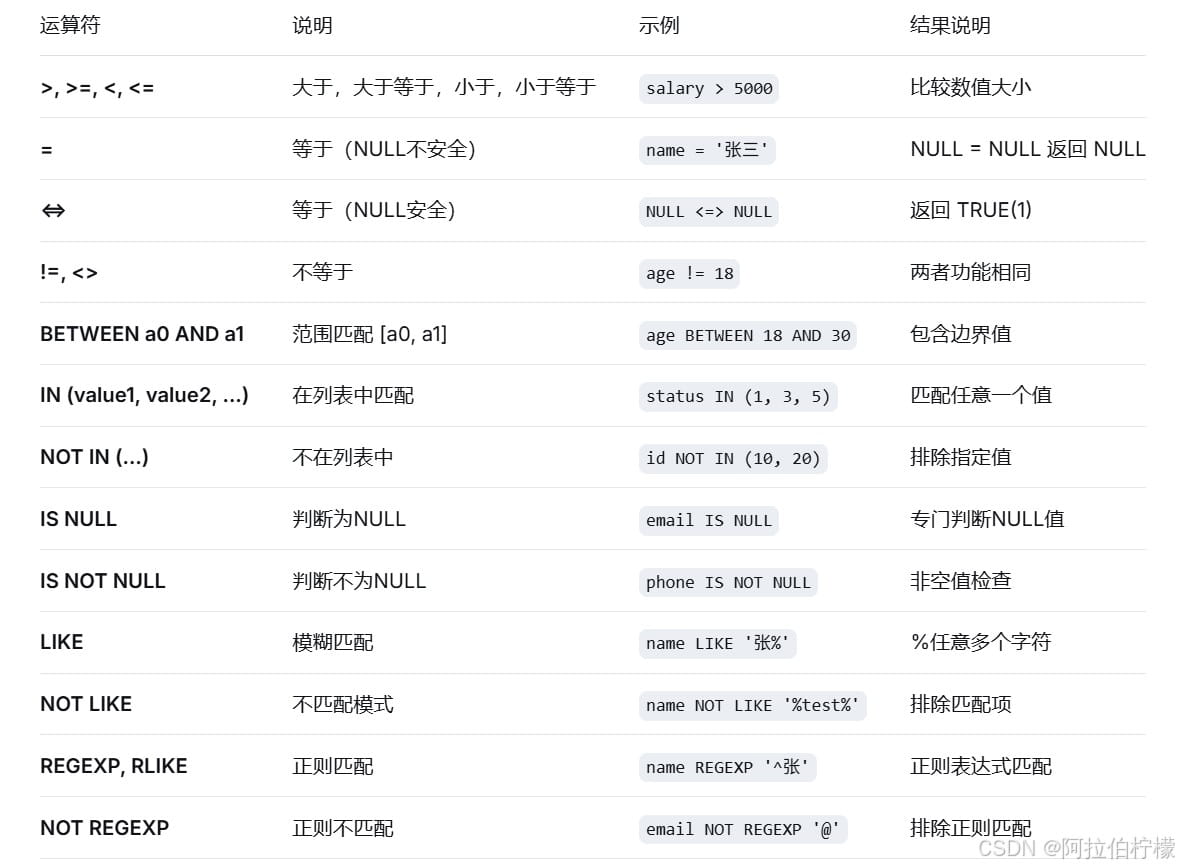
逻辑运算符:
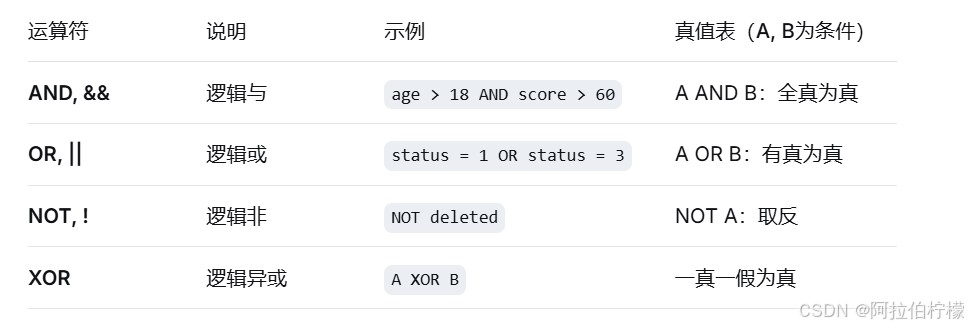
运算符优先级(从高到低):
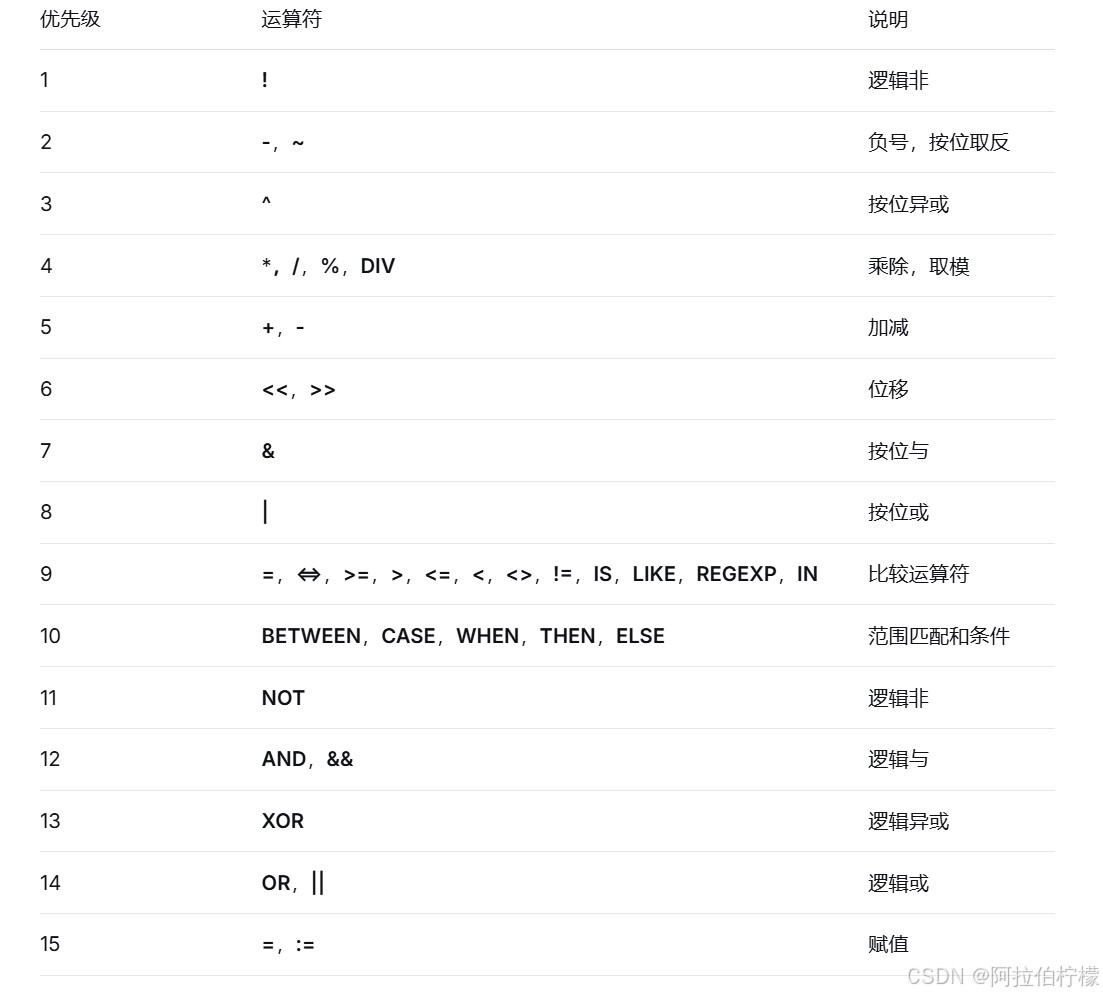
- 英语不及格的同学及英语成绩 ( < 60 )
mysql> select name, english from exam_result where english < 60;
+-----------+---------+
| name      | english |
+-----------+---------+
| 唐三藏    |      56 |
| 刘玄德    |      45 |
| 宋公明    |      30 |
+-----------+---------+
3 rows in set (0.00 sec)
- 语文成绩在 [80, 90] 分的同学及语文成绩
--使用and连接
mysql> select name, chinese from exam_result where chinese >= 80 and chinese <= 90;
+-----------+---------+
| name      | chinese |
+-----------+---------+
| 孙悟空    |      87 |
| 猪悟能    |      88 |
| 曹孟德    |      82 |
+-----------+---------+
3 rows in set (0.00 sec)
--使用between and 连接
mysql> select name, chinese from exam_result where chinese between 80 and 90;
+-----------+---------+
| name      | chinese |
+-----------+---------+
| 孙悟空    |      87 |
| 猪悟能    |      88 |
| 曹孟德    |      82 |
+-----------+---------+
3 rows in set (0.00 sec)
- 数学成绩是 58 或者 59 或者 98 或者 99 分的同学及数学成绩
--使用or连接
mysql> select name, math from exam_result where math = 58 or math = 59 or math = 98 or math = 99;
+-----------+------+
| name      | math |
+-----------+------+
| 唐三藏    |   98 |
| 猪悟能    |   98 |
+-----------+------+
2 rows in set (0.00 sec)
--使用in连接
mysql> select name, math from exam_result where math in (58, 59, 98, 99);
+-----------+------+
| name      | math |
+-----------+------+
| 唐三藏    |   98 |
| 猪悟能    |   98 |
+-----------+------+
2 rows in set (0.00 sec)
- 姓孙的同学 及 孙某同学
--姓孙的同学
mysql> select name from exam_result where name like ('孙%');
+-----------+
| name      |
+-----------+
| 孙悟空    |
| 孙权      |
+-----------+
2 rows in set (0.00 sec)
--孙某同学
mysql> select name from exam_result where name like ('孙_');
+--------+
| name   |
+--------+
| 孙权   |
+--------+
1 row in set (0.00 sec)- 语文成绩好于英语成绩的同学
mysql> select name, chinese, english from exam_result where chinese > english;
+-----------+---------+---------+
| name      | chinese | english |
+-----------+---------+---------+
| 唐三藏    |      67 |      56 |
| 孙悟空    |      87 |      77 |
| 曹孟德    |      82 |      67 |
| 刘玄德    |      55 |      45 |
| 宋公明    |      75 |      30 |
+-----------+---------+---------+
5 rows in set (0.00 sec)
- 总分在 200 分以下的同学
别名不能用在 where 条件中
mysql> select name, chinese + math +english 总分 from exam_result where chinese + math + english < 200;
+-----------+--------+
| name      | 总分   |
+-----------+--------+
| 刘玄德    |    185 |
| 宋公明    |    170 |
+-----------+--------+
2 rows in set (0.00 sec)
- 语文成绩 > 80 并且不姓孙的同学
mysql> select name, chinese from exam_result where chinese > 80 and name not like ('孙%');
+-----------+---------+
| name      | chinese |
+-----------+---------+
| 猪悟能    |      88 |
| 曹孟德    |      82 |
+-----------+---------+
2 rows in set (0.00 sec)
- 孙姓同学,否则要求总成绩 > 200 并且 语文成绩 < 数学成绩 并且 英语成绩 > 80
mysql> select name, chinese, math, english, chinese + math + english total from exam_result where name like ('孙%') or (chinese + math + english > 200 and chinese < math and english > 80);
+-----------+---------+------+---------+-------+
| name      | chinese | math | english | total |
+-----------+---------+------+---------+-------+
| 孙悟空    |      87 |   78 |      77 |   242 |
| 猪悟能    |      88 |   98 |      90 |   276 |
| 孙权      |      70 |   73 |      78 |   221 |
+-----------+---------+------+---------+-------+
3 rows in set (0.00 sec)
结果排序 order by
语法:
– asc 为升序(从小到大)
– desc 为降序(从大到小)
– 默认为 asc
select ... from table_name [where ...]
order by column [asc|desc], [...];
注意:在mysql中,没有 order by 子句的查询,返回的顺序是未定义的,永远不要依赖这个顺序
- 同学及数学成绩,按数学成绩升序显示
mysql> select name, math from exam_result order by math;
+-----------+------+
| name      | math |
+-----------+------+
| 宋公明    |   65 |
| 孙权      |   73 |
| 孙悟空    |   78 |
| 曹孟德    |   84 |
| 刘玄德    |   85 |
| 唐三藏    |   98 |
| 猪悟能    |   98 |
+-----------+------+
7 rows in set (0.00 sec)
- 查询同学各门成绩,依次按 数学降序,英语升序,语文升序的方式显示
排序规则:
先按照第一个字段(math)排序,当第一个字段的值相同时,再按照第二个字段(english)排序,如果第二个字段也相同,则按照第三个字段(chinese)排序。
mysql> select name, math, english, chinese from exam_result order by math desc, english, chinese;
+-----------+------+---------+---------+
| name      | math | english | chinese |
+-----------+------+---------+---------+
| 唐三藏    |   98 |      56 |      67 |
| 猪悟能    |   98 |      90 |      88 |
| 刘玄德    |   85 |      45 |      55 |
| 曹孟德    |   84 |      67 |      82 |
| 孙悟空    |   78 |      77 |      87 |
| 孙权      |   73 |      78 |      70 |
| 宋公明    |   65 |      30 |      75 |
+-----------+------+---------+---------+
7 rows in set (0.00 sec)
- 查询同学及总分,由高到低
mysql> select name, chinese + math + english total from exam_result order by chinese + math + english desc;
+-----------+-------+
| name      | total |
+-----------+-------+
| 猪悟能    |   276 |
| 孙悟空    |   242 |
| 曹孟德    |   233 |
| 唐三藏    |   221 |
| 孙权      |   221 |
| 刘玄德    |   185 |
| 宋公明    |   170 |
+-----------+-------+
7 rows in set (0.00 sec)
--order by 字句中可以使用列别名
mysql> select name, chinese + math + english total from exam_result order by total desc;
+-----------+-------+
| name      | total |
+-----------+-------+
| 猪悟能    |   276 |
| 孙悟空    |   242 |
| 曹孟德    |   233 |
| 唐三藏    |   221 |
| 孙权      |   221 |
| 刘玄德    |   185 |
| 宋公明    |   170 |
+-----------+-------+
7 rows in set (0.00 sec)
- 查询姓孙的同学或者姓曹的同学数学成绩,结果按数学成绩由高到低显示
mysql> select name, math from exam_result where name like ('孙%') or name like ('曹%') order by math desc;
+-----------+------+
| name      | math |
+-----------+------+
| 曹孟德    |   84 |
| 孙悟空    |   78 |
| 孙权      |   73 |
+-----------+------+
3 rows in set (0.00 sec)
筛选分页结果 limit
语法:
– 起始下标为 0
– 从 0 开始,筛选 n 条结果
select … from table_name [where …] [order by …] limit n;
– 从 s 开始,筛选 n 条结果
select … from table_name [where …] [order by …] limit s, n;
– 从 s 开始,筛选 n 条结果,比第二种用法更明确,建议使用
select … from table_name [where …] [order by …] limit n offset s;
注意:
对未知表进行查询时,最好加一条 limit 1,避免因为表中数据过大,查询全表数据导致数据库卡死
- 按 id 进行分页,每页 3 条记录,分别显示 第 1、2、3 页
--第1页
mysql> select * from exam_result order by id limit 0, 3;
+----+-----------+---------+------+---------+
| id | name      | chinese | math | english |
+----+-----------+---------+------+---------+
|  1 | 唐三藏    |      67 |   98 |      56 |
|  2 | 孙悟空    |      87 |   78 |      77 |
|  3 | 猪悟能    |      88 |   98 |      90 |
+----+-----------+---------+------+---------+
3 rows in set (0.00 sec)
--第2页
mysql> select * from exam_result order by id limit 3, 3;
+----+-----------+---------+------+---------+
| id | name      | chinese | math | english |
+----+-----------+---------+------+---------+
|  4 | 曹孟德    |      82 |   84 |      67 |
|  5 | 刘玄德    |      55 |   85 |      45 |
|  6 | 孙权      |      70 |   73 |      78 |
+----+-----------+---------+------+---------+
3 rows in set (0.00 sec)
--第3页
mysql> select * from exam_result order by id limit 6, 3;
+----+-----------+---------+------+---------+
| id | name      | chinese | math | english |
+----+-----------+---------+------+---------+
|  7 | 宋公明    |      75 |   65 |      30 |
+----+-----------+---------+------+---------+
1 row in set (0.00 sec)
三、update
语法:
对查询到的结果进行列值更新:
update table_name set column = expr [, column = expr ...]
	[where ...] [order by ...] [limit ...]
- 将孙悟空同学的数学成绩变更为 80 分
-- 查看原数据
select name, math from exam_result where name = '孙悟空';
+-----------+--------+
| name | math |
+-----------+--------+
| 孙悟空 | 78 |
+-----------+--------+
1 row in set (0.00 sec)
-- 数据更新
update exam_result set math = 80 where name = '孙悟空';
query ok, 1 row affected (0.04 sec)
rows matched: 1 changed: 1 warnings: 0
-- 查看更新后数据
select name, math from exam_result where name = '孙悟空';
+-----------+--------+
| name | math |
+-----------+--------+
| 孙悟空 | 80 |
+-----------+--------+
1 row in set (0.00 sec)
- 将曹孟德同学的数学成绩变更为 60 分,语文成绩变更为 70 分
-- 查看原数据
select name, math, chinese from exam_result where name = '曹孟德';
+-----------+--------+-------+
e | math | chinese |
+-----------+--------+-------+
| 曹孟德 | 84 | 82 |
+-----------+--------+-------+
1 row in set (0.00 sec)
-- 数据更新
update exam_result set math = 60, chinese = 70 where name = '曹孟德';
query ok, 1 row affected (0.14 sec)
rows matched: 1 changed: 1 warnings: 0
-- 查看更新后数据
select name, math, chinese from exam_result where name = '曹孟德';
+-----------+--------+-------+
| name | math | chinese |
+-----------+--------+-------+
| 曹孟德 | 60 | 70 |
+-----------+--------+-------+
1 row in set (0.00 sec)
- 将总成绩倒数前三的 3 位同学的数学成绩加上 30 分
-- 查看原数据
-- 别名可以在order by中使用
select name, math, chinese + math + english 总分 from exam_result order by 总分 limit 3;
+-----------+--------+--------+
| name | math | 总分 |
+-----------+--------+--------+
| 宋公明 | 65 | 170 |
| 刘玄德 | 85 | 185 |
| 曹孟德 | 60 | 197 |
+-----------+--------+--------+
3 rows in set (0.00 sec)
-- 数据更新,mysql不支持 math += 30 这种语法
update exam_result set math = math + 30 order by chinese + math + english limit 3;
-- 查看更新后数据
--这里还可以按总分升序排序取前 3 个
select name, math, chinese + math + english 总分 from exam_result where name in ('宋公明', '刘玄德', '曹孟德');
+-----------+--------+--------+
| name | math | 总分 |
+-----------+--------+--------+
| 曹孟德 | 90 | 227 |
| 刘玄德 | 115 | 215 |
| 宋公明 | 95 | 200 |
+-----------+--------+--------+
3 rows in set (0.00 sec)
-- 按总成绩排序后查询结果
select name, math, chinese + math + english 总分 from exam_result order by 总分 limit 3;
+-----------+--------+--------+
| name | math | 总分 |
+-----------+--------+--------+
| 宋公明 | 95 | 200 |
| 刘玄德 | 115 | 215 |
| 唐三藏 | 98 | 221 |
+-----------+--------+--------+
3 rows in set (0.00 sec)- 将所有同学的语文成绩更新为原来的 2 倍
-- 查看原数据
select * from exam_result;
+----+-----------+-------+--------+--------+
| id | name | chinese | math | english |
+----+-----------+-------+--------+--------+
| 1 | 唐三藏 | 67 | 98 | 56 |
| 2 | 孙悟空 | 87 | 80 | 77 |
| 3 | 猪悟能 | 88 | 98 | 90 |
| 4 | 曹孟德 | 70 | 90 | 67 |
| 5 | 刘玄德 | 55 | 115 | 45 |
| 6 | 孙权 | 70 | 73 | 78 |
| 7 | 宋公明 | 75 | 95 | 30 |
+----+-----------+-------+--------+--------+
7 rows in set (0.00 sec)
-- 数据更新
update exam_result set chinese = chinese * 2;
query ok, 7 rows affected (0.00 sec)
rows matched: 7 changed: 7 warnings: 0
-- 查看更新后数据
select * from exam_result;
+----+-----------+-------+--------+--------+
| id | name | chinese | math | english |
+----+-----------+-------+--------+--------+
| 1 | 唐三藏 | 134 | 98 | 56 |
| 2 | 孙悟空 | 174 | 80 | 77 |
| 3 | 猪悟能 | 176 | 98 | 90 |
| 4 | 曹孟德 | 140 | 90 | 67 |
| 5 | 刘玄德 | 110 | 115 | 45 |
| 6 | 孙权 | 140 | 73 | 78 |
| 7 | 宋公明 | 150 | 95 | 30 |
+----+-----------+-------+--------+--------+
7 rows in set (0.00 sec)
四、delete
删除数据
语法:
delete from table_name [where ...] [order by ...] [limit ...]
- 删除孙悟空同学的考试成绩
-- 查看原数据
select * from exam_result where name = '孙悟空';
+----+-----------+-------+--------+--------+
| id | name | chinese | math | english |
+----+-----------+-------+--------+--------+
| 2 | 孙悟空 | 174 | 80 | 77 |
+----+-----------+-------+--------+--------+
1 row in set (0.00 sec)
-- 删除数据
delete from exam_result where name = '孙悟空';
query ok, 1 row affected (0.17 sec)
-- 查看删除结果
select * from exam_result where name = '孙悟空';
empty set (0.00 sec)
- 删除整张表数据
-- 准备测试表
create table for_delete (
id int primary key auto_increment,
name varchar(20)
);
query ok, 0 rows affected (0.16 sec)
-- 插入测试数据
insert into for_delete (name) values ('a'), ('b'), ('c');
query ok, 3 rows affected (1.05 sec)
records: 3 duplicates: 0 warnings: 0
-- 查看测试数据
select * from for_delete;
+----+------+
| id | name |
+----+------+
| 1 | a |
| 2 | b |
| 3 | c |
+----+------+
3 rows in set (0.00 sec)
-- 删除整表数据
delete from for_delete;
query ok, 3 rows affected (0.00 sec)
-- 查看删除结果
select * from for_delete;
empty set (0.00 sec)
-- 再插入一条数据,自增 id 在原值上增长
insert into for_delete (name) values ('d');
query ok, 1 row affected (0.00 sec)
-- 查看数据
select * from for_delete;
+----+------+
| id | name |
+----+------+
| 4 | d |
+----+------+
1 row in set (0.00 sec)
-- 查看表结构,会有 auto_increment=n 项
show create table for_delete\g
*************************** 1. row ***************************
table: for_delete
create table: create table `for_delete` (
`id` int(11) not null auto_increment,
`name` varchar(20) default null,
primary key (`id`)
) engine=innodb auto_increment=5 default charset=utf8
1 row in set (0.00 sec)
截断表:
语法:
truncate [table] table_name
注意:
这个操作慎重使用
- 只能对整表操作,不能像 delete 一样针对部分数据操作;
- 实际上 mysql 不对数据操作,所以比 delete 更快,但是truncate在删除数据的时候,并不经过真正的事物,所以无法回滚
- 会重置 auto_increment 项
-- 准备测试表
create table for_truncate (
id int primary key auto_increment,
name varchar(20)
);
query ok, 0 rows affected (0.16 sec)
-- 插入测试数据
insert into for_truncate (name) values ('a'), ('b'), ('c');
query ok, 3 rows affected (1.05 sec)
records: 3 duplicates: 0 warnings: 0
-- 查看测试数据
select * from for_truncate;
+----+------+
| id | name |
+----+------+
| 1 | a |
| 2 | b |
| 3 | c |
+----+------+
3 rows in set (0.00 sec)
-- 截断整表数据,注意影响行数是 0,所以实际上没有对数据真正操作
truncate for_truncate;
query ok, 0 rows affected (0.10 sec)
-- 查看删除结果
select * from for_truncate;
empty set (0.00 sec)
-- 再插入一条数据,自增 id 在重新增长
insert into for_truncate (name) values ('d');
query ok, 1 row affected (0.00 sec)
-- 查看数据
select * from for_truncate;
+----+------+
| id | name |
+----+------+
| 1 | d |
+----+------+
1 row in set (0.00 sec)
-- 查看表结构,会有 auto_increment=2 项
show create table for_truncate\g
*************************** 1. row ***************************
table: for_truncate
create table: create table `for_truncate` (
`id` int(11) not null auto_increment,
`name` varchar(20) default null,
primary key (`id`)
) engine=innodb auto_increment=2 default charset=utf8
1 row in set (0.00 sec)
插入查询结果
语法:
insert into table_name [(column [, column ...])] select ...
样例:
删除表中的的重复复记录,将 duplicate_table 的去重数据插入到 no_duplicate_table
-- 创建原数据表
create table duplicate_table (id int, name varchar(20));
query ok, 0 rows affected (0.01 sec)
-- 插入测试数据
insert into duplicate_table values
(100, 'aaa'),
(100, 'aaa'),
(200, 'bbb'),
(200, 'bbb'),
(200, 'bbb'),
(300, 'ccc');
query ok, 6 rows affected (0.00 sec)
records: 6 duplicates: 0 warnings: 0
-- 创建一张空表 no_duplicate_table,结构和 duplicate_table 一样
create table no_duplicate_table like duplicate_table;
query ok, 0 rows affected (0.00 sec)
-- 将 duplicate_table 的去重数据插入到 no_duplicate_table
insert into no_duplicate_table select distinct * from duplicate_table;
query ok, 3 rows affected (0.00 sec)
records: 3 duplicates: 0 warnings: 0
-- 通过重命名表,实现原子的去重操作
rename table duplicate_table to old_duplicate_table, no_duplicate_table to duplicate_table;
query ok, 0 rows affected (0.00 sec)
-- 查看最终结果
select * from duplicate_table;
+------+------+
| id | name |
+------+------+
| 100 | aaa |
| 200 | bbb |
| 300 | ccc |
+------+------+
3 rows in set (0.00 sec)
-- 删除备份表duplicate_table
drop table dulpicate_table;
到此这篇关于mysql基本查询的文章就介绍到这了,更多相关mysql基本查询内容请搜索代码网以前的文章或继续浏览下面的相关文章希望大家以后多多支持代码网!






发表评论