
 我要评论
我要评论代码示例
docxtpl 一个很强大的包,其主要通过对docx文档模板加载,从而对其进行修改,我主要是用docxtpl对图片进行替换。
简单代码如下:
import base64
from docxtpl import docxtemplate

pl = int(input('输出数字:'))
num = 'd:\\py\\testdata\\1.docx'
tpl = docxtemplate(num)
# 定义图片名称位置
context = {
    1: '1.jpg',
    2: '2.jpg',
}
images = "base64"
tmp_img = "%s.jpg" % (pl)
with open(tmp_img, 'wb') as image_tpl:
    data = images.split(',')
    imgs_tmp = base64.b64decode(data[1])
    image_tpl.write(imgs_tmp)
    datas = image_tpl.name
print(datas)
# 判断位置,进行图片替换
if tpl:
    tpl.replace_pic(context.get(pl), datas)
print(tpl)
tpl.save("决定1003.docx")
print(tpl)
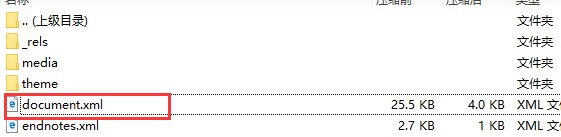
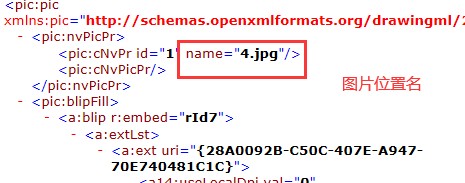
查找图片的位置
如果图片位置不清楚可以使用docx转xml,然后进行解压在目录word\document.xml下面可以找到图片的位置。
方法补充
1.python替换图片的指定区域
要在python中替换图片的指定区域,可以使用pillow库。以下是一个简单的例子,展示如何替换图片的一个区域:
from pil import image

def replace_image_region(src_path, dest_path, region, replacement_image):
# 加载原始图片和替换区域的图片
image = image.open(src_path)
replacement = image.open(replacement_image).convert(image.mode)

# 获取替换区域的大小
region_width, region_height = region[2] - region[0], region[3] - region[1]

# 调整替换图片的大小以匹配替换区域
replacement = replacement.resize((region_width, region_height))

# 通过掩码获取替换区域
mask = image.new("l", (region_width, region_height), 255)
region_image = image.crop(region)

# 应用掩码和替换图片
region_image.paste(replacement, (0, 0), mask)

# 粘贴图片区域回原图
image.paste(region_image, region)

# 保存新图片
image.save(dest_path)
使用示例
src_img_path = ‘source.jpg' # 原始图片路径
dest_img_path = ‘destination.jpg' # 替换后保存的图片路径
replacement_img_path = ‘replacement.png' # 替换区域的图片路径
region = (100, 100, 300, 300) # 替换的区域坐标 (左, 上, 右, 下)

replace_image_region(src_img_path, dest_img_path, region, replacement_img_path)
2.python-docx替换word中图片的方法
需要先安装python-docx:
pip install python-docx
再使用以下的代码:
import docx
from docx.shared import cm


def replace_img(in_word_path, out_word_path, output_paragraph_idx, new_img_path, height, width):
    """
    replace a image in a docx(word) file.
    :param in_word_path: the path of the input docx file to be replaced
    :param out_word_path: the path of the output docx file
    :param new_img_path: the path of the image that will be the new image in the docx file(i.e. one image(the image is assigned by output_paragraph_idx) will be replaced by the image which is in img_path)
    :param output_paragraph_idx: the paragraph index of the image in the docx file(the index starts with 0)
    :param height: the height of the new image which is in centimeters.
    :param width: the width of the new image which is in centimeters..
    :return: empty
    """
    doc = docx.document(in_word_path)
    para = doc.paragraphs[output_paragraph_idx]
    para.clear()
    pic = para.add_run().add_picture(new_img_path)
    pic.height = cm(height)
    pic.width = cm(width)
    doc.save(out_word_path)
到此这篇关于python使用docxtpl库实现图片替换功能的文章就介绍到这了,更多相关python docxtpl图片替换内容请搜索代码网以前的文章或继续浏览下面的相关文章希望大家以后多多支持代码网!




发表评论