
 我要评论
我要评论一、e-r模型
实体-联系模型(e-r模型)提供了一种不受特定数据库管理系统(dbms)约束的、面向用户的表达方法,在数据库设计中被广泛用作数据建模工具。在项目开发中,需提前使用e-r模型绘制er图,以确保数据库结构清晰、合理。
dbms 中的约束是用于强制限制可以插入、更新或删除到表中的数据或数据类型的一组规则。约束的整个目的是在执行更新、删除或插入操作时保持数据的完整性。
约束的类型
- 非空约束 (not null constraint):确保列中的值不能为null,防止插入或更新空值。
- 唯一约束 (unique constraint):确保表中某一列或多列的值是唯一的,但允许空值存在。
- 默认约束 (default constraint):为列指定默认值,当插入新行时如果没有为该列提供值,则使用默认值。
- 检查约束 (check constraint):定义对列值的条件限制,确保数据满足特定的条件或范围。
- 主键约束 (primary key constraint):唯一标识表中的每一行数据,要求值唯一且非空。
- 外键约束 (foreign key constraint):确保表之间的引用完整性,要求一个表的列值必须在另一个表的主键列中存在。
知识库中提到的"域约束"实际上是检查约束的功能描述,而"映射约束"不是标准的数据库约束类型。数据库中标准的约束类型为上述六种。
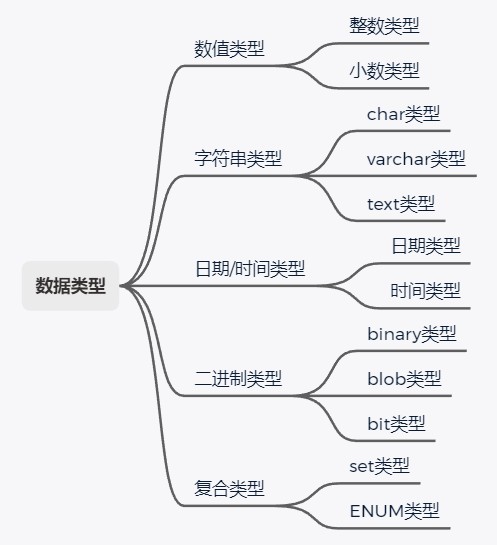
二、数据类型
三、字段命名规范
- 命名组成:采用26个英文字母(区分大小写)、0-9数字(通常不使用)和下划线
_,确保命名简洁明确,多单词用下划线分隔(如user_id)。 - 大小写规范:统一使用小写字母(如
is_active,而非isactive)。 - 禁用关键字:避免使用数据库保留字(如
table、time、datetime、primary)。 - 命名逻辑:字段名应为名词或动宾短语(如
user_id、is_valid)。 - 长度限制:名称需易读易懂,通常不超过三个英文单词(如
order_date,而非order_creation_timestamp)。
四、数据库创建与管理
4.1 创建数据库
语法:create database db_name;
示例:create database db_test;
4.2 删除数据库
语法:drop database db_name;
示例:drop database db_test;
4.3 列出数据库
语法:show databases;
示例:show databases;
4.4 备份数据库
语法:mysqldump -h 主机名 -u 用户名 -p 密码 数据库名称 > 脚本文件路径;
示例:mysqldump -u root -p000000 test > test.sql;
说明:宿主机操作可省略
-h参数(如mysqldump -u root -p000000 test > test.sql;)。
4.5 还原数据库
语法1(命令行):mysql -h 主机名 -u 用户名 -p 密码 数据库名称 < 脚本文件路径;
示例1:mysql -u root -p000000 test < test.sql;
语法2(mysql客户端):source 脚本文件路径;
示例2:source test.sql;
4.6 使用某个数据库
语法:use db_name;
示例:use db_test;
五、数据表创建与管理
5.1 创建表
语法:create table table_name (col_name1 data_type1, col_name2 data_type2, ...);
说明:
data_type中的数字表示字段长度(如char(20)表示最多存储 20 个字符)。
示例:
create table t_test (id char(20), name char(10));
5.2 查看表结构
describe table_name; -- 或简写为 `desc table_name;`
示例:
desc t_test;
5.3 查看数据表
语法:show tables;
示例:
show tables;
5.4 复制表结构
语法:create table new_table_name like old_table_name;
说明:若复制其他数据库的表,需在 old_table_name 前添加数据库名(如 db_test.t_test)。
示例(复制 t_test 结构到当前库,命名为 t_test2):
create table t_test2 like t_test;
5.5 复制表数据
表结构一致:
insert into table_name_new select * from table_name_old;
表结构不一致:
insert into table_name_new (col1, col2)
select col1, col2 from table_name_old;
5.6 修改表名
语法:alter table old_table_name rename new_table_name;
示例:
alter table t_test1 rename t_test2;
5.7 增加字段
语法:
alter table table_name add col_name data_type;
插入首位:
alter table table_name add col_name data_type first;
插入指定字段后:
alter table table_name add col_name data_type after existing_col;
示例(在 t_test 表首位添加 test_address):
alter table t_test add test_address varchar(255) first;
5.8 删除字段
语法:alter table table_name drop col_name;
示例:
alter table t_test drop test1;
5.9 修改字段数据类型
语法:alter table table_name modify col_name new_data_type;
示例(将 test2 类型从 varchar 改为 char(100)):
alter table t_test modify test2 char(100);
5.10 修改字段名称
语法:alter table table_name change old_col_name new_col_name data_type;
示例(将 test_address 改为 address,类型为 char(100)):
alter table t_test change test_address address char(100);
5.11 设置主键
创建表时设置:
create table student (
  xs_id char(12),
  xs_name char(10),
  primary key (xs_id)  -- 单字段主键
);
create table student (
  xs_id char(12),
  xs_name char(10),
  primary key (xs_id, xs_name)  -- 组合主键
);
创建表后设置:
alter table student add primary key (xs_id);
5.12 删除主键
语法:alter table table_name drop primary key;
示例:
alter table student drop primary key;
5.13 设置外键
作用:确保引用完整性(如 t_test2.id 必须在 t_test1.id 中存在)。
语法:
alter table table_name
add constraint fk_name
foreign key (foreign_col)
references referenced_table (primary_col);
示例(将 t_test2.id 设为外键,引用 t_test1.id):
alter table t_test2
add constraint fk1
foreign key (id)
references t_test1(id);
5.14 删除外键
步骤:
- 查找外键名:
show create table table_name; - 删除外键:
alter table table_name drop foreign key fk_name;
示例:
-- 查看外键名
show create table t_test2;
-- 删除外键(假设外键名为 fk1)
alter table t_test2 drop foreign key fk1;
六、数据更新操作
6.1 插入记录(insert)
6.1.1 插入单条记录
语法:
insert into 表名 [(字段1, 字段2, ...)] values (值1, 值2, ...);
说明:
- 字段列表可选(不指定则需按表结构顺序提供所有值)。
- 值类型需与字段数据类型匹配。
示例:
-- 插入完整字段
insert into test (id, name) values (123, 'tt');
-- 插入指定字段(id)
insert into test (id) values (124);
6.1.2 插入多条记录
语法:
insert into 表名 values (值1, 值2, ...), (值1, 值2, ...), ...;
示例:
insert into test values
(125, 'ttww'),
(126, 'ttwwe'),
(127, 'ttqqq');
6.1.3 子查询插入多条记录
语法:
insert into 表名1 [(字段1, 字段2, ...)]
select 字段1, 字段2, ...
from 表名2 [where 条件];
说明:
- 目标表字段与查询字段数量、类型需一致。
示例:
-- 插入所有字段
insert into test1 select * from test2;
-- 插入指定字段
insert into test1 (id, name) select id, name from test2;
6.2 删除记录(delete)
语法:
delete from 表名 where 条件;
说明:
- 必须指定
where条件!否则会删除整表数据。
示例:
-- 删除所有记录(危险!慎用)
delete from test;
-- 删除指定条件记录
delete from test where id = 123;
6.3 更新记录(update)
语法:
update 表名
set 字段1 = 值1, 字段2 = 值2, ...
where 条件;
说明:
- 必须指定
where条件!否则会更新整表数据。
示例:
-- 更新指定条件的记录
update test
set name = 'new_name'
where id = 123;
-- 同时更新多字段
update test
set name = 'updated', status = 1
where id = 124;
⚠️ 重要提示
| 操作 | 未指定 where 的后果 |
|---|---|
delete | 清空整表(不可逆!) |
update | 全表字段被覆盖(数据丢失) |
建议:执行前先用
select验证条件,或在测试环境操作。
七、数据查询操作
7.1 单表查询
7.1.1 基础语法
select [列名1, 列名2, ... | *] [as 别名] from 表名;
- 通配符
*:匹配所有列 - 别名
as:为字段/结果指定临时名称(如name as 姓名)
示例:
select id, name as 姓名 from test;  -- 为name字段取别名
select * from test;                 -- 查询所有列
7 .1.2 条件过滤(where)
| 关键字 | 作用 | 示例 |
|---|---|---|
and/or | 连接多个条件 | where age > 20 and salary > 5000 |
between ... and | 范围查询 | where price between 100 and 200 |
is null | 查询空值 | where email is null |
in | 查询集合中值 | where city in ('北京', '上海') |
like | 模糊查询 | where name like '张%'(以张开头) |
通配符:
%:匹配任意长度字符(如name like '%明%')_:匹配单个字符(如name like '张_')
7.1.3 排序(order by)
select * from 表名 order by 列名 [asc|desc];
- 默认升序(asc),
desc为降序
示例:
select * from books order by price desc; -- 按价格降序
7.1.4 聚集函数
| 函数 | 作用 | 示例 |
|---|---|---|
count() | 计数 | select count(*) from books; |
max() | 最大值 | select max(price) from books; |
min() | 最小值 | select min(price) from books; |
sum() | 求和 | select sum(salary) from employees; |
avg() | 平均值 | select avg(age) from students; |
7.1.5 分组(group by)
select 聚集函数(列), 分组列 from 表名 group by 分组列;
示例(统计出版社图书数量):
select count(*), pressname
from books
group by pressname;
结果说明:
pressname为 “人民邮电出版社” 的记录数 = 1,“清华大学出版社” = 6。
7.2 连接查询
7.2.1 简单连接(逗号分隔)
select 表1.列, 表2.列
from 表1, 表2
where 表1.关联列 = 表2.关联列;
示例:
select b.reader_id, br.book_name
from books b, borrow_record br
where b.isbn = br.isbn;
7.2.2 join 连接
| 类型 | 语法 | 说明 |
|---|---|---|
| 内连接 | select * from 表1 inner join 表2 on 条件; | 仅返回匹配的记录 |
| 左连接 | select * from 表1 left join 表2 on 条件; | 保留左表所有记录 |
| 右连接 | select * from 表1 right join 表2 on 条件; | 保留右表所有记录 |
示例(左连接):
select * from books b
left join borrow_record br
on b.isbn = br.isbn;
⚠️ 注意:
on用于指定连接条件,不可用where替代(否则会丢失左表空值记录)。
7.3 嵌套查询(子查询)
**7.3.1 in 谓语
select * from 表1
where 列名 in (select 列名 from 表2 where 条件);
示例:
select * from books
where isbn in (select isbn from borrow_record where reader_id = '201801');
7.3.2 比较运算符
select * from 表1
where 列名 > (select 列名 from 表2 where 条件);
示例:
select * from books
where isbn = (select isbn from borrow_record where reader_id = '201801');
7.3.3any/all谓语
select * from 表1
where 列名 > any (select 列名 from 表2 where 条件);
示例(查询未借阅的图书):
select * from books
where isbn <> all (select isbn from borrow_record where reader_id = '201801');
7.3.4exists谓语
select * from 表1
where not exists (select 1 from 表2 where 表1.列 = 表2.列 and 条件);
示例(查询未借阅的图书):
select * from books
where not exists (
  select 1
  from borrow_record
  where isbn = books.isbn and reader_id = '201801'
);
7.4 合并查询(union)
作用:合并两个查询结果(去重)
select 列 from 表1
union
select 列 from 表2;
示例:
select * from t_major1
union
select * from t_major;
要求:
- 两个查询的列数和数据类型必须一致
- 默认去重,用
union all保留重复项
⚠️ 关键安全提示
| 操作 | 风险 | 避免方法 |
|---|---|---|
select * | 传输冗余数据,影响性能 | 显式指定所需字段 |
无条件 delete/update | 清空整表数据 | 必须添加 where 条件 |
| 嵌套查询未优化 | 慢查询导致数据库阻塞 | 确保子查询返回结果集小 |
最佳实践:
- 单表查询避免
select *,只选必要字段- 连接查询优先用
join语法(清晰、性能高)- 嵌套查询用
exists替代in(大数据集性能更好)
到此这篇关于mysql常用sql命令的文章就介绍到这了,更多相关mysql sql命令内容请搜索代码网以前的文章或继续浏览下面的相关文章希望大家以后多多支持代码网!



发表评论