
 我要评论
我要评论在项目开发或数据处理中,经常需要批量处理 excel 文件,例如将所有单元格的值强制转换为字符串(特别是处理合并单元格时,避免读取到 none)。如果文件行数较多,处理时间较长,用户很容易误以为程序卡死。这时,添加一个实时进度条就能极大提升用户体验。
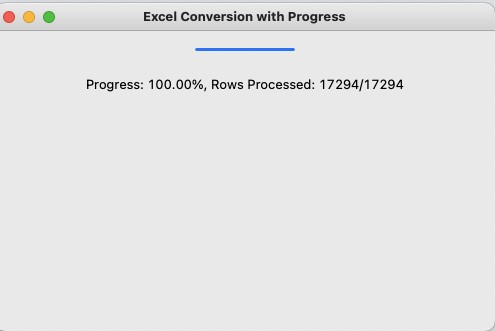
本文分享一个完整示例:使用 openpyxl 正确处理合并单元格并将单元格转为字符串,同时结合 tkinter 实现带进度条的图形界面,实时显示处理进度、当前工作表和已处理行数。
环境准备
pip install openpyxl
tkinter 是 python 标准库,无需额外安装。
完整代码
import tkinter as tk
from tkinter import ttk
import openpyxl

def update_progress(progress_var, processed, total):
    """更新进度条百分比"""
    if total > 0:
        progress = (processed / total) * 100
        progress_var.set(progress)

def process_sheet(sheet, progress_var, root, progress_label, accumulated_rows, total_all_rows):
    """
    处理单个工作表
    正确处理合并单元格,将所有单元格值转换为字符串
    """
    current_processed = 0  # 当前工作表已处理行数

    for row in sheet.iter_rows():
        for cell in row:
            # 判断是否在合并单元格内
            if cell.coordinate in sheet.merged_cells:
                # 查找对应的合并区域,取出左上角单元格的值
                for merged_range in sheet.merged_cells.ranges:
                    if cell.coordinate in merged_range:
                        top_left = sheet.cell(merged_range.min_row, merged_range.min_col)
                        value = top_left.value
                        break
            else:
                value = cell.value

            # 统一转为字符串,none 转为空字符串
            cell.value = str(value) if value is not none else ''

        current_processed += 1
        total_processed = accumulated_rows + current_processed

        # 更新进度条和文字
        update_progress(progress_var, total_processed, total_all_rows)
        progress_label.config(
            text=f"正在处理工作表:{sheet.title}  "
                 f"进度:{progress_var.get():.2f}%  "
                 f"已处理行数:{total_processed}/{total_all_rows}"
        )
        root.update_idletasks()  # 强制刷新界面

    return accumulated_rows + current_processed

if __name__ == "__main__":
    # 请修改为你的实际 excel 文件路径
    file_path = "output_file.xlsx"

    workbook = openpyxl.load_workbook(file_path)

    # 计算所有工作表的总行数,用于整体进度显示
    total_all_rows = sum(sheet.max_row for sheet in workbook.worksheets)

    # 创建主窗口
    root = tk.tk()
    root.title("excel 单元格转字符串工具(带进度条)")
    root.geometry("600x200")
    root.resizable(false, false)

    # 进度变量
    progress_var = tk.doublevar(value=0)

    # 标题
    title_label = tk.label(root, text="正在处理 excel 文件,请稍候...", font=("微软雅黑", 12))
    title_label.pack(pady=20)

    # 进度条
    progress_bar = ttk.progressbar(root, mode="determinate", variable=progress_var, maximum=100)
    progress_bar.pack(padx=50, pady=10, fill=tk.x)

    # 进度文字
    progress_label = tk.label(root, text="进度:0.00%  已处理行数:0/0", font=("微软雅黑", 10))
    progress_label.pack(pady=5)

    accumulated_rows = 0  # 已累计处理行数

    # 逐个处理工作表
    for sheet_name in workbook.sheetnames:
        sheet = workbook[sheet_name]
        accumulated_rows = process_sheet(
            sheet, progress_var, root, progress_label, accumulated_rows, total_all_rows
        )

    # 处理完成
    progress_var.set(100)
    title_label.config(text="所有工作表处理完成!")
    progress_label.config(text=f"处理完成!100.00%  总计处理行数:{total_all_rows}/{total_all_rows}")

    # 保存文件
    workbook.save(file_path)
    print(f"处理完成,文件已保存:{file_path}")

    # 保持窗口打开,直到用户手动关闭
    root.mainloop()
核心功能详解
合并单元格正确处理:合并区域内除左上角外的单元格读取时会返回 none,代码通过遍历 merged_cells.ranges 找到对应区域的左上角值,确保数据不丢失。
实时进度条:每处理完一行就调用 root.update_idletasks() 强制刷新界面,让进度条和文字实时更新,视觉反馈流畅。
多工作表整体进度:预先统计所有 sheet 的总行数,实现整个文件的统一进度显示,同时显示当前正在处理的工作表名称。
使用注意事项
- 对于超大 excel 文件(数十万行),每行都刷新界面可能会略微影响性能。可改为每 10 行或 50 行更新一次。
- 处理前建议备份原文件,以防万一。
- 本例将所有值强制转为字符串(包括数字、日期等),如有特殊需求可自行调整转换逻辑。
总结
通过 tkinter 与 openpyxl 的结合,我们轻松实现了一个带图形化进度条的 excel 处理工具,用户体验友好,代码清晰易扩展。后续还可以加入文件选择对话框、日志输出、错误处理等功能。
到此这篇关于python使用tkinter+openpyxl处理excel文件并显示实时进度条的文章就介绍到这了,更多相关python处理excel文件内容请搜索代码网以前的文章或继续浏览下面的相关文章希望大家以后多多支持代码网!






发表评论