
 我要评论
我要评论python 命令行参数为运行程序时在命令行中接受某些信息提供了一种方便的方式。我们通常会把这些值和python脚本的名称一起传递。
要运行 python 程序,我们在作系统的命令提示符终端执行以下命令。例如,在 windows 中,在 windows 命令提示符终端中输入以下命令。
$ python script.py arg1 arg2 arg3
这里 python 脚本名是 script.py,其他三个参数——arg1、arg2、arg3 是程序的命令行参数。
如果程序需要接受用户输入,则使用 python 的 input() 函数。当程序从命令行执行时,用户输入会从命令终端接收。
示例
name = input("enter your name: ")
print ("hello {}. how are you?".format(name))
程序从命令提示符终端运行如下 −
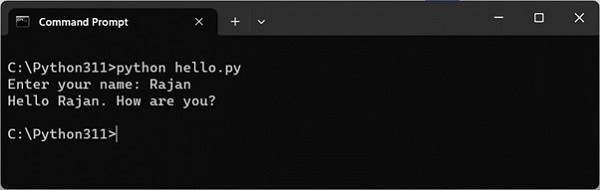
执行时传递参数
很多时候,你可能需要把程序使用的数据放在命令行里,然后在程序内部使用。在命令行中提供数据的一个例子是windows或linux中的任何dos命令。
在windows中,你使用以下dos命令将文件 hello.py 重命名为 hi.py。
c:\python311>ren hello.py hi.py
在linux中,你可以使用mv命令 −
$ mv hello.py hi.py
这里的ren或mv是需要新旧文件名的命令。由于它们与命令对齐,因此被称为命令行参数。
您可以从命令行向python程序传递值。python在列表对象中收集参数。python的sys模块通过sys.argv变量提供对任何命令行参数的访问。sys.argv是命令行参数列表,sys.argv[0]是程序,即脚本名称。
示例
hello.py脚本在运行后使用input()函数接受用户输入。让我们将其更改为接受来自命令行的输入。
import sys
print ('argument list', sys.argv)
name = sys.argv[1]
print ("hello {}. how are you?".format(name))
从命令行运行程序,如下图所示:
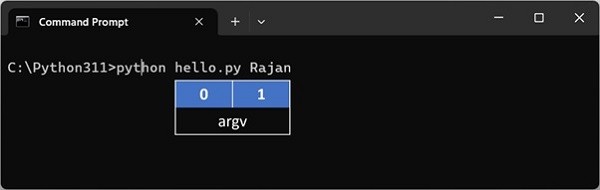
输出如下所示:
c:\python311>python hello.py rajan
argument list ['hello.py', 'rajan']
hello rajan. how are you?
命令行参数始终存储在字符串变量中。要将它们用作数字,可以使用类型转换函数进行适当的转换。
示例
在下面的示例中,输入了两个数字作为命令行参数。在程序内部,我们使用int()函数将它们解析为整数变量。
import sys
print ('argument list', sys.argv)
first = int(sys.argv[1])
second = int(sys.argv[2])
print ("sum = {}".format(first+second))
它将产生以下输出:
c:\python311>python hello.py 10 20
argument list ['hello.py', '10', '20']
sum = 30
python的标准库包括几个有用的模块来解析命令行参数和选项——
- getopt − c风格的命令行选项解析器。
- argparse − 用于命令行选项、参数和子命令的解析器。
python getopt 模块
python提供了一个getopt模块,可以帮助您解析命令行选项和参数。此模块提供两个函数和一个异常来启用命令行参数解析。
getopt.getopt() 方法
此方法解析命令行选项和参数列表。以下是此方法的简单语法:
getopt.getopt(args, options, [long_options])
以下是参数的详细信息:
- args − this is the argument list to be parsed.
- options − this is the string of option letters that the script wants to recognize, with options that require an argument should be followed by a colon (:).
- long_options − this is an optional parameter and if specified, must be a list of strings with the names of the long options, which should be supported. long options, which require an argument should be followed by an equal sign ('='). to accept only long options, options should be an empty string.
此方法返回一个由两个元素组成的值——第一个是(选项,值)对的列表,第二个是剥离选项列表后留下的程序参数列表。
返回的每个选项和值对都将选项作为其第一个元素,短选项以连字符作为前缀(例如“-x”),长选项以两个连字符作为后缀(例如“--long option”)。
异常,getopt.getopterror
当在参数列表中发现一个无法识别的选项,或者当一个需要参数的选项没有给出时,就会出现这种情况。
异常的参数是一个指示错误原因的字符串。属性msg和opt给出了错误消息和相关选项。
示例
假设我们想通过命令行传递两个文件名,我们还想提供一个选项来检查脚本的使用情况。脚本的用法如下:
usage: test.py -i <inputfile> -o <outputfile>
以下是test.py的脚本:
import sys, getopt
def main(argv):
   inputfile = ''
   outputfile = ''
   try:
      opts, args = getopt.getopt(argv,"hi:o:",["ifile=","ofile="])
   except getopt.getopterror:
      print ('test.py -i <inputfile> -o <outputfile>')
      sys.exit(2)
   for opt, arg in opts:
      if opt == '-h':
         print ('test.py -i <inputfile> -o <outputfile>')
         sys.exit()
      elif opt in ("-i", "--ifile"):
         inputfile = arg
      elif opt in ("-o", "--ofile"):
         outputfile = arg
   print ('input file is "', inputfile)
   print ('output file is "', outputfile)
if __name__ == "__main__":
   main(sys.argv[1:])
现在,按如下方式运行上述脚本:
$ test.py -h
usage: test.py -i <inputfile> -o <outputfile>
$ test.py -i bmp -o
usage: test.py -i <inputfile> -o <outputfile>
$ test.py -i inputfile -o outputfile
input file is " inputfile
output file is " outputfile
python argparse 模块
argparse 模块提供了编写非常易用命令行接口的工具。它处理如何解析 sys.argv 列表中收集的参数,自动生成帮助,并在给出无效选项时发出错误信息。
设计命令行界面的第一步是设置解析器对象。这通过argparse模块中的argumentparser()函数实现。函数可以作为描述参数给出一个解释字符串。
首先,我们的脚本将从命令行执行,无需任何参数。不过 使用解析器对象的parse_args()方法,但由于没有参数,因此没有任何参数。
import argparse
parser=argparse.argumentparser(description="sample argument parser")
args=parser.parse_args()
当上述脚本运行时 −
c:\python311>python parser1.py
c:\python311>python parser1.py -h
usage: parser1.py [-h]
sample argument parser
options:
   -h, --help show this help message and exit
第二种命令行使用方式会给出 −help 选项,如图所示,会生成帮助信息。−help参数默认可用。
现在我们定义一个参数,这个参数是脚本运行的必定条件,如果不给出,脚本应抛出错误。这里我们通过 add_argument() 方法定义参数 'user'。
import argparse
parser=argparse.argumentparser(description="sample argument parser")
parser.add_argument("user")
args=parser.parse_args()
if args.user=="admin":
   print ("hello admin")
else:
   print ("hello guest")
该脚本的帮助现在显示一个位置论元,形式为“用户”。程序会检查它的值是否为“管理员”,并打印相应的消息。
c:\python311>python parser2.py --help
usage: parser2.py [-h] user
sample argument parser
positional arguments:
   user
options:
   -h, --help show this help message and exit
使用以下命令 −
c:\python311>python parser2.py admin
hello admin
但以下用法显示的是hello guest message。
c:\python311>python parser2.py rajan
hello guest
add_argument()方法
我们可以在 add_argument() 方法中为参数赋予默认值。
import argparse
parser=argparse.argumentparser(description="sample argument parser")
parser.add_argument("user", nargs='?',default="admin")
args=parser.parse_args()
if args.user=="admin":
   print ("hello admin")
else:
   print ("hello guest")
这里 nargs 是应被消耗的命令行参数数量。'?'.如果可能,会从命令行消耗一个参数,并作为一个项目生成。如果没有命令行参数,则会从默认中生成值。
默认情况下,所有参数都被视为字符串。要明确提及参数类型,请在 add_argument() 方法中使用类型参数。所有 python 数据类型均为有效的类型值。
import argparse
parser=argparse.argumentparser(description="add numbers")
parser.add_argument("first", type=int)
parser.add_argument("second", type=int)
args=parser.parse_args()
x=args.first
y=args.second
z=x+y
print ('addition of {} and {} = {}'.format(x,y,z))它将产生以下输出 −
c:\python311>python parser3.py 10 20
addition of 10 and 20 = 30
在上述例子中,论证是强制的。为了添加可选参数,可以在名称前加上双划号--.以下情况下,姓氏论元是可选的,因为它前加了双划号(--surname)。
import argparse
parser=argparse.argumentparser()
parser.add_argument("name")
parser.add_argument("--surname")
args=parser.parse_args()
print ("my name is ", args.name, end=' ')
if args.surname:
   print (args.surname)
一个字母的参数名称加上单段前缀,作为简短名称选项。
c:\python311>python parser3.py anup
my name is anup
c:\python311>python parser3.py anup --surname gupta
my name is anup gupta
如果希望参数只取定义列表中的值,则定义为选择参数。
import argparse
parser=argparse.argumentparser()
parser.add_argument("sub", choices=['physics', 'maths', 'biology'])
args=parser.parse_args()
print ("my subject is ", args.sub)
注意,如果参数值不来自列表中,则显示无效选择错误。
c:\python311>python parser3.py physics
my subject is physics
c:\python311>python parser3.py history
usage: parser3.py [-h] {physics,maths,biology}
parser3.py: error: argument sub: invalid choice: 'history' (choose from
'physics', 'maths', 'biology')
到此这篇关于python命令行参数的项目实践的文章就介绍到这了,更多相关python命令行参数内容请搜索代码网以前的文章或继续浏览下面的相关文章希望大家以后多多支持代码网!





发表评论