
 我要评论
我要评论前言
在对一些特定导出功能,使用常规excel无法解决的,通常使用word来实现导出功能,这篇介绍下如何在java中使用freemarker模板注入方式来实现word导出功能
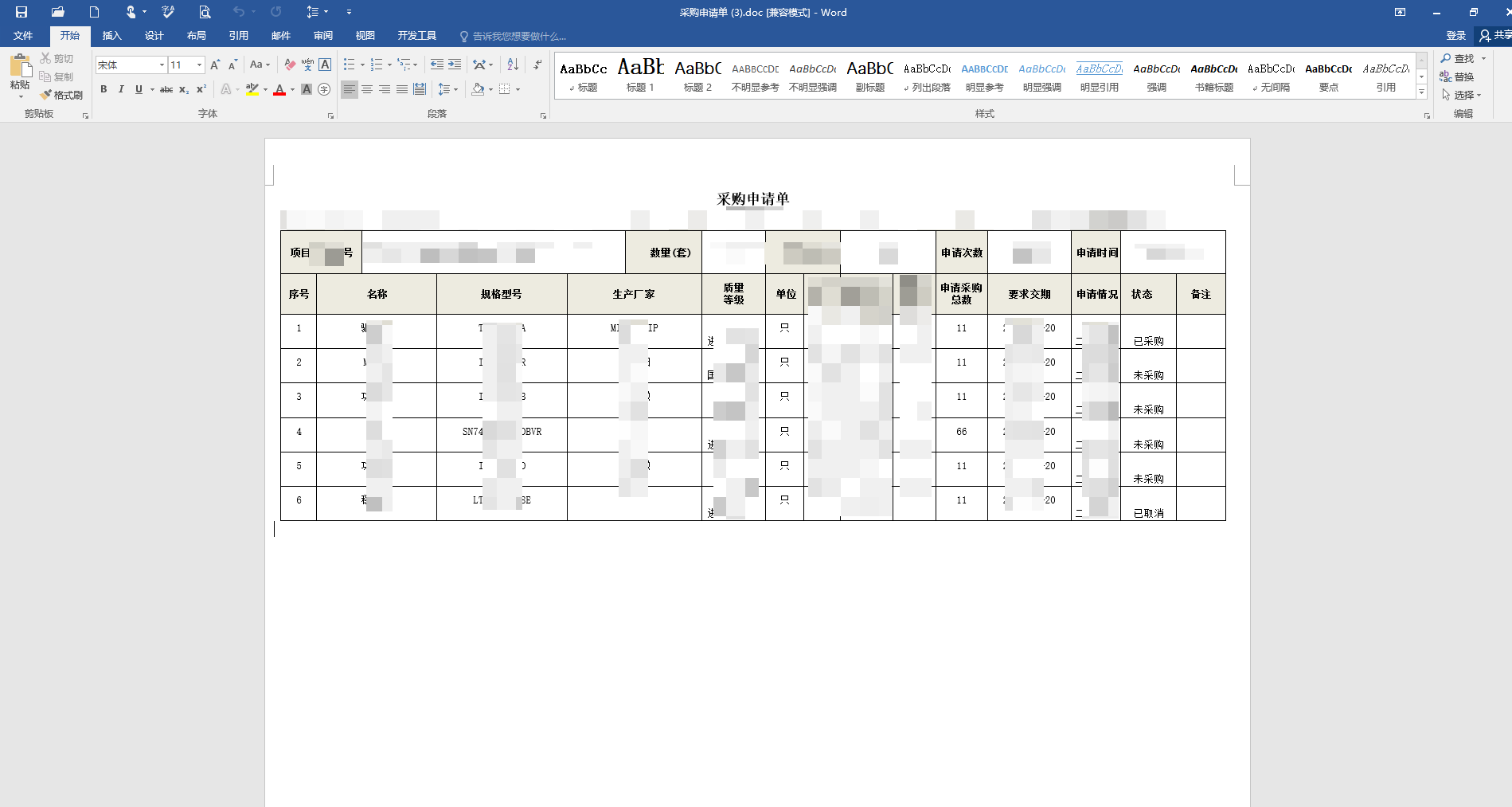
导出案例(已作打码处理)
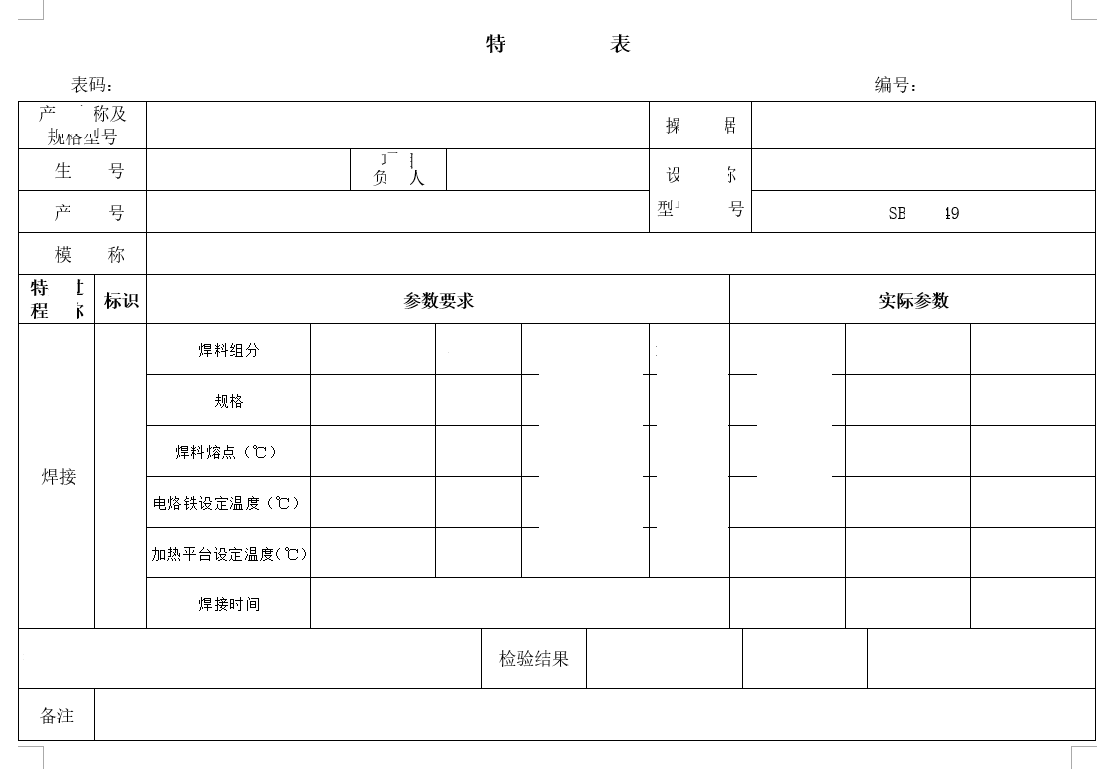
或者:
准备工作
第一步:maven依赖库
		<!-- freemarker (用于word导出)-->
       	<dependency>
	        <groupid>org.freemarker</groupid>
	        <artifactid>freemarker</artifactid>
	        <version>${freemarker.version}</version>
       	</dependency>
第二步:word导出工具类
import com.zrxt.common.config.ruoyiconfig;
import com.zrxt.common.core.text.charsetkit;
import freemarker.cache.classtemplateloader;
import freemarker.template.configuration;
import freemarker.template.template;

import javax.servlet.http.httpservletrequest;
import javax.servlet.http.httpservletresponse;
import java.io.*;
import java.net.urlencoder;
import java.nio.charset.standardcharsets;
import java.util.map;

/**
 * @classname wordutil
 * @description 使用freemarker生成word文档工具类
 * @author
 * @date 2023/12/14
 **/
public class wordutil {
    /**
     * 使用freemarker自动生成word文档(磁盘路径方法)
     *
     * @param datamap      保存word文档中所需要的数据
     * @param templatepath 模板文件的绝对路径
     * @param templatefile 模板文件的名称
     * @throws exception
     */
    public static void createword(httpservletresponse response, map<string, object> datamap, string templatepath, string templatefile) throws exception {
        writer out = null;
        try {
            // 设置freemarker的版本
            configuration configuration = new configuration(configuration.default_incompatible_improvements);
            // 设置freemarker的编码格式
            configuration.setdefaultencoding(charsetkit.utf_8);
            // 设置freemarker生成word文档所需要的模板的路径
            configuration.setdirectoryfortemplateloading(new file(templatepath));
            // 设置freemarker生成word文档所需要的模板名称
            template t = configuration.gettemplate(templatefile, charsetkit.utf_8);
            // 创建一个word文档的输出流
            out = new bufferedwriter(new outputstreamwriter(response.getoutputstream(), standardcharsets.utf_8));
            //freemarker使用word模板和数据生成word文档
            t.process(datamap, out);
        }catch (exception e){
            e.printstacktrace();
        }finally {
            assert out != null;
            out.flush();
            out.close();
        }
    }

    /**
     * 使用freemarker自动生成word文档
     *
     * @param datamap      保存word文档中所需要的数据
     * @param templatepath 模板文件的路径(绝对)
     * @param templatefile 模板文件的名称
     * @throws exception
     */
    public static void generatorword(httpservletresponse response, map<string, object> datamap, string templatepath, string templatefile) throws exception {
        writer out = null;
        try {
            // 设置freemarker的版本
            configuration configuration = new configuration(configuration.version_2_3_28);
            // 设置freemarker的编码格式
            configuration.setdefaultencoding(charsetkit.utf_8);
            //相对路径加载模板方法
            configuration.settemplateloader(new classtemplateloader(wordutil.class,templatepath));
            // 设置freemarker生成word文档所需要的模板名称
            template template  = configuration.gettemplate(templatefile, charsetkit.utf_8);
            // 创建一个word文档的输出流
            out = new bufferedwriter(new outputstreamwriter(response.getoutputstream(), standardcharsets.utf_8));
            //freemarker使用word模板和数据生成word文档
            template .process(datamap, out);
        }catch (exception e){
            e.printstacktrace();
        }finally {
            assert out != null;
            out.flush();
            out.close();
        }
    }

    /**
     * 下载文件
     *
     * @param path     文件的位置
     * @param filename 自定义下载文件的名称
     * @param response http响应
     * @param request  http请求
     */
    public static void downloadfile(string path, string filename, httpservletresponse response, httpservletrequest request) {
        try {
            file file = new file(path);
            // 中文乱码解决
            string type = request.getheader("user-agent").tolowercase();
            if (type.indexof("firefox") > 0 || type.indexof("chrome") > 0) {
                // 谷歌或火狐
                filename = new string(filename.getbytes(standardcharsets.utf_8), "iso8859-1");
            } else {
                // ie
                filename = urlencoder.encode(filename, charsetkit.utf_8);
            }
            // 设置响应的头部信息
            response.setheader("content-disposition", "attachment;filename=" + filename);
            // 设置响应内容的类型
            response.setcontenttype(getfilecontenttype(filename) + "; charset=" + charsetkit.utf_8);
            // 设置响应内容的长度
            response.setcontentlength((int) file.length());
            // 输出
            outstream(new fileinputstream(file), response.getoutputstream());
        } catch (exception e) {
            e.printstacktrace();
        }
    }

    /**
     * 文件的内容类型
     */
    private static string getfilecontenttype(string name) {
        string result = "";
        string filetype = name.tolowercase();
        if (filetype.endswith(".png")) {
            result = "image/png";
        } else if (filetype.endswith(".gif")) {
            result = "image/gif";
        } else if (filetype.endswith(".jpg") || filetype.endswith(".jpeg")) {
            result = "image/jpeg";
        } else if (filetype.endswith(".svg")) {
            result = "image/svg+xml";
        } else if (filetype.endswith(".doc")) {
            result = "application/msword";
        } else if (filetype.endswith(".xls")) {
            result = "application/x-excel";
        } else if (filetype.endswith(".zip")) {
            result = "application/zip";
        } else if (filetype.endswith(".pdf")) {
            result = "application/pdf";
        } else {
            result = "application/octet-stream";
        }
        return result;
    }


    /**
     * 基础字节数组输出
     */
    private static void outstream(inputstream is, outputstream os) {
        try {
            byte[] buffer = new byte[10240];
            int length = -1;
            while ((length = is.read(buffer)) != -1) {
                os.write(buffer, 0, length);
                os.flush();
            }
        } catch (exception e) {
            e.printstacktrace();
        } finally {
            try {
                os.close();
                is.close();
            } catch (ioexception e) {
                e.printstacktrace();
            }
        }
    }

    /**
     * 检查存储生成文件的路径是否存在,如果不存在则新建路径.
     *
     * @param directory the directory name, like '\dir-name'
     */
    public static void checkdownloadpath(string directory) {
        file path = new file(ruoyiconfig.getdownloadpath() + directory);
        if (!path.exists()) {
            path.mkdirs();
        }
    }
}
模板准备
第一步:首先要编写word模板,可以参考文章开头的示例图片。
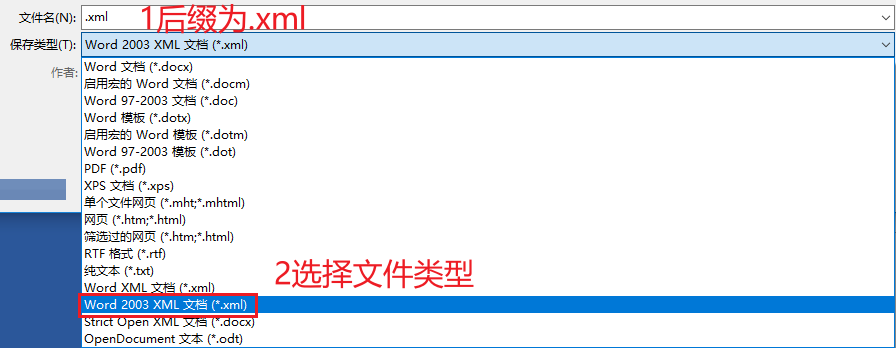
第二步:word模板编写好后,点击另存为,然后选择word 2003 xml文档
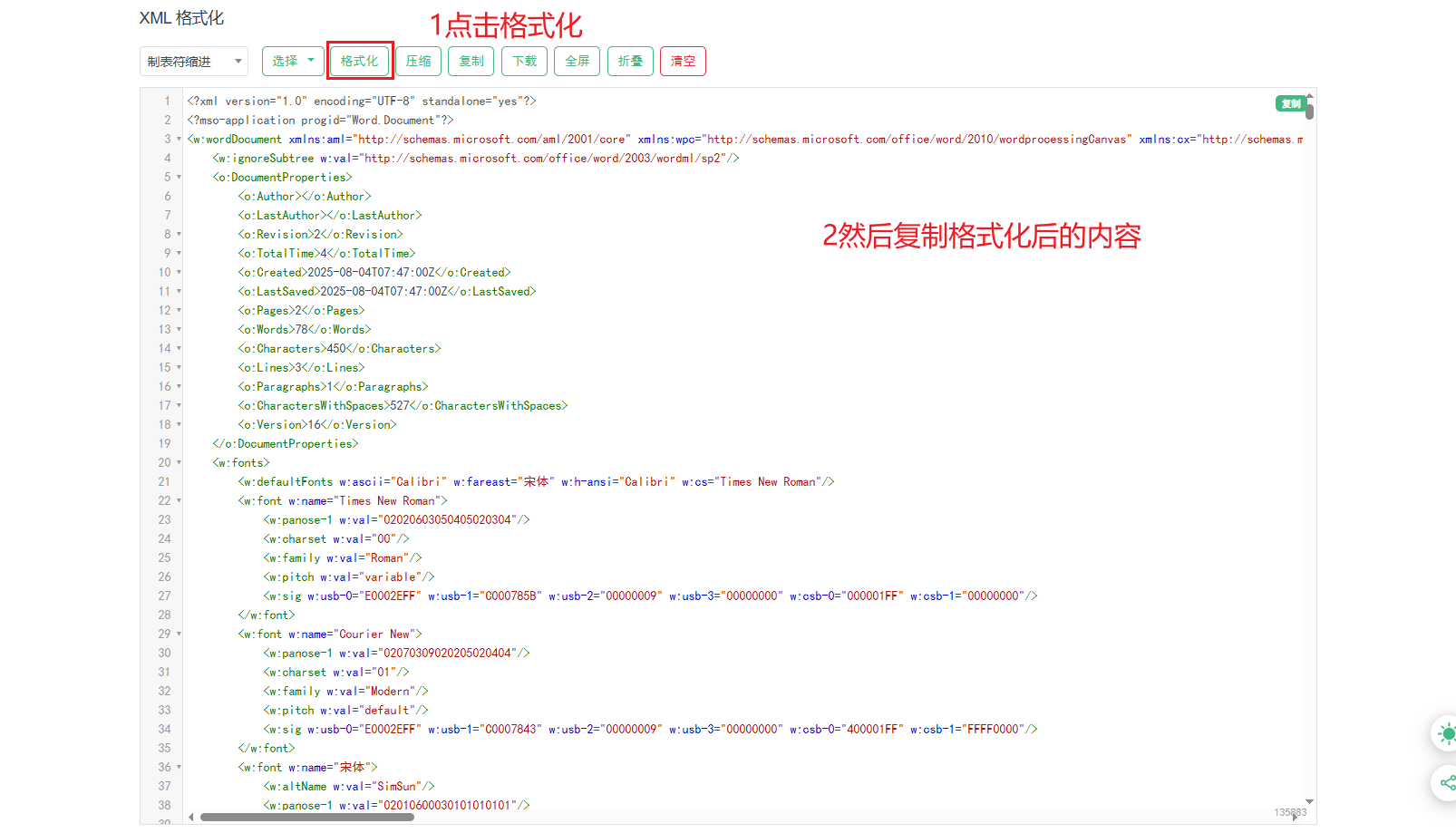
第三步:保存好后的文件打开,ctrl+a复制文档所有内容,然后在线搜索xml格式化在线工具,我这边提供一个现成的xml格式化在线工具,将内容全部粘贴进去后点击格式化按钮。
创建ftl文件
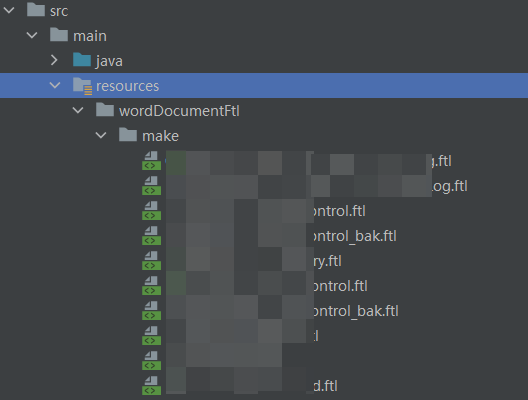
上面所有工作准备好后,就可以在resource目录下创建一个.ftl文件,然后将格式化后的代码复制到文件中即可。
测试导出是否完整
在controller层编写测试代码,判断是否可以正常导出
    /**
     * 导出(word)关键过程控制详细信息详细信息(xml版本)
     */
    @postmapping(value = "/exportword")
    public void getinfo(makecriticalprocesscontrol param, httpservletresponse response) {
        try {
            makecriticalprocesscontrol obj=
                    makecriticalprocesscontrolservice.selectbyid(param.getid());

            map<string, object> context = new hashmap<>();
            context.put("obj", obj);
            wordutil.generatorword(response, context, "/worddocumentftl/make/", "makecriticalprocesscontrol.ftl");
        } catch (exception e) {
            e.printstacktrace();
            throw new serviceexception("导出word文件失败,请稍后重试!");
        }
    }
wordutil.generatorword()方法
第二个参数context为数据库的数据,要往word中空白单元格所填充的。
第三个参数为templatepath – 模板文件的路径(相对路径)。
第四个参数为具体的模板的文件名称(带后缀)
注:测试后需检查格式是否混乱,是否有缺少单元格等情况,如果有则检查原word模板并修复然后重新走一遍流程即可
如何将数据库数据填充到word中
ftl文件中的内容是一行一行的顺序,也就是从第一行的第一个单元格开始,然后是第一行第二个单元格,第三个单元格…
然后第一行如果结束了,则是第二行第一个单元格、第二个单元格、第三个…
以此类推,所以优先找到对应标题的对应数据单元格在ftl文件的哪个位置。
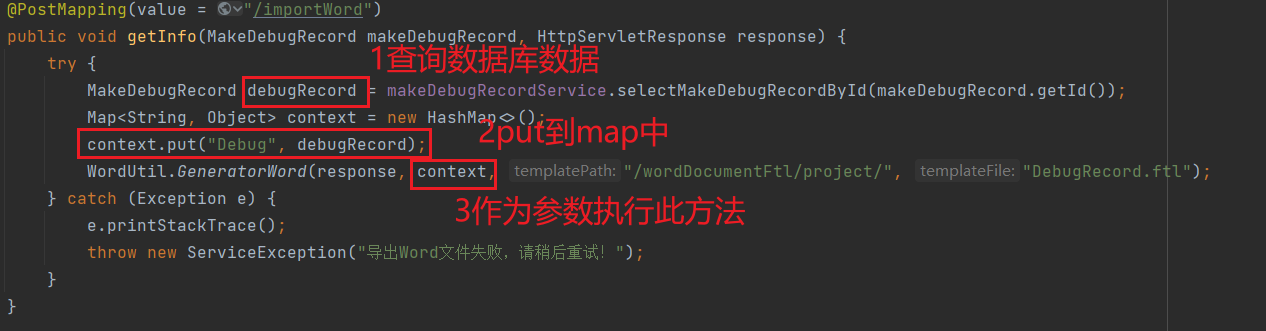
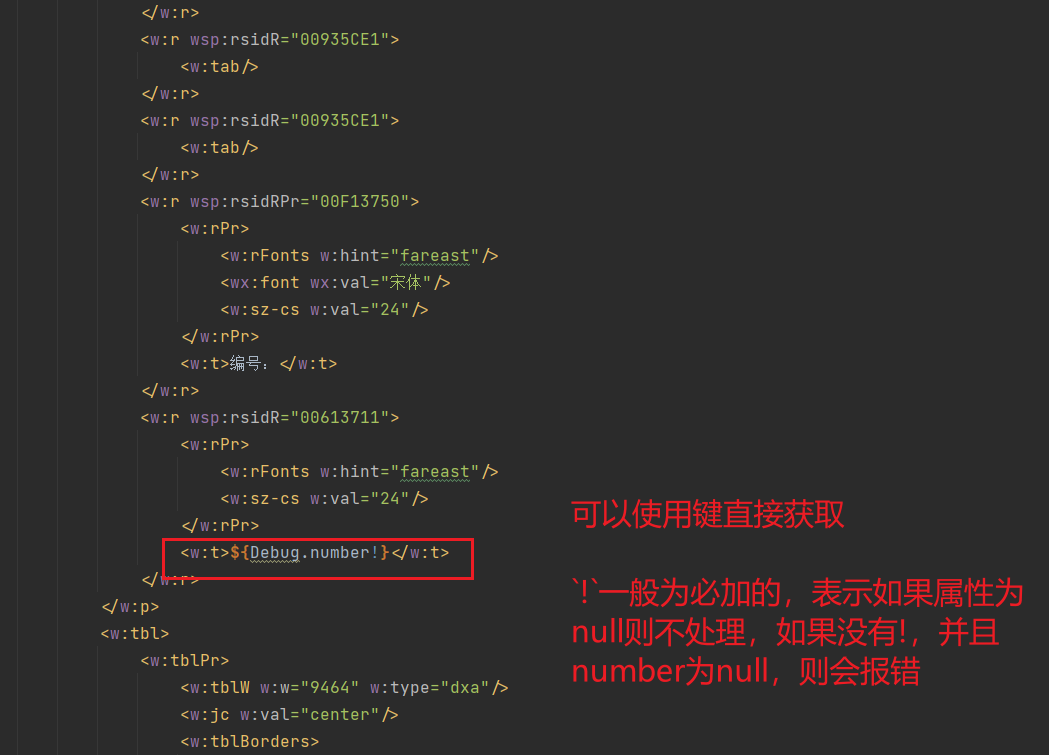
如果是单个属性或对象类型的,可以在controller中使用map<string, object> context = new hashmap<>();将数据put,然后key作为键,在ftl文件中可以把属性获取出来。例如下图
如果涉及到遍历,将一个list结果导出到word,请看以下案例
如果是遍历导出的话,则在word模板设置时,只需要设置一行表头,下方对应一行空的单元格即可,我们要循环空的单元格,然后将数据挨个写入。

只需要在标题下写一行即可
在controller中依旧是查询出对应list,然后put到map中
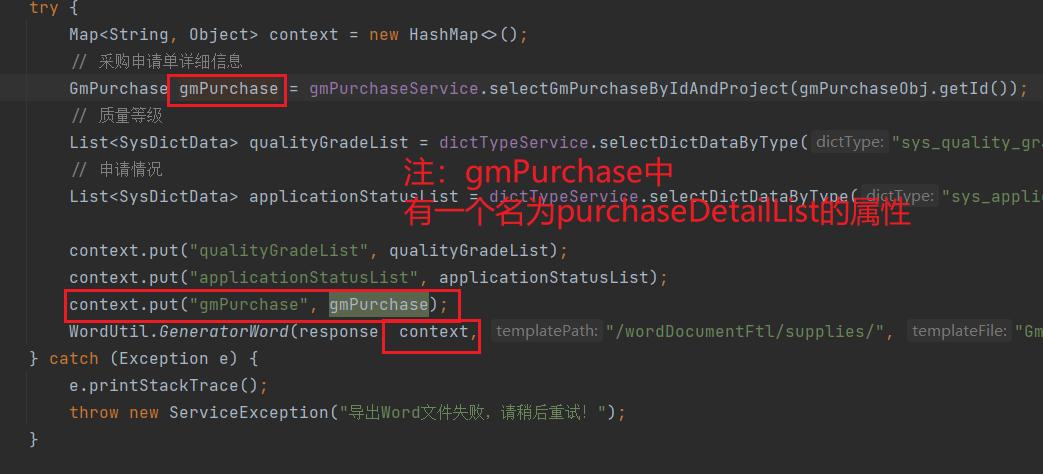
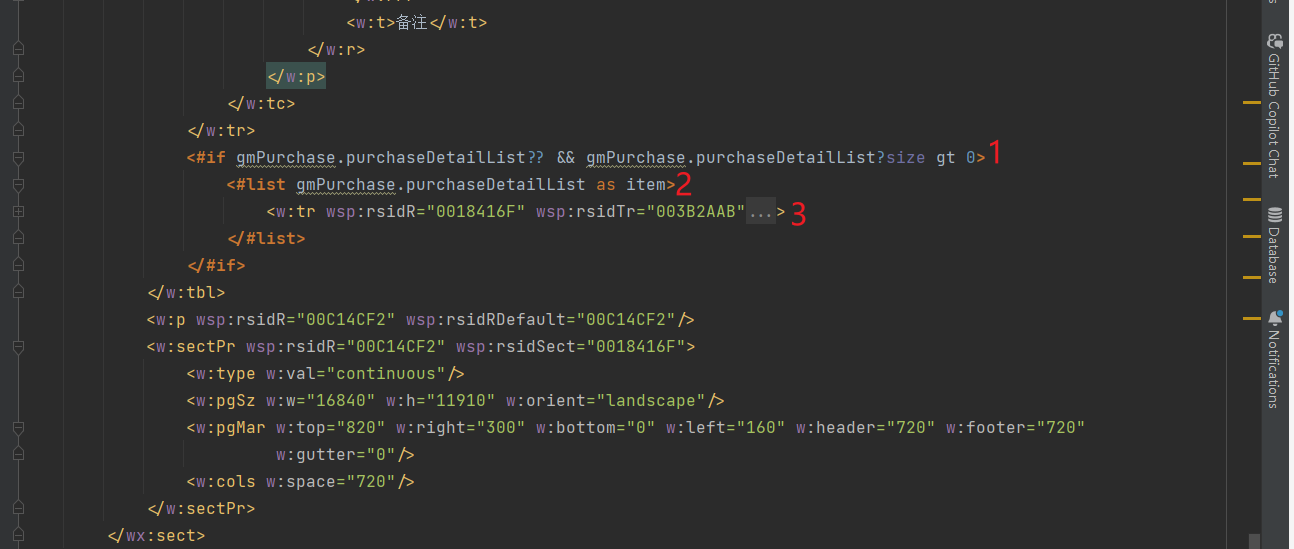
1:判断list是否为空
2:循环遍历list
3:一般<w:tr>表示为行,所以这里的意思就是,list有多少数据,则就生成多少行
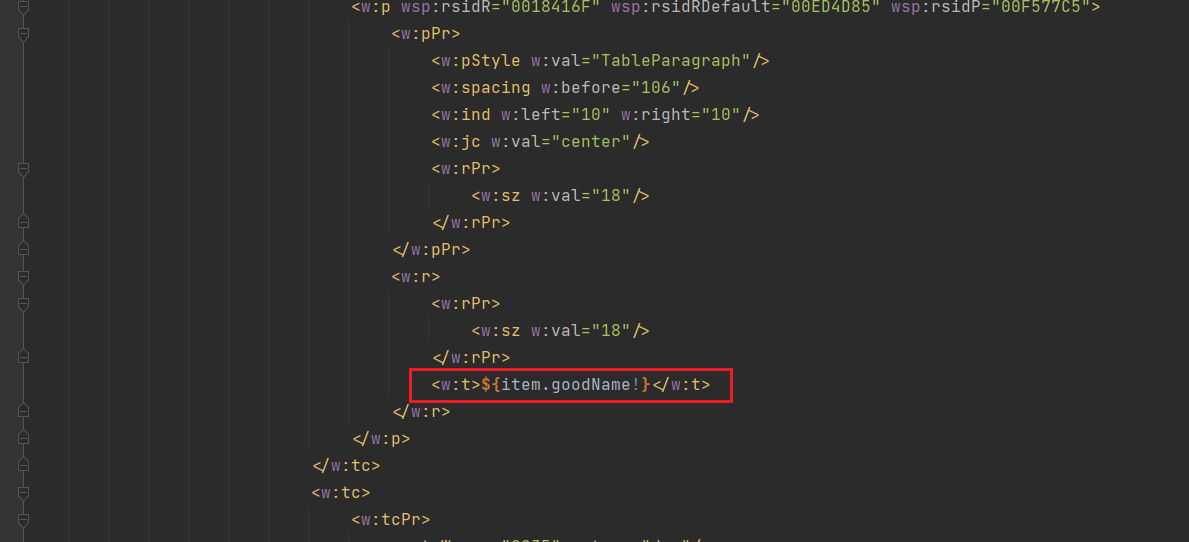
如何要获取值的话就可以${item.属性名!}
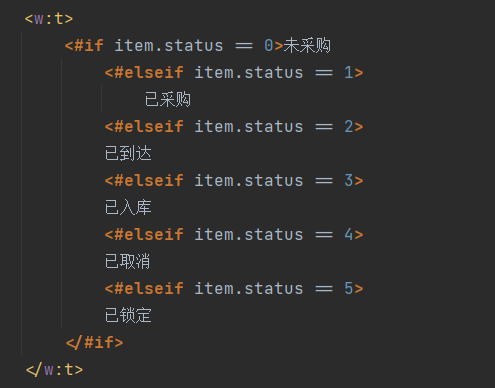
如果涉及到if语句或者是需要将数字转为对应的状态
以上就是java使用freemarker来实现word自定义导出功能的详细内容,更多关于java freemarker word自定义导出的资料请关注代码网其它相关文章!





发表评论