
 我要评论
我要评论spring boot 的热启动(热部署)主要通过 **`spring-boot-devtools`** 模块实现,它能在代码修改后自动重启应用(无需手动停止再启动),大幅提升开发效率。以下是详细配置和使用指南:
一、核心机制
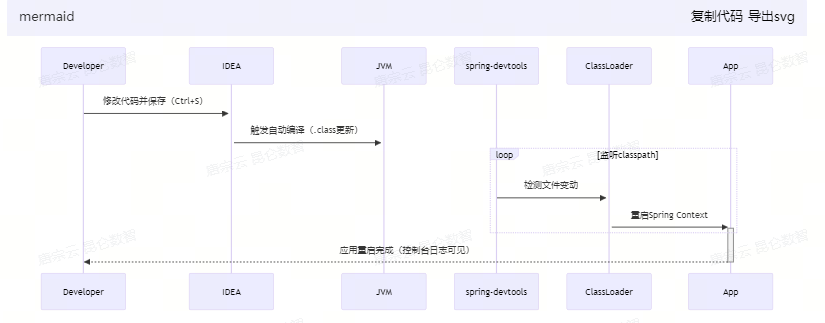
spring-boot-devtools 通过两阶段实现热更新:
1.自动重启(restart):检测到 classpath 下的文件变动(如 java 类、配置文件)→ 触发应用重启(速度比冷启动快)。
2.实时重载(livereload):配合浏览器插件,静态资源(html/css/js)修改后自动刷新页面。
二、快速配置(3步)
1. 添加依赖
<!-- maven pom.xml -->
<dependencies>
    <dependency>
        <groupid>org.springframework.boot</groupid>
        <artifactid>spring-boot-devtools</artifactid>
        <scope>runtime</scope>
        <optional>true</optional> <!-- 避免依赖传递 -->
    </dependency>
</dependencies>
// gradle build.gradle
dependencies {
    developmentonly 'org.springframework.boot:spring-boot-devtools'
}
2. 开启 idea 自动编译
设置路径:settings > build, execution, deployment > compiler
勾选 build project automatically
启用运行时编译 (关键步骤!):ctrl + shift + a 搜索 registry → 勾选:
compiler.automake.allow.when.app.running
3. 修改配置(可选)
# application.yml
spring:
  devtools:
    restart:
      enabled: true  # 默认true,可关闭
      trigger-file: .trigger # 用此文件触发重启(避免频繁保存触发)
      exclude: static/**      # 排除无需监控的目录
三、使用技巧
静态资源热更新(无需重启)
- 前端文件位置:
src/main/resources/static或public - 浏览器安装插件:livereload
- 修改 css/js/html 后 → 自动刷新页面
跳过指定文件重启
// 在代码中排除触发重启
@springbootapplication
public class app {
    public static void main(string[] args) {
        system.setproperty("spring.devtools.restart.exclude", "templates/**");
        springapplication.run(app.class, args);
    }
}
手动触发重启
在项目中创建 src/main/resources/.trigger 文件(文件名与配置一致),修改该文件触发重启。
四、常见问题解决
修改 java 代码后未重启
- 检查是否关闭了 idea 的
build project automatically - 确认
registry中的compiler.automake.allow.when.app.running已启用 - 尝试手动 build:
build > build project(ctrl+f9)
静态资源修改未刷新
- 检查是否使用了
src/main/webapp目录(不推荐) → 改用static或public - 浏览器禁用缓存:开发者工具 → network → ✅ disable cache
热部署失效(多模块项目)
在子模块的 pom.xml 中添加:
<build>
    <plugins>
        <plugin>
            <groupid>org.springframework.boot</groupid>
            <artifactid>spring-boot-maven-plugin</artifactid>
            <configuration>
                <excludedevtools>false</excludedevtools>
            </configuration>
        </plugin>
    </plugins>
</build>
五、高级方案:jrebel(付费)
若需 无重启热更新(直接替换内存中的类),推荐 jrebel:
- 安装 idea 插件:
jrebel and xrebel - 激活(可试用14天)
- 启动项目时选择
debug with jrebel
优势:修改 java 代码后无需重启应用,实时生效(对大型项目提速显著)。
六、热启动原理图
mermaid代码导出svg
生产环境警告:务必移除 spring-boot-devtools 依赖(通过 <scope>provided</scope> 或 developmentonly),避免安全风险!
到此这篇关于一文详解springboot中的热启动配置方案的文章就介绍到这了,更多相关springboot热启动内容请搜索代码网以前的文章或继续浏览下面的相关文章希望大家以后多多支持代码网!



发表评论