
 我要评论
我要评论任何软件的开发,都离不开数据库的使用,你使用的各个软件的用户信息都储存在后端的数据库中,上次我们讲了后端springboot+mybatis+postersql的使用连接方法,但其实,android studio在安装时有一个快捷简便的数据库sqlite他以轻便快捷著称。
1.基本概念
1)sqlite是什么?为什么要用sqlite?sqlite有什么特点?
答:下面请听小猪娓娓道来:
①sqlite是一个轻量级的关系型数据库,运算速度快,占用资源少,很适合在移动设备上使用, 不仅支持标准sql语法,还遵循acid(数据库事务)原则,无需账号,使用起来非常方便!
②前面我们学习了使用文件与sharedpreference来保存数据,但是在很多情况下, 文件并不一定是有效的,如多线程并发访问是相关的;app要处理可能变化的复杂数据结构等等! 比如银行的存钱与取钱!使用前两者就会显得很无力或者繁琐,数据库的出现可以解决这种问题, 而android又给我们提供了这样一个轻量级的sqlite,为何不用?
③sqlite支持五种数据类型:null,integer,real(浮点数),text(字符串文本)和blob(二进制对象) 虽然只有五种,但是对于varchar,char等其他数据类型都是可以保存的;因为sqlite有个最大的特点: 你可以各种数据类型的数据保存到任何字段中而不用关心字段声明的数据类型是什么,比如你 可以在integer类型的字段中存放字符串,当然除了声明为主键integer primary key的字段只能够存储64位整数! 另外, sqlite 在解析create table 语句时, 会忽略 create table 语句中跟在字段名后面的数据类型信息如下面语句会忽略 name字段的类型信息: create table person (personid integer primary key autoincrement, name varchar(20))
小结下特点:
sqlite通过文件来保存数据库,一个文件就是一个数据库,数据库中又包含多个表格,表格里又有 多条记录,每个记录由多个字段构成,每个字段有对应的值,每个值我们可以指定类型,也可以不指定 类型(主键除外)
2)几个相关的类:
sqliteopenhelper:抽象类,我们通过继承该类,然后重写数据库创建以及更新的方法, 我们还可以通过该类的对象获得数据库实例,或者关闭数据库!
sqlitedatabase:数据库访问类:我们可以通过该类的对象来对数据库做一些增删改查的操作
cursor:游标,有点类似于jdbc里的resultset,结果集!可以简单理解为指向数据库中某 一个记录的指针!
3)代码示例:
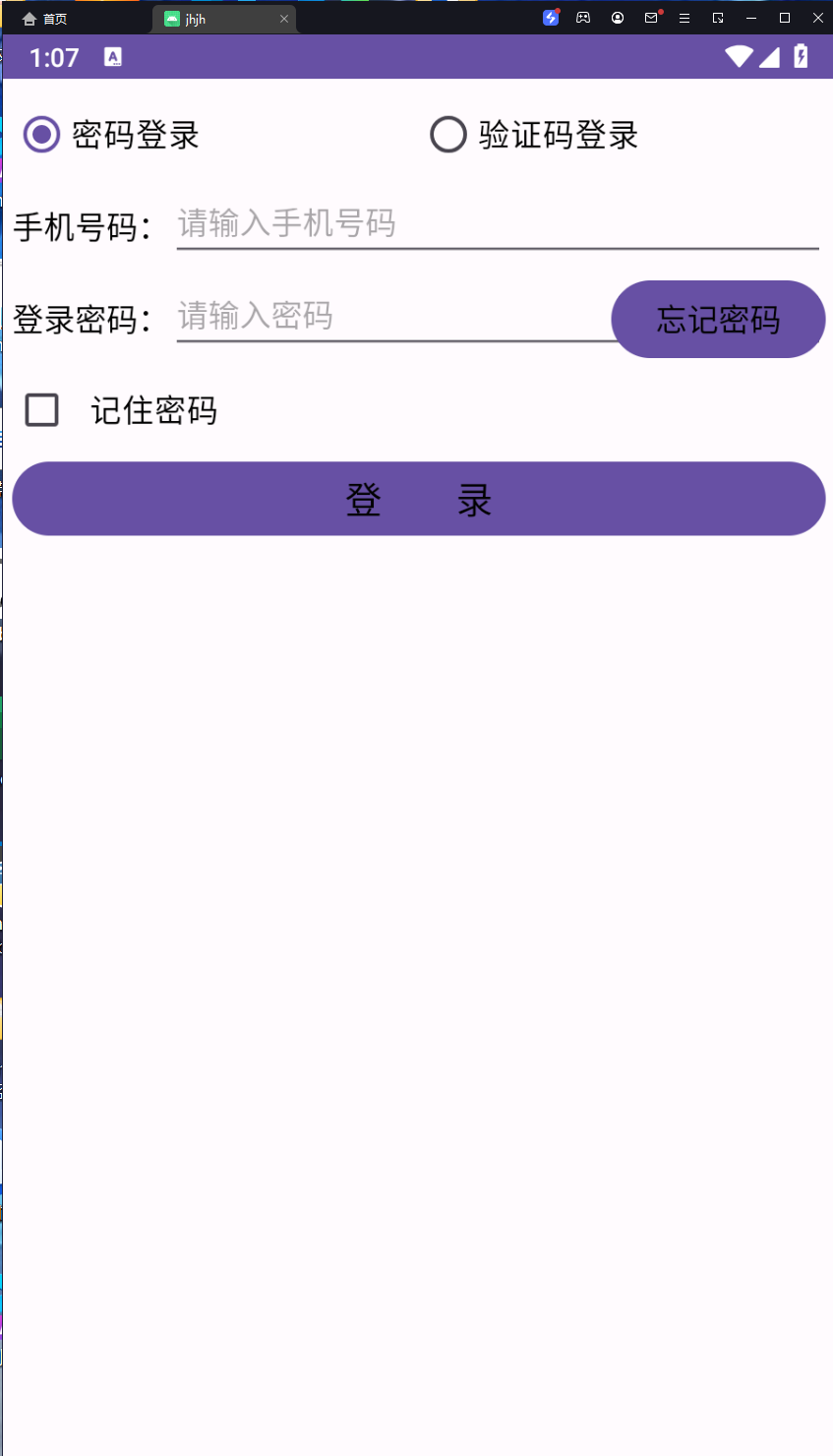
用sqlite做一个登录页面,包括记住密码,重置密码,发送验证码
userinfo类,
设定一些对象应有的属性:
package com.example.jhjh;
//用户信息
public class userinfo {
    public long rowid; // 行号
    public int xuhao; // 序号
    public string name; // 姓名
    public int age; // 年龄
    public long height; // 身高
    public float weight; // 体重
    public boolean married; // 婚否
    public string update_time; // 更新时间
    public string phone; // 手机号
    public string password; // 密码
    public userinfo() {
        rowid = 0l;
        xuhao = 0;
        name = "";
        age = 0;
        height = 0l;
        weight = 0.0f;
        married = false;
        update_time = "";
        phone = "";
        password = "";
    }
}
userdbhelper类
用来调用数据及数据库的一些操作
package com.example.jhjh;
import android.annotation.suppresslint;
import android.content.contentvalues;
import android.content.context;
import android.database.cursor;
import android.database.sqlite.sqlitedatabase;
import android.database.sqlite.sqliteopenhelper;
import android.util.log;
import com.example.jhjh.userinfo;
import java.util.arraylist;
import java.util.list;
@suppresslint("defaultlocale")
public class userdbhelper extends sqliteopenhelper {
    private static final string tag = "userdbhelper";
    private static final string db_name = "user.db"; // 数据库的名称
    private static final int db_version = 1; // 数据库的版本号
    private static userdbhelper mhelper = null; // 数据库帮助器的实例
    private sqlitedatabase mdb = null; // 数据库的实例
    public static final string table_name = "user_info"; // 表的名称
    private userdbhelper(context context) {
        super(context, db_name, null, db_version);
    }
    private userdbhelper(context context, int version) {
        super(context, db_name, null, version);
    }
    // 利用单例模式获取数据库帮助器的唯一实例
    public static userdbhelper getinstance(context context, int version) {
        if (version > 0 && mhelper == null) {
            mhelper = new userdbhelper(context, version);
        } else if (mhelper == null) {
            mhelper = new userdbhelper(context);
        }
        return mhelper;
    }
    // 打开数据库的读连接
    public sqlitedatabase openreadlink() {
        if (mdb == null || !mdb.isopen()) {
            mdb = mhelper.getreadabledatabase();
        }
        return mdb;
    }
    // 打开数据库的写连接
    public sqlitedatabase openwritelink() {
        if (mdb == null || !mdb.isopen()) {
            mdb = mhelper.getwritabledatabase();
        }
        return mdb;
    }
    // 关闭数据库连接
    public void closelink() {
        if (mdb != null && mdb.isopen()) {
            mdb.close();
            mdb = null;
        }
    }
    // 创建数据库,执行建表语句
    public void oncreate(sqlitedatabase db) {
        log.d(tag, "oncreate");
        string drop_sql = "drop table if exists " + table_name + ";";
        log.d(tag, "drop_sql:" + drop_sql);
        db.execsql(drop_sql);
        string create_sql = "create table if not exists " + table_name + " ("
                + "_id integer primary key  autoincrement not null,"
                + "name varchar not null," + "age integer not null,"
                + "height integer not null," + "weight float not null,"
                + "married integer not null," + "update_time varchar not null"
                //演示数据库升级时要先把下面这行注释
                + ",phone varchar" + ",password varchar"
                + ");";
        log.d(tag, "create_sql:" + create_sql);
        db.execsql(create_sql); // 执行完整的sql语句
    }
    // 升级数据库,执行表结构变更语句
    public void onupgrade(sqlitedatabase db, int oldversion, int newversion) {
        log.d(tag, "onupgrade oldversion=" + oldversion + ", newversion=" + newversion);
        if (newversion > 1) {
            //android的alter命令不支持一次添加多列,只能分多次添加
            string alter_sql = "alter table " + table_name + " add column " + "phone varchar;";
            log.d(tag, "alter_sql:" + alter_sql);
            db.execsql(alter_sql);
            alter_sql = "alter table " + table_name + " add column " + "password varchar;";
            log.d(tag, "alter_sql:" + alter_sql);
            db.execsql(alter_sql); // 执行完整的sql语句
        }
    }
    // 根据指定条件删除表记录
    public int delete(string condition) {
        // 执行删除记录动作,该语句返回删除记录的数目
        return mdb.delete(table_name, condition, null);
    }
    // 删除该表的所有记录
    public int deleteall() {
        // 执行删除记录动作,该语句返回删除记录的数目
        return mdb.delete(table_name, "1=1", null);
    }
    // 往该表添加一条记录
    public long insert(userinfo info) {
        list<userinfo> infolist = new arraylist<userinfo>();
        infolist.add(info);
        return insert(infolist);
    }
    // 往该表添加多条记录
    public long insert(list<userinfo> infolist) {
        long result = -1;
        for (int i = 0; i < infolist.size(); i++) {
            userinfo info = infolist.get(i);
            list<userinfo> templist = new arraylist<userinfo>();
            // 如果存在同名记录,则更新记录
            // 注意条件语句的等号后面要用单引号括起来
            if (info.name != null && info.name.length() > 0) {
                string condition = string.format("name='%s'", info.name);
                templist = query(condition);
                if (templist.size() > 0) {
                    update(info, condition);
                    result = templist.get(0).rowid;
                    continue;
                }
            }
            // 如果存在同样的手机号码,则更新记录
            if (info.phone != null && info.phone.length() > 0) {
                string condition = string.format("phone='%s'", info.phone);
                templist = query(condition);
                if (templist.size() > 0) {
                    update(info, condition);
                    result = templist.get(0).rowid;
                    continue;
                }
            }
            // 不存在唯一性重复的记录,则插入新记录
            contentvalues cv = new contentvalues();
            cv.put("name", info.name);
            cv.put("age", info.age);
            cv.put("height", info.height);
            cv.put("weight", info.weight);
            cv.put("married", info.married);
            cv.put("update_time", info.update_time);
            cv.put("phone", info.phone);
            cv.put("password", info.password);
            // 执行插入记录动作,该语句返回插入记录的行号
            result = mdb.insert(table_name, "", cv);
            if (result == -1) { // 添加成功则返回行号,添加失败则返回-1
                return result;
            }
        }
        return result;
    }
    // 根据条件更新指定的表记录
    public int update(userinfo info, string condition) {
        contentvalues cv = new contentvalues();
        cv.put("name", info.name);
        cv.put("age", info.age);
        cv.put("height", info.height);
        cv.put("weight", info.weight);
        cv.put("married", info.married);
        cv.put("update_time", info.update_time);
        cv.put("phone", info.phone);
        cv.put("password", info.password);
        // 执行更新记录动作,该语句返回更新的记录数量
        return mdb.update(table_name, cv, condition, null);
    }
    public int update(userinfo info) {
        // 执行更新记录动作,该语句返回更新的记录数量
        return update(info, "rowid=" + info.rowid);
    }
    // 根据指定条件查询记录,并返回结果数据列表
    public list<userinfo> query(string condition) {
        string sql = string.format("select rowid,_id,name,age,height," +
                        "weight,married,update_time,phone,password " +
                        "from %s where %s;", table_name, condition);
        log.d(tag, "query sql: " + sql);
        list<userinfo> infolist = new arraylist<userinfo>();
        // 执行记录查询动作,该语句返回结果集的游标
        cursor cursor = mdb.rawquery(sql, null);
        // 循环取出游标指向的每条记录
        while (cursor.movetonext()) {
            userinfo info = new userinfo();
            info.rowid = cursor.getlong(0); // 取出长整型数
            info.xuhao = cursor.getint(1); // 取出整型数
            info.name = cursor.getstring(2); // 取出字符串
            info.age = cursor.getint(3); // 取出整型数
            info.height = cursor.getlong(4); // 取出长整型数
            info.weight = cursor.getfloat(5); // 取出浮点数
            //sqlite没有布尔型,用0表示false,用1表示true
            info.married = (cursor.getint(6) == 0) ? false : true;
            info.update_time = cursor.getstring(7); // 取出字符串
            info.phone = cursor.getstring(8); // 取出字符串
            info.password = cursor.getstring(9); // 取出字符串
            infolist.add(info);
        }
        cursor.close(); // 查询完毕,关闭数据库游标
        return infolist;
    }
    // 根据手机号码查询指定记录
    public userinfo querybyphone(string phone) {
        userinfo info = null;
        list<userinfo> infolist = query(string.format("phone='%s'", phone));
        if (infolist.size() > 0) { // 存在该号码的登录信息
            info = infolist.get(0);
        }
        return info;
    }
}
dateuitl类:
用来获取实时时间
package com.example.jhjh;
import android.annotation.suppresslint;
import android.text.textutils;
import java.text.simpledateformat;
import java.util.calendar;
import java.util.date;
@suppresslint("simpledateformat")
public class dateutil {
    // 获取当前的日期时间
    public static string getnowdatetime(string formatstr) {
        string format = formatstr;
        if (textutils.isempty(format)) {
            format = "yyyymmddhhmmss";
        }
        simpledateformat sdf = new simpledateformat(format);
        return sdf.format(new date());
    }
    // 获取当前的时间
    public static string getnowtime() {
        simpledateformat sdf = new simpledateformat("hh:mm:ss");
        return sdf.format(new date());
    }
    // 获取当前的时间(精确到毫秒)
    public static string getnowtimedetail() {
        simpledateformat sdf = new simpledateformat("hh:mm:ss.sss");
        return sdf.format(new date());
    }
    public static string formatdate(long time) {
        date date = new date(time);
        simpledateformat sdf = new simpledateformat("yyyy-mm-dd hh:mm:ss");
        return sdf.format(date);
    }
}
密码登录的activity
loginsqliteactivity .java
package com.example.jhjh;
import android.annotation.suppresslint;
import android.app.alertdialog;
import android.content.intent;
import android.os.bundle;
import android.text.editable;
import android.text.textwatcher;
import android.view.view;
import android.view.view.onfocuschangelistener;
import android.widget.button;
import android.widget.checkbox;
import android.widget.edittext;
import android.widget.radiobutton;
import android.widget.radiogroup;
import android.widget.textview;
import android.widget.toast;
import androidx.appcompat.app.appcompatactivity;
import com.example.jhjh.userinfo;
import com.example.jhjh.userdbhelper;
import com.example.jhjh.dateutil;
import com.example.jhjh.viewutil;
import java.util.random;
@suppresslint("defaultlocale")
public class loginsqliteactivity extends appcompatactivity implements view.onclicklistener, onfocuschangelistener {
    private radiogroup rg_login; // 声明一个单选组对象
    private radiobutton rb_password; // 声明一个单选按钮对象
    private radiobutton rb_verifycode; // 声明一个单选按钮对象
    private edittext et_phone; // 声明一个编辑框对象
    private textview tv_password; // 声明一个文本视图对象
    private edittext et_password; // 声明一个编辑框对象
    private button btn_forget; // 声明一个按钮控件对象
    private checkbox ck_remember; // 声明一个复选框对象
    private int mrequestcode = 0; // 跳转页面时的请求代码
    private boolean isremember = false; // 是否记住密码
    private string mpassword = "111111"; // 默认密码
    private string mverifycode; // 验证码
    private userdbhelper mhelper; // 声明一个用户数据库的帮助器对象
    @override
    protected void oncreate(bundle savedinstancestate) {
        super.oncreate(savedinstancestate);
        setcontentview(r.layout.activity_login_sqlite);
        rg_login = findviewbyid(r.id.rg_login);
        rb_password = findviewbyid(r.id.rb_password);
        rb_verifycode = findviewbyid(r.id.rb_verifycode);
        et_phone = findviewbyid(r.id.et_phone);
        tv_password = findviewbyid(r.id.tv_password);
        et_password = findviewbyid(r.id.et_password);
        btn_forget = findviewbyid(r.id.btn_forget);
        ck_remember = findviewbyid(r.id.ck_remember);
        // 给rg_login设置单选监听器
        rg_login.setoncheckedchangelistener(new radiolistener());
        // 给ck_remember设置勾选监听器
        ck_remember.setoncheckedchangelistener((buttonview, ischecked) -> isremember = ischecked);
        // 给et_phone添加文本变更监听器
        et_phone.addtextchangedlistener(new hidetextwatcher(et_phone, 11));
        // 给et_password添加文本变更监听器
        et_password.addtextchangedlistener(new hidetextwatcher(et_password, 6));
        btn_forget.setonclicklistener(this);
        findviewbyid(r.id.btn_login).setonclicklistener(this);
        // 给密码编辑框注册一个焦点变化监听器,一旦焦点发生变化,就触发监听器的onfocuschange方法
        et_password.setonfocuschangelistener(this);
    }
    // 定义登录方式的单选监听器
    private class radiolistener implements radiogroup.oncheckedchangelistener {
        @override
        public void oncheckedchanged(radiogroup group, int checkedid) {
            if (checkedid == r.id.rb_password) { // 选择了密码登录
                tv_password.settext("登录密码:");
                et_password.sethint("请输入密码");
                btn_forget.settext("忘记密码");
                ck_remember.setvisibility(view.visible);
            } else if (checkedid == r.id.rb_verifycode) { // 选择了验证码登录
                tv_password.settext(" 验证码:");
                et_password.sethint("请输入验证码");
                btn_forget.settext("获取验证码");
                ck_remember.setvisibility(view.gone);
            }
        }
    }
    // 定义一个编辑框监听器,在输入文本达到指定长度时自动隐藏输入法
    private class hidetextwatcher implements textwatcher {
        private edittext mview; // 声明一个编辑框对象
        private int mmaxlength; // 声明一个最大长度变量
        public hidetextwatcher(edittext v, int maxlength) {
            super();
            mview = v;
            mmaxlength = maxlength;
        }
        // 在编辑框的输入文本变化前触发
        public void beforetextchanged(charsequence s, int start, int count, int after) {}
        // 在编辑框的输入文本变化时触发
        public void ontextchanged(charsequence s, int start, int before, int count) {}
        // 在编辑框的输入文本变化后触发
        public void aftertextchanged(editable s) {
            string str = s.tostring(); // 获得已输入的文本字符串
            // 输入文本达到11位(如手机号码),或者达到6位(如登录密码)时关闭输入法
            if ((str.length() == 11 && mmaxlength == 11)
                    || (str.length() == 6 && mmaxlength == 6)) {
                viewutil.hideoneinputmethod(loginsqliteactivity.this, mview); // 隐藏输入法软键盘
            }
        }
    }
    @override
    public void onclick(view v) {
        string phone = et_phone.gettext().tostring();
        if (v.getid() == r.id.btn_forget) { // 点击了“忘记密码”按钮
            if (phone.length() < 11) { // 手机号码不足11位
                toast.maketext(this, "请输入正确的手机号", toast.length_short).show();
                return;
            }
            if (rb_password.ischecked()) { // 选择了密码方式校验,此时要跳到找回密码页面
                // 以下携带手机号码跳转到找回密码页面
                intent intent = new intent(this, loginforgetactivity.class);
                intent.putextra("phone", phone);
                startactivityforresult(intent, mrequestcode); // 携带意图返回上一个页面
            } else if (rb_verifycode.ischecked()) { // 选择了验证码方式校验,此时要生成六位随机数字验证码
                // 生成六位随机数字的验证码
                mverifycode = string.format("%06d", new random().nextint(999999));
                // 以下弹出提醒对话框,提示用户记住六位验证码数字
                alertdialog.builder builder = new alertdialog.builder(this);
                builder.settitle("请记住验证码");
                builder.setmessage("手机号" + phone + ",本次验证码是" + mverifycode + ",请输入验证码");
                builder.setpositivebutton("好的", null);
                alertdialog alert = builder.create();
                alert.show(); // 显示提醒对话框
            }
        } else if (v.getid() == r.id.btn_login) { // 点击了“登录”按钮
            if (phone.length() < 11) { // 手机号码不足11位
                toast.maketext(this, "请输入正确的手机号", toast.length_short).show();
                return;
            }
            if (rb_password.ischecked()) { // 密码方式校验
                if (!et_password.gettext().tostring().equals(mpassword)) {
                    toast.maketext(this, "请输入正确的密码", toast.length_short).show();
                } else { // 密码校验通过
                    loginsuccess(); // 提示用户登录成功
                }
            } else if (rb_verifycode.ischecked()) { // 验证码方式校验
                if (!et_password.gettext().tostring().equals(mverifycode)) {
                    toast.maketext(this, "请输入正确的验证码", toast.length_short).show();
                } else { // 验证码校验通过
                    loginsuccess(); // 提示用户登录成功
                }
            }
        }
    }
    // 从下一个页面携带参数返回当前页面时触发
    @override
    protected void onactivityresult(int requestcode, int resultcode, intent data) {
        super.onactivityresult(requestcode, resultcode, data);
        if (requestcode == mrequestcode && data != null) {
            // 用户密码已改为新密码,故更新密码变量
            mpassword = data.getstringextra("new_password");
        }
    }
    // 从修改密码页面返回登录页面,要清空密码的输入框
    @override
    protected void onrestart() {
        super.onrestart();
        et_password.settext("");
    }
    @override
    protected void onresume() {
        super.onresume();
        mhelper = userdbhelper.getinstance(this, 1); // 获得用户数据库帮助器的实例
        mhelper.openwritelink(); // 恢复页面,则打开数据库连接
    }
    @override
    protected void onpause() {
        super.onpause();
        mhelper.closelink(); // 暂停页面,则关闭数据库连接
    }
    // 校验通过,登录成功
    private void loginsuccess() {
        string desc = string.format("您的手机号码是%s,恭喜你通过登录验证,点击“确定”按钮返回上个页面",
                et_phone.gettext().tostring());
        // 以下弹出提醒对话框,提示用户登录成功
        alertdialog.builder builder = new alertdialog.builder(this);
        builder.settitle("登录成功");
        builder.setmessage(desc);
        builder.setpositivebutton("确定返回", (dialog, which) -> finish());
        builder.setnegativebutton("我再看看", null);
        alertdialog alert = builder.create();
        alert.show();
        // 如果勾选了“记住密码”,则把手机号码和密码保存为数据库的用户表记录
        if (isremember) {
            userinfo info = new userinfo(); // 创建一个用户信息对象
            info.phone = et_phone.gettext().tostring();
            info.password = et_password.gettext().tostring();
            info.update_time = dateutil.getnowdatetime("yyyy-mm-dd hh:mm:ss");
            mhelper.insert(info); // 往用户数据库添加登录成功的用户信息
        }
    }
    // 焦点变更事件的处理方法,hasfocus表示当前控件是否获得焦点。
    // 为什么光标进入密码框事件不选onclick?因为要点两下才会触发onclick动作(第一下是切换焦点动作)
    @override
    public void onfocuschange(view v, boolean hasfocus) {
        string phone = et_phone.gettext().tostring();
        // 判断是否是密码编辑框发生焦点变化
        if (v.getid() == r.id.et_password) {
            // 用户已输入手机号码,且密码框获得焦点
            if (phone.length() > 0 && hasfocus) {
                // 根据手机号码到数据库中查询用户记录
                userinfo info = mhelper.querybyphone(phone);
                if (info != null) {
                    // 找到用户记录,则自动在密码框中填写该用户的密码
                    et_password.settext(info.password);
                }
            }
        }
    }
}
xml:
<linearlayout xmlns:android="http://schemas.android.com/apk/res/android"
    android:layout_width="match_parent"
    android:layout_height="match_parent"
    android:orientation="vertical"
    android:padding="5dp" >
    <radiogroup
        android:id="@+id/rg_login"
        android:layout_width="match_parent"
        android:layout_height="50dp"
        android:orientation="horizontal" >
        <radiobutton
            android:id="@+id/rb_password"
            android:layout_width="0dp"
            android:layout_height="match_parent"
            android:layout_weight="1"
            android:checked="true"
            android:gravity="left|center"
            android:text="密码登录"
            android:textcolor="@color/black"
            android:textsize="17sp" />
        <radiobutton
            android:id="@+id/rb_verifycode"
            android:layout_width="0dp"
            android:layout_height="match_parent"
            android:layout_weight="1"
            android:checked="false"
            android:gravity="left|center"
            android:text="验证码登录"
            android:textcolor="@color/black"
            android:textsize="17sp" />
    </radiogroup>
    <relativelayout
        android:layout_width="match_parent"
        android:layout_height="50dp" >
        <textview
            android:id="@+id/tv_phone"
            android:layout_width="wrap_content"
            android:layout_height="match_parent"
            android:layout_alignparentleft="true"
            android:gravity="center"
            android:text="手机号码:"
            android:textcolor="@color/black"
            android:textsize="17sp" />
        <edittext
            android:id="@+id/et_phone"
            android:layout_width="match_parent"
            android:layout_height="match_parent"
            android:layout_marginbottom="5dp"
            android:layout_margintop="5dp"
            android:layout_torightof="@+id/tv_phone"
            android:gravity="left|center"
            android:hint="请输入手机号码"
            android:inputtype="number"
            android:maxlength="11"
            android:textcolor="@color/black"
            android:textsize="17sp" />
    </relativelayout>
    <relativelayout
        android:layout_width="match_parent"
        android:layout_height="50dp" >
        <textview
            android:id="@+id/tv_password"
            android:layout_width="wrap_content"
            android:layout_height="match_parent"
            android:layout_alignparentleft="true"
            android:gravity="center"
            android:text="登录密码:"
            android:textcolor="@color/black"
            android:textsize="17sp" />
        <relativelayout
            android:layout_width="match_parent"
            android:layout_height="match_parent"
            android:layout_torightof="@+id/tv_password" >
            <edittext
                android:id="@+id/et_password"
                android:layout_width="match_parent"
                android:layout_height="match_parent"
                android:layout_marginbottom="5dp"
                android:layout_margintop="5dp"
                android:gravity="left|center"
                android:hint="请输入密码"
                android:inputtype="numberpassword"
                android:maxlength="6"
                android:textcolor="@color/black"
                android:textsize="17sp" />
            <button
                android:id="@+id/btn_forget"
                android:layout_width="wrap_content"
                android:layout_height="match_parent"
                android:layout_alignparentright="true"
                android:gravity="center"
                android:text="忘记密码"
                android:textcolor="@color/black"
                android:textsize="17sp" />
        </relativelayout>
    </relativelayout>
    <checkbox
        android:id="@+id/ck_remember"
        android:layout_width="match_parent"
        android:layout_height="wrap_content"
        android:checked="false"
        android:padding="10dp"
        android:text="记住密码"
        android:textcolor="@color/black"
        android:textsize="17sp" />
    <button
        android:id="@+id/btn_login"
        android:layout_width="match_parent"
        android:layout_height="wrap_content"
        android:text="登  录"
        android:textcolor="@color/black"
        android:textsize="20sp" />
</linearlayout>
效果图:
有关忘记密码后通过验证码的代码:
loginforgetactivity.activity.java:
package com.example.jhjh;
import android.annotation.suppresslint;
import android.app.activity;
import android.app.alertdialog;
import android.content.intent;
import android.os.bundle;
import android.view.view;
import android.widget.edittext;
import android.widget.toast;
import androidx.appcompat.app.appcompatactivity;
import java.util.random;
@suppresslint("defaultlocale")
public class loginforgetactivity extends appcompatactivity implements view.onclicklistener {
    private edittext et_password_first; // 声明一个编辑框对象
    private edittext et_password_second; // 声明一个编辑框对象
    private edittext et_verifycode; // 声明一个编辑框对象
    private string mverifycode; // 验证码
    private string mphone; // 手机号码
    @override
    protected void oncreate(bundle savedinstancestate) {
        super.oncreate(savedinstancestate);
        setcontentview(r.layout.activity_login_forget);
        // 从布局文件中获取名叫et_password_first的编辑框
        et_password_first = findviewbyid(r.id.et_password_first);
        // 从布局文件中获取名叫et_password_second的编辑框
        et_password_second = findviewbyid(r.id.et_password_second);
        // 从布局文件中获取名叫et_verifycode的编辑框
        et_verifycode = findviewbyid(r.id.et_verifycode);
        findviewbyid(r.id.btn_verifycode).setonclicklistener(this);
        findviewbyid(r.id.btn_confirm).setonclicklistener(this);
        // 从上一个页面获取要修改密码的手机号码
        mphone = getintent().getstringextra("phone");
    }
    @override
    public void onclick(view v) {
        if (v.getid() == r.id.btn_verifycode) { // 点击了“获取验证码”按钮
            if (mphone == null || mphone.length() < 11) {
                toast.maketext(this, "请输入正确的手机号", toast.length_short).show();
                return;
            }
            // 生成六位随机数字的验证码
            mverifycode = string.format("%06d", new random().nextint(999999));
            // 以下弹出提醒对话框,提示用户记住六位验证码数字
            alertdialog.builder builder = new alertdialog.builder(this);
            builder.settitle("请记住验证码");
            builder.setmessage("手机号" + mphone + ",本次验证码是" + mverifycode + ",请输入验证码");
            builder.setpositivebutton("好的", null);
            alertdialog alert = builder.create();
            alert.show(); // 显示提醒对话框
        } else if (v.getid() == r.id.btn_confirm) { // 点击了“确定”按钮
            string password_first = et_password_first.gettext().tostring();
            string password_second = et_password_second.gettext().tostring();
            if (password_first.length() < 6 || password_second.length() < 6) {
                toast.maketext(this, "请输入正确的新密码", toast.length_short).show();
                return;
            }
            if (!password_first.equals(password_second)) {
                toast.maketext(this, "两次输入的新密码不一致", toast.length_short).show();
                return;
            }
            if (!et_verifycode.gettext().tostring().equals(mverifycode)) {
                toast.maketext(this, "请输入正确的验证码", toast.length_short).show();
            } else {
                toast.maketext(this, "密码修改成功", toast.length_short).show();
                // 以下把修改好的新密码返回给上一个页面
                intent intent = new intent(); // 创建一个新意图
                intent.putextra("new_password", password_first); // 存入新密码
                setresult(activity.result_ok, intent); // 携带意图返回上一个页面
                finish(); // 结束当前的活动页面
            }
        }
    }
}
xml:
<linearlayout xmlns:android="http://schemas.android.com/apk/res/android"
    android:layout_width="match_parent"
    android:layout_height="match_parent"
    android:orientation="vertical"
    android:padding="5dp" >
    <relativelayout
        android:layout_width="match_parent"
        android:layout_height="50dp" >
        <textview
            android:id="@+id/tv_password_first"
            android:layout_width="wrap_content"
            android:layout_height="match_parent"
            android:gravity="center"
            android:text="输入新密码:"
            android:textcolor="@color/black"
            android:textsize="17sp" />
        <edittext
            android:id="@+id/et_password_first"
            android:layout_width="match_parent"
            android:layout_height="match_parent"
            android:layout_marginbottom="5dp"
            android:layout_margintop="5dp"
            android:layout_torightof="@+id/tv_password_first"
            android:gravity="left|center"
            android:hint="请输入新密码"
            android:inputtype="numberpassword"
            android:maxlength="11"
            android:textcolor="@color/black"
            android:textsize="17sp" />
    </relativelayout>
    <relativelayout
        android:layout_width="match_parent"
        android:layout_height="50dp" >
        <textview
            android:id="@+id/tv_password_second"
            android:layout_width="wrap_content"
            android:layout_height="match_parent"
            android:gravity="center"
            android:text="确认新密码:"
            android:textcolor="@color/black"
            android:textsize="17sp" />
        <edittext
            android:id="@+id/et_password_second"
            android:layout_width="match_parent"
            android:layout_height="match_parent"
            android:layout_marginbottom="5dp"
            android:layout_margintop="5dp"
            android:layout_torightof="@+id/tv_password_second"
            android:gravity="left|center"
            android:hint="请再次输入新密码"
            android:inputtype="numberpassword"
            android:maxlength="11"
            android:textcolor="@color/black"
            android:textsize="17sp" />
    </relativelayout>
    <relativelayout
        android:layout_width="match_parent"
        android:layout_height="50dp" >
        <textview
            android:id="@+id/tv_verifycode"
            android:layout_width="wrap_content"
            android:layout_height="match_parent"
            android:gravity="center"
            android:text="  验证码:"
            android:textcolor="@color/black"
            android:textsize="17sp" />
        <relativelayout
            android:layout_width="match_parent"
            android:layout_height="match_parent"
            android:layout_torightof="@+id/tv_verifycode" >
            <edittext
                android:id="@+id/et_verifycode"
                android:layout_width="match_parent"
                android:layout_height="match_parent"
                android:layout_marginbottom="5dp"
                android:layout_margintop="5dp"
                android:gravity="left|center"
                android:hint="请输入验证码"
                android:inputtype="numberpassword"
                android:maxlength="6"
                android:textcolor="@color/black"
                android:textsize="17sp" />
            <button
                android:id="@+id/btn_verifycode"
                android:layout_width="wrap_content"
                android:layout_height="match_parent"
                android:layout_alignparentright="true"
                android:gravity="center"
                android:text="获取验证码"
                android:textcolor="@color/black"
                android:textsize="17sp" />
        </relativelayout>
    </relativelayout>
    <button
        android:id="@+id/btn_confirm"
        android:layout_width="match_parent"
        android:layout_height="wrap_content"
        android:text="确  定"
        android:textcolor="@color/black"
        android:textsize="20sp" />
</linearlayout>
效果图:

最终效果:
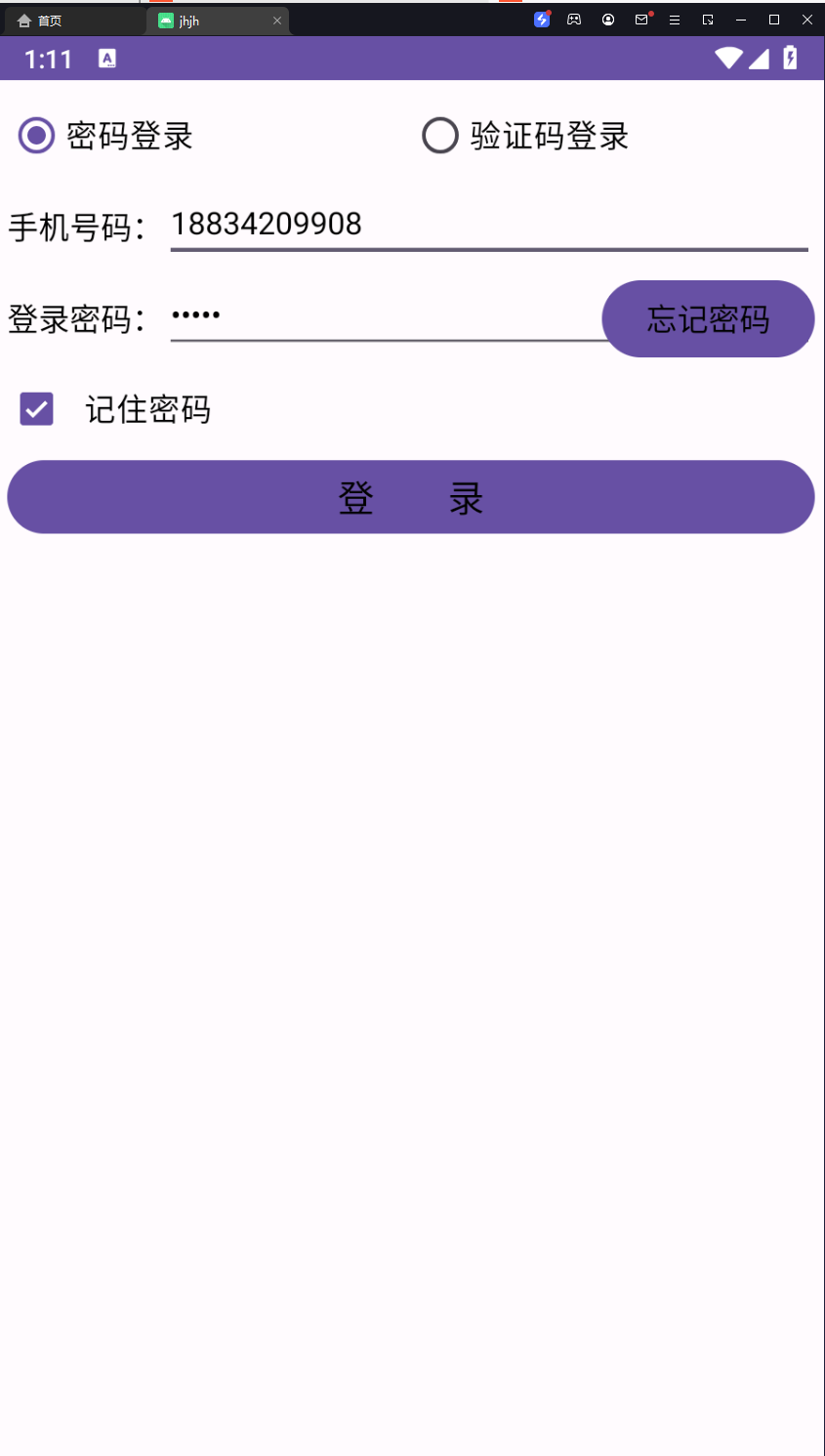
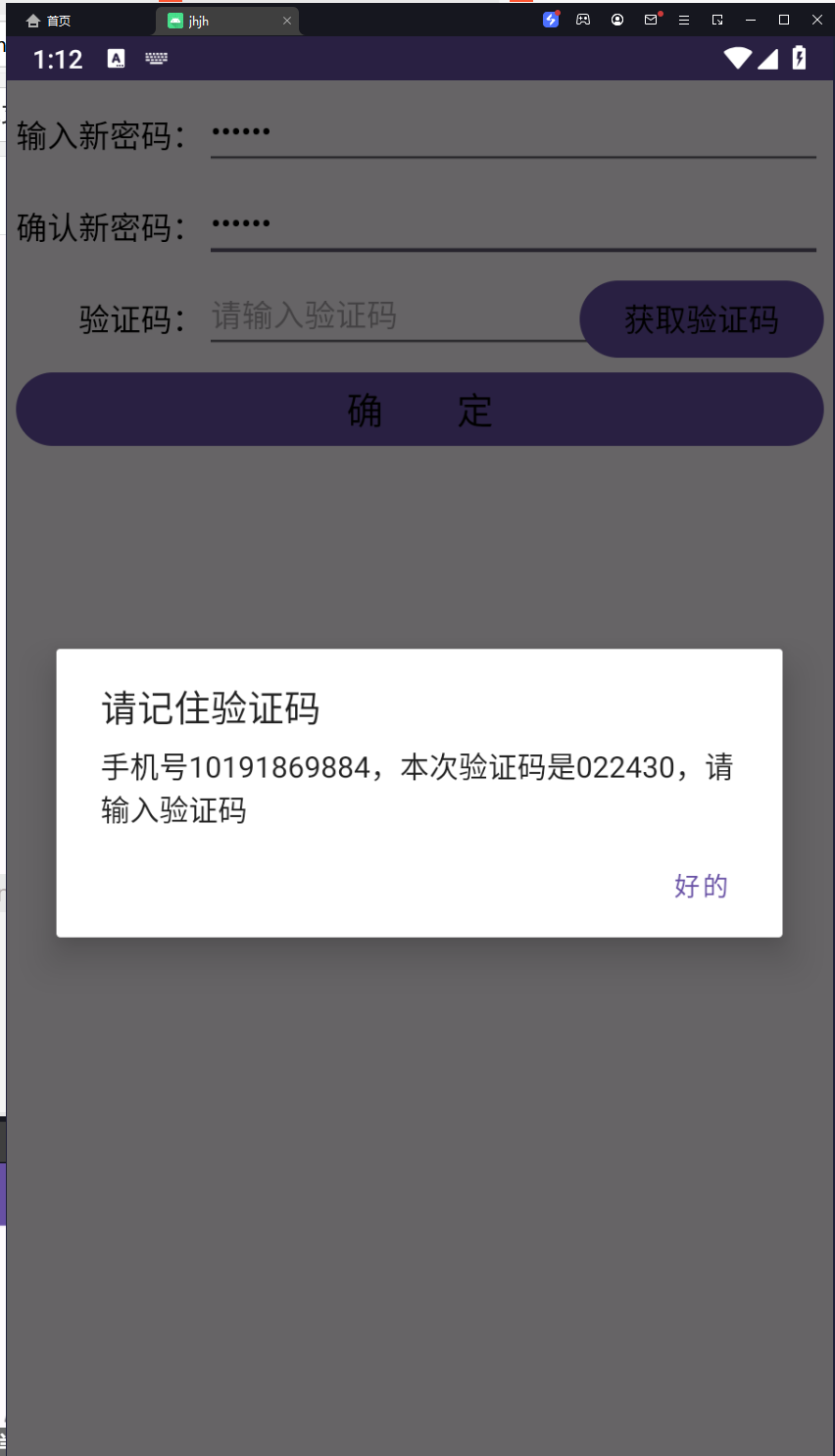
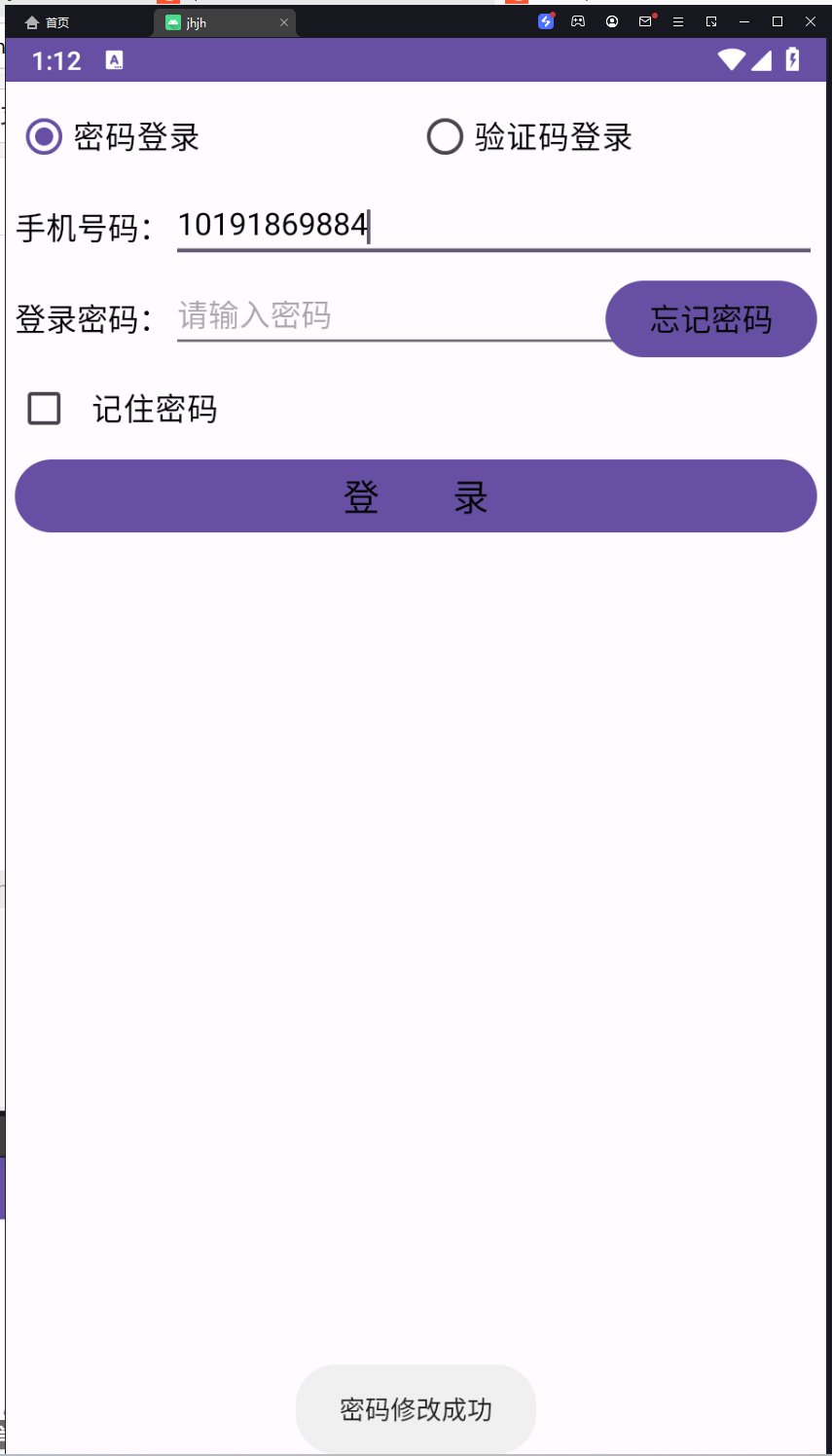
这样,一个登录的数据库和通过验证码找回密码的系统就做好了。
到此这篇关于android studio内置数据库sqlite的使用指南的文章就介绍到这了,更多相关android studio sqlite使用内容请搜索代码网以前的文章或继续浏览下面的相关文章希望大家以后多多支持代码网!






发表评论