
 我要评论
我要评论直接查询段大小
表的存储空间信息存储在段(segment)中,通过以下 sql 可以获取表的大小(包含数据、索引、lob 等占用的空间)
select
    segment_name as table_name,
    bytes,
    round(bytes / 1024 / 1024, 2) as size_mb
from
    user_segments  -- 根据权限替换为 dba_segments 或 all_segments
where
    segment_type = 'table'
  and segment_name = 'ai_tools';
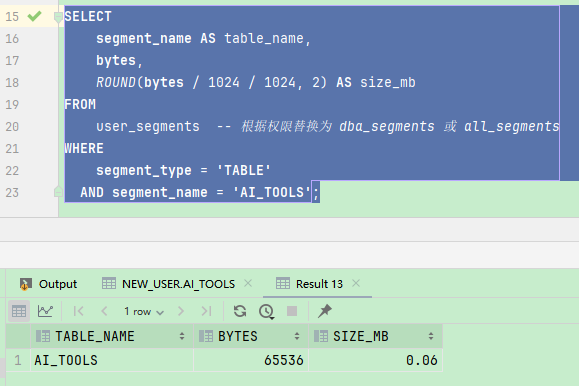
确保表名使用大写,因为 oracle 数据字典默认存储大写对象名。
bytes字段表示分配的存储空间,可能包含未使用的块。若表有分区,需查询
dba_tab_partitions视图获取各分区大小。
计算表数据估算大小(基于统计信息)
结合 dba_tables 中的行数和平均行长估算数据量(需更新统计信息):
begin
    dbms_stats.gather_table_stats(
            ownname    => 'new_user',
            tabname    => 'ai_tools'
    );
end;
/

select
    table_name,
    num_rows,
    avg_row_len,
    round((num_rows * avg_row_len) / 1024 / 1024, 2) as estimated_size_mb
from
    user_tables
where
    table_name = 'ai_tools';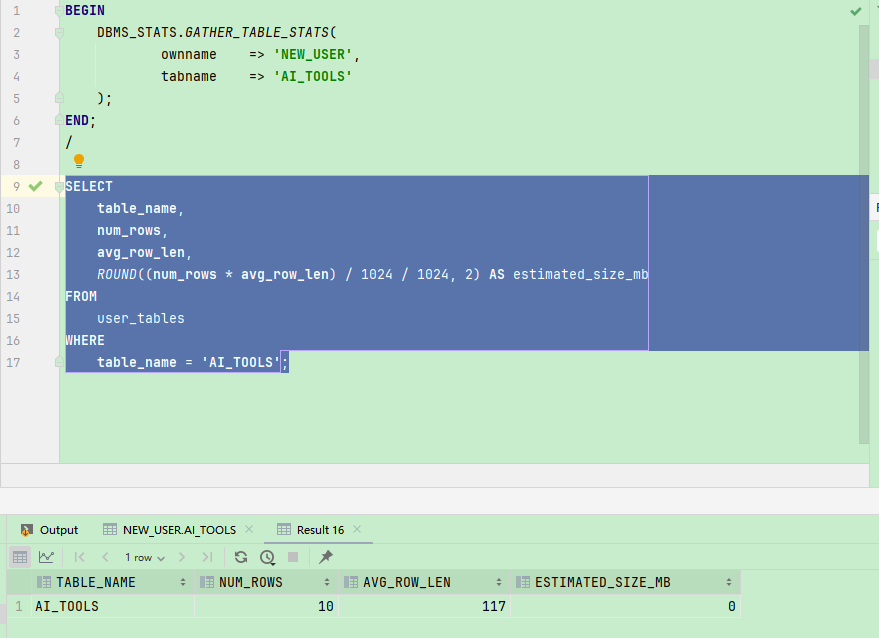
汇总表及索引的总大小
select
    'table' as segment_type,
    segment_name,
    bytes as table_size_bytes,
    round(bytes / 1024 / 1024, 2) as table_size_mb
from
    user_segments
where
    segment_type = 'table'
    and segment_name = 'your_table_name'

union all

select
    'index' as segment_type,
    segment_name,
    bytes as index_size_bytes,
    round(bytes / 1024 / 1024, 2) as index_size_mb
from
    user_segments
where
    segment_type = 'index'
    and segment_name in (
        select index_name
        from user_indexes
        where table_name = 'your_table_name'
    );
到此这篇关于获取oracle表大小的三种方法的文章就介绍到这了,更多相关获取oracle表大小内容请搜索代码网以前的文章或继续浏览下面的相关文章希望大家以后多多支持代码网!






发表评论