
 我要评论
我要评论需求:
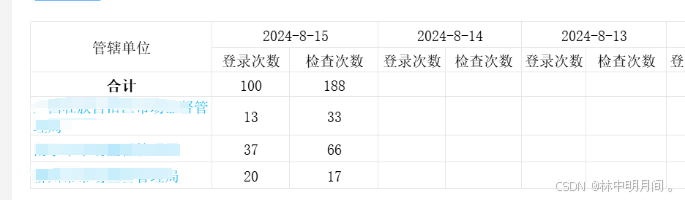
不同以前 现在需要表头嵌套循环 以前只要
 <template>
    <el-table
      :data="tabledata"
      style="width: 100%">
      <el-table-column
        prop="date"
        label="日期"
        width="180">
      </el-table-column>
    </el-table>
  </template>
 data() {
        return {
          tabledata: [{
            date: '2016-05-02',
            name: '王小虎',
            address: '上海市普陀区金沙江路 1518 弄'
          }]
        }
      }
现在需要表头嵌套循环:思路,两个数组,一个数组循环表格数据,一个循环表头
<el-table
        ref="pagetable"
        :data="tabledata"
        style="margin-top: 15px"
        height="548"
        :header-cell-style="cellstylefun"
        id="out-table2"
      >
        <el-table-column
          fixed
          label="管辖单位"
          prop="c_name"
          :formatter="fmttableprop"
          align="center"
          width="230"
        >
          <template slot-scope="scope">
            <el-button
              type="text"
              style="white-space: pre-wrap"
              @click="detailtree(scope.row)"
              >{{ scope.row.c_name }}</el-button
            >
          </template>
        </el-table-column>
        <el-table-column
          v-for="item in tableheaderdata" //单独循环表头-普通循环
          :key="item"
          :label="item"
          align="center"
          width="140"
        >
          <el-table-column
            label="登录次数"
            prop="login_count"
            align="center"
            width="140"
          >
            <template slot-scope="scope">
              <span>{{ scope.row[item].login_count }}</span>
            </template>
          </el-table-column>
          <el-table-column
            label="检查次数"
            prop="check_count"
            align="center"
            width="140"
          >
            <template slot-scope="scope">
              <span>{{ scope.row[item].check_count }}</span>
            </template>
          </el-table-column>
        </el-table-column>
      </el-table>
js:
tableheaderdata: [], // 头部列表数据
tabledata: [], // 列表数据
searchfun() {
      this.loading = true;
      const param = this.paramset();
      workstatisticsbygx(param).then((data) => {
        this.loading = false;
        if (data.data && data.data.code == 10000) {
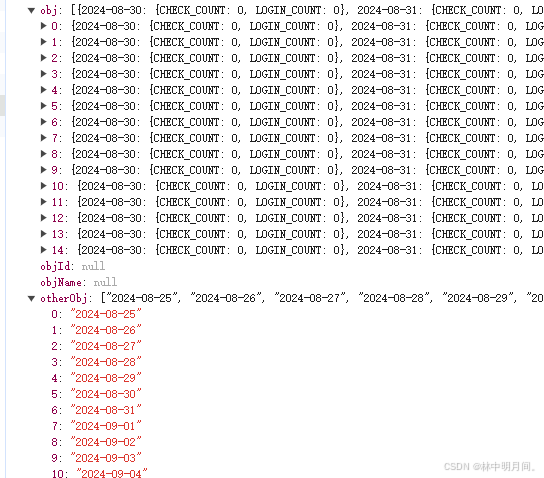
          this.tableheaderdata = data.data.otherobj;//表头时间
          this.tabledata = data.data.obj;//表格数据
        } else {
          this.$confirm(data.data.message || "服务器忙", "提示", {
            type: "warning",
            center: true,
            customclass: "warn-dialog",
          })
            .then(() => {})
            .catch(() => {});
        }
      });
    },
到此这篇关于el-table el-table-column表头嵌套循环数据的文章就介绍到这了,更多相关el-table el-table-column嵌套内容请搜索代码网以前的文章或继续浏览下面的相关文章希望大家以后多多支持代码网!





发表评论