
 我要评论
我要评论uv3-table:一款基于uniapp+vue3跨端自定义手机端增强版表格组件。支持固定表头/列、边框、斑马纹、单选/多选,自定义表头/表体插槽、左右固定列阴影高亮显示。支持编译兼容h5+小程序端+app端。
如下图:h5+小程序+app端,多端运行一致。

uv3-table表格插件是最新原创项目uniapp-os后台管理系统的一个独立版组件。
由于在开发uni-os手机后台系统需要用到table表格组件。无奈uniapp官方及插件市场table表格组件无论功能及ui上都不满足要求,于是自己爆肝一个多日夜开发了一款全新uniapp+vue3综合表格组件。

目前该项目已经出阶段性成果接近尾声了,相信很快就能和大家见面,到时也会做一些技术分享,敬请期待!

uv3-table使用示例
将uv3-table组件放到uniapp项目components目录下,无需在页面再次引入,即可使用。
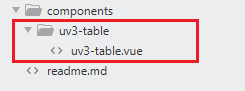
基础用法
<uv3-table :columns="columns" :datasource="data.list" />
自定义条纹样式
<uv3-table
    :columns="columns"
    :datasource="data.list"
    stripe
    stripecolor="#eee"
    padding="5px"
    height="450rpx"
/>
综合用法(固定表头/列、自定义插槽内容)
<script setup>
    import { ref } from 'vue'
    import mock from 'mockjs'

    const columns = ref([
        {type: 'selection', align: 'center', width: 80, fixed: true}, // 多选
        {type: 'index', label: 'id', align: 'center', width: 80, fixed: true}, // 索引序号
        {prop: 'author', label: '作者', align: 'center', width: 120},
        {prop: 'title', label: '标题', align: 'left', width: 350},
        {prop: 'image', label: '图片', align: 'center', width: 120},
        {prop: 'switch', label: '推荐', align: 'center', width: 100},
        {prop: 'tags', label: '标签', align: 'center', width: 100},
        {prop: 'rate', label: '评分', align: 'center', width: 200},
        {prop: 'date', label: '发布时间', align: 'left', width: 250}, // 时间
        {prop: 'action', label: '操作', align: 'center', width: 150, fixed: 'right'}, // 操作
    ])
    const data = ref(mock.mock({
        total: 100,
        page: 1,
        pagesize: 10,
        'list|20': [
            {
                id: '@id()',
                author: '@cname()',
                title: '@ctitle(10, 20)',
                image: `//api.yimian.xyz/img?id=@integer(100, 300)`,
                switch: '@boolean()',
                'tags|1': ['admin', 'test', 'dev'],
                rate: '@integer(1, 5)',
                date: '@datetime()',
                color: '@color()',
            }
        ]
    }))
</script>
<uv3-table
:datasource="data.list"
:columns="columns"
:headerbold="true"
headerbackground="#ecf5ff"
stripe
border
padding="5px"
maxheight="650rpx"
@rowclick="handlerowclick"
@select="handleselect"
>
<!-- 自定义header插槽内容 -->
<template #headercell="{ key, col, index }">
<template v-if="key == 'title'">
<view >{{col.label}} <input placeholder="搜索" size="small" /></view>
</template>
<template v-else-if="key == 'date'">
<uni-icons type="calendar"></uni-icons> {{col.label}}
</template>
<template v-else>{{col.label}}</template>
</template>
<!-- 自定义body插槽内容(由于小程序不支持动态:name插槽,通过key标识来自定义表格内容) -->
<template #default="{ key, value, row, col, index }">
<template v-if="key == 'image'">
<uv-image :src="value" lazyload observelazyload @click="previewimage(value)" />
</template>
<template v-else-if="key == 'switch'">
<switch :checked="value" />
</template>
<template v-else-if="key == 'tags'">
<uv-tags :text="value" :color="row.color" :bordercolor="row.color" plain size="mini" />
</template>
<template v-else-if="key == 'rate'">
<uni-rate :value="value" size="14" readonly />
</template>
<template v-else-if="key == 'action'">
<uni-icons type="compose" color="#00aa7f" @click="handleedit(row)" />
<uni-icons type="trash" color="#ff007f" @click="handledel(row)" />
</template>
<template v-else>{{value}}</template>
</template>
</uv3-table>
rowclick点击表格行,会返回该行数据。

select单选/多选,会返回表格选中数据。

uv3table编码实现
uv3-table表格参数配置
const props = defineprops({
    // 表格数据
    datasource: {
        type: array,
        default() {
            return []
        }
    },
    /**
     * @params {string} background 对应列背景色
     * @params {string} type 对应列类型(多选selection 索引index)
     * @params {string} label 显示的列标题
     * @params {string} prop 对应的列字段名
     * @params {string} align 列水平对齐方式(left center right)
     * @params {number|string} width 对应列宽度
     * @params {boolean|string} fixed 该列固定到左侧(fixed:true|'left')或右侧(fixed:'right')
     * @params {string} columnstyle 对应列自定义样式
     * @params {string} classname/class 表格列的类名classname
     */
    columns: {
        type: array,
        default() {
            return []
        }
    },
    // 表格宽度
    width: { type: [number, string] },
    // 表格高度
    height: { type: [number, string] },
    // 表格最大高度
    maxheight: { type: [number, string] },
    // 是否为斑马纹
    stripe: { type: [boolean, string] },
    // 斑马纹背景
    stripecolor: { type: string, default: '#fafafa' },
    // 是否带有边框
    border: { type: [boolean, string] },
    // 列宽度(推荐默认rpx)
    columnwidth: { type: [number, string], default: 200 },
    // 单元格间距
    padding: { type: string, default: '5rpx 10rpx' },
    // 是否显示表头
    showheader: { type: [boolean, string], default: true },
    // 表头背景色
    headerbackground: { type: string, default: '#ebeef5' },
    // 表头颜色
    headercolor: { type: string, default: '#333' },
    // 表头字体加粗
    headerbold: { type: [boolean, string], default: true },
    // 表格背景色
    background: { type: string, default: '#fff' },
    // 表格颜色
    color: { type: string, default: '#606266' },
    // 空数据时显示的文本内容,也可以通过 #empty 设置
    emptytext: { type: string, default: '暂无数据' }
})
模板结构如下
<template>
    <view

        ...
    >
        <!-- 表头 -->
        <view v-if="showheader"  :>
            <view
                v-for="(col, cindex) in columns"
                :key="cindex"

                :
                ...
                @click="handleheaderclick(col)"
            >
                ...
            </view>
        </view>
        <!-- 表体 -->
        <view >
            ...
        </view>
    </view>
</template>
props参数

columns参数
background 对应列背景色 type 对应列类型(多选selection 索引index) label 显示的列标题 prop 对应的列字段名 align 列水平对齐方式(left center right) width 对应列宽度 fixed 该列固定到左侧(fixed:true|‘left’) 或 右侧(fixed:‘right’) columnstyle 对应列自定义样式 classname/class 表格列的类名classname
事件
@headerclick 点击表头 @rowclick 点击行触发 @select 多选/单选
自定义插槽
headercell 自定义表头内容 default 默认表体内容 empty 无数据插槽
希望以上分享对大家有些帮助,开发不易,一起fighting~~💝
到此这篇关于基于uniapp+vue3自定义增强版table表格组件「兼容h5+小程序+app端」的文章就介绍到这了,更多相关uniapp+vue3自定义增强版table表格组件内容请搜索代码网以前的文章或继续浏览下面的相关文章希望大家以后多多支持代码网!





发表评论