
 我要评论
说明:
%home%,一般为c:\users\administrator,也可以是你自己创建的系统用户名目录,反正都在c:\users\中
一、windows下
需要创建一个.git-credentials文件,由于在window中不允许直接创建以"."开头的文件,所以需要借助git bash进行,步骤如下:
1.打开git bash客户端,进入%home%目录(即c:\users\自己的电脑用户名,一般为c:\users\administrator)
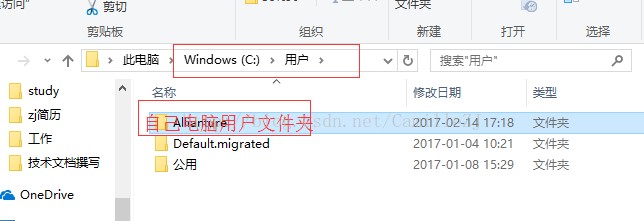
2.用touch创建文件 .git-credentials。

3.touch创建文件后用vim打开并编辑此文件,命令如下:
- 打开并编辑:vim .git-credentials(i-进入编辑模式)
- 编辑内容:https://{username}:{password}@github.com(登录账号,邮箱和密码)
- 保存编辑内容:按<esc>键退出编辑模式,:wq <回车>保存并退出
4.之后在配置
git config --global credential.helper store
打开%home%目录下的.gitconfig文件,会发现多了如下内容:
[credential]
helper = store
以上配置好后,关闭git bash重新打开,之后pull一个项目,首次还是要输入用户名及密码,之后pull成功后,再以后pull和push都不需要在输入用户名及密码了,此后打开新建的.git-credentials文件发现在https://{username}:{password}@github.com之上多了一条类似的文本。
二、linux或者mac下方法
基本步骤和上面类似,就是linux下面可以直接创建.git-credential文件,命令如下:
1.创建文件,进入文件,输入内容:
cd ~
touch .git-credentials
vim .git-credentials
https://{username}:{password}@github.com
2.在终端下输入:
git config --global credential.helper store
3.打开~/.gitconfig文件,会发现多了一项:
[credential]
helper = store
本地windows下还可以通过添加环境变量来配置,参考网址:https://www.jb51.net/program/376023zsj.htm
三、总结
以上为个人经验,希望能给大家一个参考,也希望大家多多支持代码网。



发表评论