
 我要评论
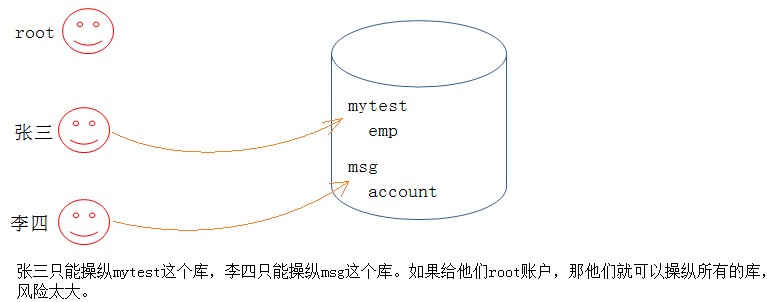
我要评论如果我们只能使用 root 用户,这样存在安全隐患。这时,就需要使用 mysql 的用户管理。
1. 用户
1.1 用户信息
mysql> show databases;
+--------------------+
| database           |
+--------------------+
| d1                 |
| information_schema |
| mysql              | <--用户信息所在的数据库
| oj_system          |
| performance_schema |
| scott              |
| store              |
| sys                |
| test_db            |
| users              |
+--------------------+
10 rows in set (0.00 sec)
mysql> use mysql
reading table information for completion of table and column names
you can turn off this feature to get a quicker startup with -a
database changed
mysql> select host,user,authentication_string from user;
+-----------+------------------+------------------------------------------------------------------------+
| host      | user             | authentication_string                                                  |
+-----------+------------------+------------------------------------------------------------------------+
| localhost | debian-sys-maint | $a$005$
ad?>}~yyxg9covu8bmtohesua4r2l8vdbyqciw5ghvas89xcjdaqga3 |
| localhost | mysql.infoschema | $a$005$thisisacombinationofinvalidsaltandpasswordthatmustneverbrbeused |
| localhost | mysql.session    | $a$005$thisisacombinationofinvalidsaltandpasswordthatmustneverbrbeused |
| localhost | mysql.sys        | $a$005$thisisacombinationofinvalidsaltandpasswordthatmustneverbrbeused |
| localhost | root             |                                                                        |
| localhost | wsj              |                                                                        |
+-----------+------------------+------------------------------------------------------------------------+
6 rows in set (0.00 sec)
user 表的表结构:
mysql> desc user;
+--------------------------+-----------------------------------+------+-----+-----------------------+-------+
| field                    | type                              | null | key | default               | extra |
+--------------------------+-----------------------------------+------+-----+-----------------------+-------+
| host                     | char(255)                         | no   | pri |                       |       |
| user                     | char(32)                          | no   | pri |                       |       |
| select_priv              | enum('n','y')                     | no   |     | n                     |       |
| insert_priv              | enum('n','y')                     | no   |     | n                     |       |
| update_priv              | enum('n','y')                     | no   |     | n                     |       |
| delete_priv              | enum('n','y')                     | no   |     | n                     |       |
| create_priv              | enum('n','y')                     | no   |     | n                     |       |
| drop_priv                | enum('n','y')                     | no   |     | n                     |       |
| reload_priv              | enum('n','y')                     | no   |     | n                     |       |
| shutdown_priv            | enum('n','y')                     | no   |     | n                     |       |
| process_priv             | enum('n','y')                     | no   |     | n                     |       |
| file_priv                | enum('n','y')                     | no   |     | n                     |       |
| grant_priv               | enum('n','y')                     | no   |     | n                     |       |
| references_priv          | enum('n','y')                     | no   |     | n                     |       |
| index_priv               | enum('n','y')                     | no   |     | n                     |       |
| alter_priv               | enum('n','y')                     | no   |     | n                     |       |
| show_db_priv             | enum('n','y')                     | no   |     | n                     |       |
| super_priv               | enum('n','y')                     | no   |     | n                     |       |
| create_tmp_table_priv    | enum('n','y')                     | no   |     | n                     |       |
| lock_tables_priv         | enum('n','y')                     | no   |     | n                     |       |
| execute_priv             | enum('n','y')                     | no   |     | n                     |       |
| repl_slave_priv          | enum('n','y')                     | no   |     | n                     |       |
| repl_client_priv         | enum('n','y')                     | no   |     | n                     |       |
| create_view_priv         | enum('n','y')                     | no   |     | n                     |       |
| show_view_priv           | enum('n','y')                     | no   |     | n                     |       |
| create_routine_priv      | enum('n','y')                     | no   |     | n                     |       |
| alter_routine_priv       | enum('n','y')                     | no   |     | n                     |       |
| create_user_priv         | enum('n','y')                     | no   |     | n                     |       |
| event_priv               | enum('n','y')                     | no   |     | n                     |       |
| trigger_priv             | enum('n','y')                     | no   |     | n                     |       |
| create_tablespace_priv   | enum('n','y')                     | no   |     | n                     |       |
| ssl_type                 | enum('','any','x509','specified') | no   |     |                       |       |
| ssl_cipher               | blob                              | no   |     | null                  |       |
| x509_issuer              | blob                              | no   |     | null                  |       |
| x509_subject             | blob                              | no   |     | null                  |       |
| max_questions            | int unsigned                      | no   |     | 0                     |       |
| max_updates              | int unsigned                      | no   |     | 0                     |       |
| max_connections          | int unsigned                      | no   |     | 0                     |       |
| max_user_connections     | int unsigned                      | no   |     | 0                     |       |
| plugin                   | char(64)                          | no   |     | caching_sha2_password |       |
| authentication_string    | text                              | yes  |     | null                  |       |
| password_expired         | enum('n','y')                     | no   |     | n                     |       |
| password_last_changed    | timestamp                         | yes  |     | null                  |       |
| password_lifetime        | smallint unsigned                 | yes  |     | null                  |       |
| account_locked           | enum('n','y')                     | no   |     | n                     |       |
| create_role_priv         | enum('n','y')                     | no   |     | n                     |       |
| drop_role_priv           | enum('n','y')                     | no   |     | n                     |       |
| password_reuse_history   | smallint unsigned                 | yes  |     | null                  |       |
| password_reuse_time      | smallint unsigned                 | yes  |     | null                  |       |
| password_require_current | enum('n','y')                     | yes  |     | null                  |       |
| user_attributes          | json                              | yes  |     | null                  |       |
+--------------------------+-----------------------------------+------+-----+-----------------------+-------+
51 rows in set (0.00 sec)
字段解释:
- host:表示这个用户可以从哪个主机登陆,如果是localhost,表示只能从本机登陆
- user:用户名
- authentication_string:用户密码通过password函数加密后的
- *_priv:用户拥有的权限。
1.2 创建用户
create user '用户名'@'登陆主机/ip' identified by '密码';
例子:
mysql> create user wsj@localhost identified by '123456';
query ok, 0 rows affected (0.01 sec)
mysql> select user,host from user;
+------------------+-----------+
| user             | host      |
+------------------+-----------+
| debian-sys-maint | localhost |
| mysql.infoschema | localhost |
| mysql.session    | localhost |
| mysql.sys        | localhost |
| root             | localhost |
| wsj              | localhost | <--新创建的用户
+------------------+-----------+
6 rows in set (0.00 sec)
登录试试:
wsj@izuf6dza8bf7vp0zjipnhmz:~$ mysql -uwsj -hlocalhost -p
enter password:
welcome to the mysql monitor.  commands end with ; or \g.
your mysql connection id is 186
server version: 8.0.46-0ubuntu0.22.04.3 (ubuntu)
copyright (c) 2000, 2026, oracle and/or its affiliates.
oracle is a registered trademark of oracle corporation and/or its
affiliates. other names may be trademarks of their respective
owners.
type 'help;' or '\h' for help. type '\c' to clear the current input statement.
mysql>
备注:可能实际在设置密码的时候,因为mysql本身的认证等级比较高,一些简单的密码无法设置,会爆出如下报错:
-- error 1819 (hy000): your password does not satisfy the current policy requirements
-- 解决方案参考:https://www.jb51.net/program/32588081w.htm
--查看密码设置相关要求:show variables like 'validate_password%';
不要轻易添加一个可以从任意地方登陆的 user:
create user '用户名'@'%' identified by '密码';
1.3 删除用户
drop user '用户名'@'主机名';
例子:
mysql> select user,host from user;
+------------------+-----------+
| user             | host      |
+------------------+-----------+
| debian-sys-maint | localhost |
| mysql.infoschema | localhost |
| mysql.session    | localhost |
| mysql.sys        | localhost |
| root             | localhost |
| wsj              | localhost |
+------------------+-----------+
6 rows in set (0.00 sec)
# 直接给个用户名,不能删除,它默认是%,表示所有地方可以登陆的用户。
mysql> drop user wsj;
error 1396 (hy000): operation drop user failed for 'wsj'@'%'
mysql> drop user wsj@localhost;
query ok, 0 rows affected (0.01 sec)
mysql> select user,host from user;
+------------------+-----------+
| user             | host      |
+------------------+-----------+
| debian-sys-maint | localhost |
| mysql.infoschema | localhost |
| mysql.session    | localhost |
| mysql.sys        | localhost |
| root             | localhost |
+------------------+-----------+
5 rows in set (0.00 sec)
1.4 修改用户密码
自己改自己的密码
set password=password('新密码');
root 用户修改指定用户的密码
set password for '用户名'@'主机名'=password('新密码');
mysql 8.0 以后移除了 password() 函数,可以使用下面的方法:
-- 修改当前登录用户的密码
alter user current_user() identified by '密码';
-- 指定用户名修改
alter user '用户名'@'登录主机' identified by '密码';
mysql> alter user current_user() identified by '111';
query ok, 0 rows affected (0.01 sec)
执行后通常会自动生效,也可以手动刷新以下权限(root):
flush privileges;
2. 数据库的权限
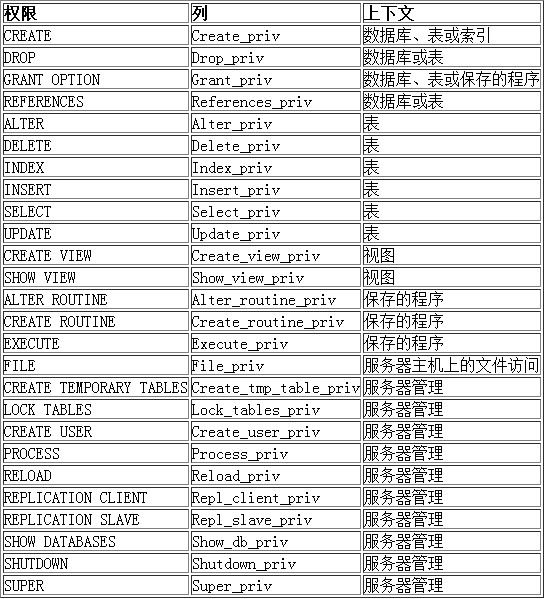
mysql 数据库提供的权限列表:
2.1 给用户授权
刚创建的用户没有任何权限,需要给用户授权
grant 权限列表 on 库.对项名(表名) to '用户名'@'登陆位置' [identified by '密码'(用户还没创建的时候带)];
权限列表,多个权限用逗号分开
grant select on ...
grant select, delete, create on ....
grant all [privileges] on ... -- 表示赋予该用户在该对象上的所有权限
- *.*:代表本系统中的所有数据库的所有对象(表,视图,存储过程等)
- 库.*:表示某个数据库中的所有数据对象(表,视图,存储过程等)
- identified by 可选。如果用户存在,赋予权限的同时修改密码,如果该用户不存在,就是创建用户(mysql 8.0 以后不再支持 grant 时自动创建用户,必须先用 create user 创建用户,再用 grant 授权)
如果发现赋权限后,没有生效,可以刷新一下(root):
flush privileges;
2.2 回收权限
revoke 权限列表 on 库.对项名 from '用户名'@'登陆位置';
例子:
-- 回收 wsj 对 test 数据库的所有权限
-- root 身份,终端a
mysql> revoke all on test.* from 'wsj'@'localhost';
query ok, 0 rows affected (0.00 sec)
--whb身份,终端b
mysql> show databases;
+--------------------+
| database           |
+--------------------+
| information_schema |
| test               |
+--------------------+
2 rows in set (0.00 sec)
mysql> show databases;
+--------------------+
| database           |
+--------------------+
| information_schema |
+--------------------+
1 row in set (0.00 sec)
到此这篇关于mysql 用户管理之创建用户、给用户授权的文章就介绍到这了,更多相关mysql创建用户、用户授权内容请搜索代码网以前的文章或继续浏览下面的相关文章希望大家以后多多支持代码网!





发表评论