
 我要评论
我要评论前言
在上一篇的文章中我们简单的了解了对表的操作,也认识了在mysql中的数据类型.
但是在上一篇文章中我们遗留了一些问题
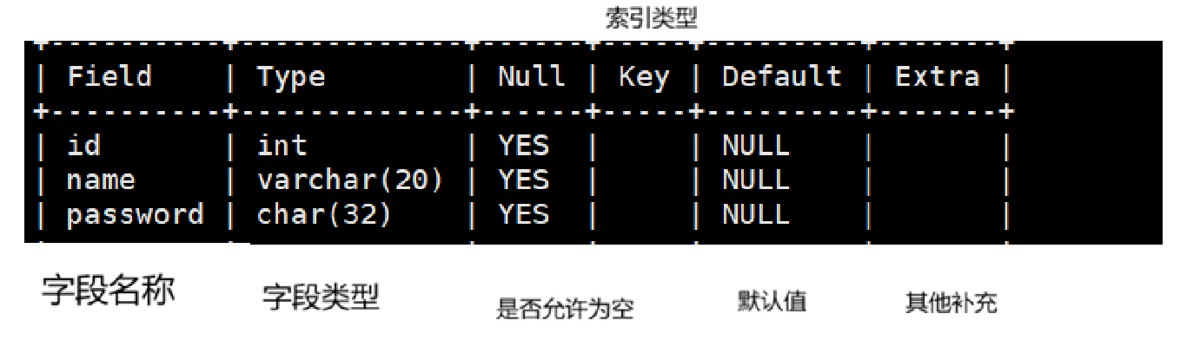
今天我们来详细的讲解一下这个表中的知识点.
这些都是对表的约束.
表的约束很多,这里主要介绍如下几个: null/not null,default, comment, zerofill,primary key,auto_increment,unique key 。
表的约束
空属性
在上述图片中的第三列中我们可以看到这样的字段
null
yes
yes
这就是代表的这个字段的填写是可以为空的也就是可以是null
create table test1 (
    -> name varchar(20),
    -> class varchar (20) not null
    -> );
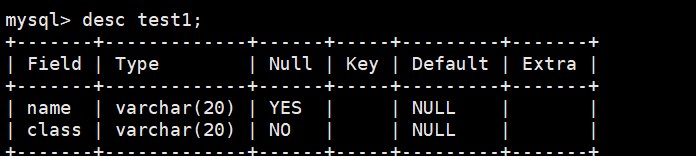
现在我们创建出的表的结构如下图:
我们来插入一组数据
insert into test1 values (null,'高三二班');
可以看到的是name这个字段是可以是空的
但是class这一行是不被允许的.
insert into test1 values (null,null);
error 1048 (23000): column 'class' cannot be null
空和空白的区别
| 类型 | 含义 | 类比 |
|---|---|---|
| null | “未知” 或 “不存在”。表示该字段没有值,暂时不知道是什么。 | 相当于一个空杯子,里面有没有水不知道(未知状态)。 |
| 空字符串 '' | “确定有值,但这个值就是空”。表示我知道这个字段的内容,但内容长度为0。 | 相当于一个明确的空瓶子,我知道里面是空的。 |
| 空白(空格) | “有值,且值是空格字符”。即 ' ' 或 ' ',它是一个长度为1或以上的非空字符串。 | 相当于瓶子里装满了空气,它是有内容的(内容是不可见的空格)。 |
举个例子:
在孙悟空没有被菩提祖师点化之前,他的名字就是空白,但是不是null.如果是null的时候就代表这猴子查无此人了.当被赋予了名字之后空白名字就被覆盖成为了孙悟空.
默认值
在c++的语法中我们知道函数参数是有一个叫做缺省值的东西的,也就是我们不向函数传参的时候他的参数会默认是缺省值的.
在这里是相同的含义的.
insert into test1 (name) values ('张三');
error 1364 (hy000): field 'class' doesn't have a default value
在上述的表结构中,两个字段的默认值都是null.所以我们不填写class的时候默认是null的.
但是我们有设置了class不为null所以出现了错误.
alter table test1 modify class varchar (20) default '高三二班';
现在我们修改了class的默认值,让他不是null.
 insert into test1 (name) values ('张三');
query ok, 1 row affected (0.00 sec)
现在插入数据即使一个合法的操作了.
列描述
这个呢就是可以类比于c++中的注释来看.
create table test1 (
 name varchar (20) comment '用户名字',
 class varchar (20) comment '用户班级'
);
但是用desc是看不到这个注释的.
我们可以看我们创建表的所有的操作来看
show create table [名称];
show create table test1;
+-------+---------------------------------------------------------------------------------------------------------------------------------------------------------------------------------------------------------------+
| table | create table                                                                                                                                                                                                  |
+-------+---------------------------------------------------------------------------------------------------------------------------------------------------------------------------------------------------------------+
| test1 | create table `test1` (
  `name` varchar(20) default null comment '用户名字',
  `class` varchar(20) default null comment '用户班级'
) engine=innodb default charset=utf8mb4 collate=utf8mb4_0900_ai_ci
zerofill
create table test1 ( id int(3) zerofill not null, name varchar (20) not null );
我们看到在创建的时候这个int类型怎么还有一个3?
这就是传说中的zerofill的参数.
名副其实的就是补零.
select * from test1;
+-----+--------+
| id  | name   |
+-----+--------+
| 001 | 张三   |
+-----+--------+
但是当实际的位数大于我们设置的宽度的时候他的行为就是什么都不做.
主键
主键:primary key用来唯一的约束该字段里面的数据,不能重复,不能为空,一张表中最多只能有一个 主键;主键所在的列通常是整数类型。
通俗的来说就是:
主键是来标识一个用户的唯一性的,类似于我们的身份证,身份证是不可能有重复的.
create table test1 (
    -> id int  primary key not null comment '学号',
    -> name varchar (20) not null
    -> );
insert into test1 value
-> (1,'j');我们现在来尝试插入重复的id
 insert into test1 value  (1,'k');
error 1062 (23000): duplicate entry '1' for key 'test1.primary'
我们的操作是不被允许的,所以主键是具有唯一性的.
我们也是可以删除主键的.
alter table test1 drop primary key;
desc test1;
+-------+-------------+------+-----+---------+-------+
| field | type        | null | key | default | extra |
+-------+-------------+------+-----+---------+-------+
| id    | int         | no   |     | null    |       |
| name  | varchar(20) | no   |     | null    |       |
+-------+-------------+------+-----+---------+-------+
删除之后这个id字段并没有消失而是删除了主键的属性而已.
那么怎么追加主键呢?
alter table test1 add primary key (id);
desc test1;
+-------+-------------+------+-----+---------+-------+
| field | type        | null | key | default | extra |
+-------+-------------+------+-----+---------+-------+
| id    | int         | no   | pri | null    |       |
| name  | varchar(20) | no   |     | null    |       |
+-------+-------------+------+-----+---------+-------+
但是在特殊的情况下一个字段是不能确认用户的唯一性的,需要多个字段来确认用户的唯一.
例如我们来描述一个陌生人:
戴眼镜与否,身材,穿着....
这时候我们就需要使用复合主键了
create table test1 (
    -> id int not null,
    -> name varchar (20) not null,
    -> class int not null,
    -> primary key (id,class)
    -> );
现在我们创建的表主键就是一个复合主键.
 insert into test1 values
    -> (1,'张三',1);

insert into test1 values  (1,'李四',2);
query ok, 1 row affected (0.01 sec)
当我们插入的数据id和class都是一样的时候他才会报错
 insert into test1 values  (1,'李四',2);
error 1062 (23000): duplicate entry '1-2' for key 'test1.primary'
自增长
auto_increment:当对应的字段,不给值,会自动的被系统触发,系统会从当前字段中已经有的最大值 +1操作,得到一个新的不同的值。通常和主键搭配使用,作为逻辑主键。
自增长的特点:
- 任何一个字段要做自增长,前提是本身是一个索引(key一栏有值)
- 自增长字段必须是整数
- 一张表最多只能有一个自增长
create table test1 (
    -> id int not null primary key auto_increment,
    -> name varchar (20) not null
    -> );
insert into test1 (name) values ('张三');


select * from test1;
+----+--------+
| id | name   |
+----+--------+
|  1 | 张三   |
+----+--------+
我们继续插入数据
insert into test1 (name) values ('李四');


select * from test1;
+----+--------+
| id | name   |
+----+--------+
|  1 | 张三   |
|  2 | 李四   |
+----+--------+
的确他是会自增长的.
insert into test1  values (100,'王五');

insert into test1 (name) values ('赵六');

select * from test1;
+-----+--------+
| id  | name   |
+-----+--------+
|   1 | 张三   |
|   2 | 李四   |
| 100 | 王五   |
| 101 | 赵六   |
+-----+--------+
我们现在删除这个赵六这个数据.
delete from test1 where id = 101;

 select * from test1;
+-----+--------+
| id  | name   |
+-----+--------+
|   1 | 张三   |
|   2 | 李四   |
| 100 | 王五   |
+-----+--------+
现在插入的话自增过后的id是多少
insert into test1 (name) values ('赵六');

select * from test1;
+-----+--------+
| id  | name   |
+-----+--------+
|   1 | 张三   |
|   2 | 李四   |
| 100 | 王五   |
| 102 | 赵六   |
+-----+--------+
可以发现的是这个自增的id不是现在存在id的最大值的++,而是存在过的最大值的自增.
这是怎么实现的?
 show table status like 'test1'\g
*************************** 1. row ***************************
           name: test1
         engine: innodb
        version: 10
     row_format: dynamic
           rows: 4
 avg_row_length: 4096
    data_length: 16384
max_data_length: 0
   index_length: 0
      data_free: 0
 auto_increment: 103
    create_time: 2026-08-26 17:41:26
    update_time: 2026-08-26 17:47:19
     check_time: null
      collation: utf8mb4_0900_ai_ci
       checksum: null
 create_options:
        comment:
在表中都是有记录的.
唯一键
唯一键代表的就是这个字段不能在同一个表中存在相同的值.
这样听起来的效果于主键是相同的.
但是他们还是有不同的地方的.
| 主键(primary key) | 唯一键(unique key) | |
|---|---|---|
| 一句话 | 表的"身份证号" | 表的"手机号" |
| 数量 | 每张表只能有1个 | 每张表可以有多个 |
| 是否允许null | ❌ 绝对不允许 | ✅ 允许有null(多个null不冲突) |
| 是否自动建索引 | ✅ 自动创建 | ✅ 自动创建 |
| 业务含义 | 通常无业务含义(如自增id) | 有业务含义(如手机号、邮箱) |
假设一个场景(当然,具体可能并不是这样,仅仅为了帮助大家理解) 比如在公司,我们需要一个员工管理系统,系统中有一个员工表,员工表中有两列信息,一个身份证号码,一 个是员工工号,我们可以选择身份号码作为主键。 而我们设计员工工号的时候,需要一种约束:而所有的员工工号都不能重复。 具体指的是在公司的业务上不能重复,我们设计表的时候,需要这个约束,那么就可以将员工工号设计成为唯 一键。 一般而言,我们建议将主键设计成为和当前业务无关的字段,这样,当业务调整的时候,我们可以尽量不会对 主键做过大的调整。
create table test1 (
    -> id int  unique comment '可以为空,但是不能重复,学号',
    -> name varchar (20) not null
    -> );
insert into test1 values (1,'张三');
query ok, 1 row affected (0.00 sec)

mysql> insert into test1 values (2,'张三');
query ok, 1 row affected (0.01 sec)

mysql> insert into test1 values (2,'李四');
error 1062 (23000): duplicate entry '2' for key 'test1.id'
可以看到的是唯一键是不可以重复的.
外键
我们先不解释什么是外键我们先来简单的创建出两个表.
一个学生表,一个班级表
create table stu (
    -> id int not null,
    -> name varchar(20) not null,
    -> class_id int not null
    -> );
create table class (
    -> class_id int not null,
    -> class_name varchar (20) not null
    -> );
现在我们先创建一些班级.
insert into class values
    -> (100,'c++班级'),
    -> (101,'java班级');
现在我们有了两个班级了现在就是输入学生的数据了
insert into stu values
    -> (1,'张三',100),
    -> (2,'李四',101);
但是如果是这样的数据呢?
insert into stu values  (1,'张三',102);
query ok, 1 row affected (0.01 sec)
有点不对劲啊,我们的班级哪里有102班这不是错误数据吗?
但是数据库并没有限制我们的操作.
这时候我们该怎么处理?
这时候就需要两个表结构建立起联系了.
怎么建立起联系呢?
外键就可以起到这个桥梁的作用了.
foreign key (当前表的字段) references [建立连接表的名称] (字段);
alter table stu add primary key (class_id);
alter table class add primary key (class_id);
delete from stu where class_id=102;
alter table stu add foreign key (class_id) references class(class_id);
首先建立外键需要两个即将建立的字段是唯一键或者是主键.
这样按道理说我们的是可以建立起外键的,因为我们之前的操作导致stu表中存在不合理的数据,所以我们需要删除这个数据.
建立外键.
这样我们再插入不合理的数据的时候就会被拦截了.
insert into stu values (3,'王五',102);
error 1452 (23000): cannot add or update a child row: a foreign key constraint fails (`jiao`.`stu`, constraint `stu_ibfk_1` foreign key (`class_id`) references `class` (`class_id`))
总结
到此这篇关于mysql数据库表约束的文章就介绍到这了,更多相关mysql表的约束内容请搜索代码网以前的文章或继续浏览下面的相关文章希望大家以后多多支持代码网!





发表评论