
 我要评论
我要评论科技媒体 neowin 昨日(7 月 27 日)发布博文,介绍了如何在 windows 11 系统中,通过 moricons.dll 和 pifmgr.dll 两个文件,恢复 windows 3.x 和 windows 9x 时代遗留的旧版图标。
附上相关操作步骤如下:
1、右键单击任意快捷方式或文件,然后选择“属性”。
2、点击“更改图标”。
3、如果弹出对话框提示当前文件没有图标,请单击“确定”继续。
4、在“在此文件中查找图标”框中,清除所有内容,然后粘贴旧版图标库的完整路径:
c:\windows\system32\moricons.dllc:\windows\system32\pifmgr.dll
5、按下回车键。
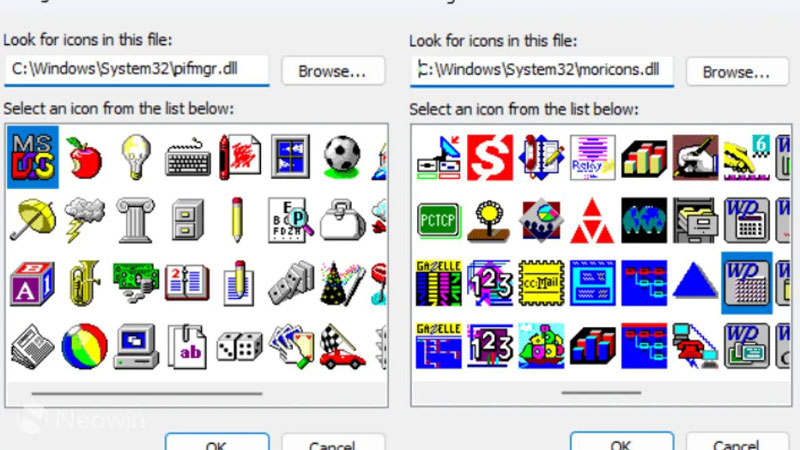
6、从出现的图标集中选择一个图标,单击“确定”,然后单击“应用”。
上述 2 个 dll 文件可以追溯到 windows 3.x 以及 windows 9x 时代,微软为了确保兼容性,防止在 windows 11 系统上指向特定图标索引的旧快捷方式失效,因此依然保留相关文件。
微软在 windows 11 系统只停止引用已移除功能的图标,没有删除动态链接库中的旧资源。除了上述图标外,windows 11 系统中还遗留了大量图标库:
- c:\windows\system32\shell32.dll 仍然是 windows 至今使用的默认设置集,但它仍然包含软盘图标和 windows 95 时代的文件夹图标。
- c:\windows\system32\imageres.dll - shell32 的现代对应文件,随 vista 引入,并且现在大多数文件资源管理器实际上都从中调用。
- c:\windows\system32\ieframe.dll - 旧的 internet explorer 图标集,即使 ie 本身已不存在,为了兼容旧版而保留。
- c:\windows\system32\shdocvw.dll - 另一个资源管理器和 ie 时代的库,与 shell32.dll 中已有的内容大部分重叠,但来自 windows 历史的早期版本。
- c:\windows\system32\mmres.dll - 扬声器、麦克风和其他声音相关图标。
- c:\windows\system32\powercpl.dll - 电池和电源计划图标。
- c:\windows\system32\pnidui.dll - wi-fi 信号和网络状态图标。
- c:\windows\system32\networkexplorer.dll - 网络位置和设备图标。
- c:\windows\system32\netshell.dll - 更宽泛的网络和连接图标,类似于 shell32 的网络集。
- c:\windows\system32\wpdshext.dll - 便携式设备、手机、相机和 usb 驱动器。
- c:\windows\system32\accessibilitycpl.dll - 辅助功能,例如放大镜和讲述人。
- c:\windows\system32\wmploc.dll - windows media player 的图标集。
- c:\windows\system32\mstscax.dll - 远程桌面连接图标。

发表评论