
 我要评论
我要评论一、正则简介
正则表达式(regular expression,常简称 “正则” 或 regex),也叫正规表示法,本质上是一套用来描述文本排列规则的表达式。它可以精准定义字符串的匹配模式,是处理复杂文本信息的强大工具。
正则表达式并非 python 专属,它是一套独立于编程语言的文本处理标准,拥有自身独特的语法规则和独立的正则引擎。当我们用正则语法编写好匹配规则(模式)后,引擎不仅能执行模糊文本查找,还能完成模糊分割、内容替换等复杂操作,让开发者可以灵活高效地处理各类文本信息。多数编程语言都会提供操作正则引擎的接口,比如 python 就内置了 re 模块来实现正则功能。
尽管在简单文本处理场景中,正则的效率略逊于编程语言自带的字符串操作,但它的功能覆盖面和处理复杂场景的能力,是普通字符串操作无法比拟的。
正则表达式最早起源于 perl 语言,后续包括 java、php、go、javascript、sql 在内的大多数编程语言,在实现正则功能时都沿用了 perl 的核心语法。这意味着你在 python 中学到的正则知识,几乎可以无缝迁移到其他语言中,具备极高的通用性。
总的来说,无论是哪种编程语言,对字符串或文本的核心操作都离不开分割、匹配、查找、替换这四类场景,而正则正是为高效解决这些问题而生的工具。
二、元字符
正则表达式的核心威力,来自于它定义的一系列 “元字符”。这些特殊字符不再代表字面含义,而是被赋予了匹配规则的功能,是我们构建复杂匹配模式的基础。
1、通配符
通配符是正则里最基础的元字符,其中最具代表性的就是英文句号 . 。
匹配规则:它可以匹配除了换行符(\n)之外的任意单个字符。
import re
# . 匹配一个任意字符(除换行符)
s = "apple a%e a9e agree age amazee animate advertise a\ne"
result1 = re.findall("a.e", s)
print(result1)  # ['a%e', 'a9e', 'age', 'aze', 'ate']
result2 = re.findall("a..e", s)
print(result2)  # ['agre', 'azee', 'adve']
result3 = re.findall("a...e", s)
print(result3)  # ['apple', 'agree', 'amaze']
result4 = re.findall("a....e", s)
print(result4)  # ['amazee']
result5 = re.findall("a.....e", s)
print(result5)  # ['a%e a9e', 'animate']
result6 = re.findall("a......e", s)
print(result6)  # ['a9e agre', 'ate adve']
2、字符集
当我们希望匹配某一类特定字符,而不是任意字符时,就需要用到字符集(character set)。它用方括号 [] 来定义。
匹配规则:方括号中的任意一个字符都会被匹配,且字符集只匹配单个位置。
import re
# [] 字符集 匹配字符集中的任意一个字符
s = "apple a%e a9e agree age amazee aye animate a1e a#e advertise a\ne"
result1 = re.findall("a[g]e", s)
print(result1)  # ['age']
result2 = re.findall("a[g9]e", s)
print(result2)  # ['a9e', 'age']
result3 = re.findall("a[g9%]e", s)
print(result3)  # ['a%e', 'a9e', 'age']
result4 = re.findall("a[0123456789]e", s)
print(result4)  # ['a9e', 'a1e']
# [0-9] 等价于 [0123456789]
result5 = re.findall("a[0-9]e", s)
print(result5)  # ['a9e', 'a1e']
result6 = re.findall("a[a-z]e", s)
print(result6)  # ['age', 'aze', 'ate']
# [a-za-z] 等价于 所有大小写英文字母
result6 = re.findall("a[a-za-z]e", s)
print(result6)  # ['age', 'aze', 'aye', 'ate']
# [^字符集] 匹配除了字符集中的任意一个字符
result7 = re.findall("a[^0-9]e", s)
print(result7)  # ['a%e', 'age', 'aze', 'aye', 'ate', 'a#e', 'a\ne']
进阶核心用法
范围表示:通过连字符
-表示连续字符范围,简化多字符书写,[a-z]匹配任意小写字母、[0-9]匹配任意数字、[a-za-z0-9_]匹配任意字母 / 数字 / 下划线。取反操作:在字符集开头加脱字符
^,表示匹配除括号内字符外的任意单个字符,[^0-9]匹配任意非数字字符。
3、重复元字符
在实际文本处理中,我们常需要匹配连续出现多次的字符 / 子模式(比如匹配 1 个或多个数字、0 个或多个字母),此时通配符和字符集的单字符匹配能力已无法满足需求,重复元字符(量词元字符) 应运而生 —— 它可以指定某个字符 / 子模式的重复匹配次数,是实现多字符批量匹配的核心元字符,让正则匹配规则从 “单字符” 拓展到 “多字符”。
重复元字符均为后缀式使用,即紧跟在需要被指定重复次数的目标字符 / 子模式后,仅对其紧邻的前一个匹配单元生效。
(1):{}
{n,m}:数量范围贪婪符,指定左边原子的数量范围,有{n},{n,},{m},{n,m}四种写法,其中n与m必须是非负整数
import re

s = "aeeee apple a%e a9e agree age amazee aye animate a1e a#e advertise a\ne wjh"
result1 = re.findall("a...e", s)
print(result1)  # ['aeeee', 'apple', 'agree', 'amaze']
# .{3} 表示任意字符出现3次 即.重复三次
result2 = re.findall("a.{3}e", s)
print(result2)  # ['aeeee', 'apple', 'agree', 'amaze']
# .{1,3} 表示任意字符出现1到3次,贪婪匹配,按着最大的匹配数去匹配
result3 = re.findall("a.{1,3}e", s)
print(result3)  # ['aeeee', 'apple', 'a%e', 'a9e', 'agree', 'age', 'amaze', 'aye', 'ate', 'a1e', 'a#e', 'adve']
# 如何取消贪婪匹配 加上?,取消贪婪匹配,按着最小的匹配数去匹配
result4 = re.findall("a.{1,3}?e", s)
print(result4)  # ['aee', 'apple', 'a%e', 'a9e', 'agre', 'age', 'amaze', 'aye', 'ate', 'a1e', 'a#e', 'adve']
"""
可以看到'aeeee'在贪婪匹配.{1,3}下 匹配到了'aeeee',取消贪婪匹配.{1,3}?下 匹配到了'aee'
"""
# .{4,} 表示任意字符出现4次或多次 贪婪
result5 = re.findall("a.{4,}e", s)
print(result5)  # ['aeeee apple a%e a9e agree age amazee aye animate a1e a#e advertise']
# .{4,}? 表示任意字符出现4次或多次 取消贪婪
result6 = re.findall("a.{4,}?e", s)
print(result6)  # ['aeeee apple', 'a%e a9e', 'agree age', 'amazee', 'aye animate', 'a1e a#e', 'advertise']
# 和字符集配合 寻找单词 [a-z]{1,4} 表示任意小写字母出现1到4次
result6 = re.findall("a[a-z]{1,4}e", s)
print(result6)  # ['aeeee', 'apple', 'agree', 'age', 'amazee', 'ate', 'adve']
(2):*
*指定左边原子出现0次或多次,等同{0,}
import re

s = "aeeee apple a%e a9e agree age amazee aye animate a1e a#e advertise a\ne wjh"
result1 = re.findall("a.{0,}e", s)
print(result1)  # ['aeeee apple a%e a9e agree age amazee aye animate a1e a#e advertise']
# .{0,} 等同于 a.*e
result2 = re.findall("a.*e", s)
print(result2)  # ['aeeee apple a%e a9e agree age amazee aye animate a1e a#e advertise']
# 贪婪模式用得少,我们一般用非贪婪模式
result3 = re.findall("a.*?e", s)
print(result3)  # ['ae', 'apple', 'a%e', 'a9e', 'agre', 'age', 'amaze', 'aye', 'animate', 'a1e', 'a#e', 'adve']
(3):+
+指定左边原子出现1次或多次,等同{1,}
import re

s = "aeeee apple a%e a9e agree age amazee aye animate a1e a#e advertise a\ne wjh"
result1 = re.findall("a.{1,}e", s)
print(result1)  # ['aeeee apple a%e a9e agree age amazee aye animate a1e a#e advertise']
# .{1,} 等同于 a.+e
result2 = re.findall("a.+e", s)
print(result2)  # ['aeeee apple a%e a9e agree age amazee aye animate a1e a#e advertise']
# 贪婪模式用得少,我们一般用非贪婪模式
result3 = re.findall("a.+?e", s)
print(result3)  # ['aee', 'apple', 'a%e', 'a9e', 'agre', 'age', 'amaze', 'aye', 'animate', 'a1e', 'a#e', 'adve']
(4):?
?指定左边原子出现1次或多次,等同{0,1}
import re

s = "https://www.baidu.com/,http://www.jd.com/,http://www.taobao.com/,https://www.zhihu.com/"
result1 = re.findall("https://www.[a-z]*?.com/", s)
print(result1)  # ['https://www.baidu.com/', 'https://www.zhihu.com/']
# 只能拿https的
# 我们用上 ?
result2 = re.findall("https?://www.[a-z]*?.com/", s)
print(result2)  # ['https://www.baidu.com/', 'http://www.jd.com/', 'http://www.taobao.com/', 'https://www.zhihu.com/']
(5):总结
常用核心重复元字符
| 重复元字符 | 核心匹配规则 | 简单示例 | 示例匹配结果 |
| {n} | 匹配前一个单元恰好 n 次(n 为非负整数) | a{3}b | 仅匹配aaab |
| {n,} | 匹配前一个单元至少 n 次(n 次及以上) | a{2,}b | aab、aaab、aaaab(不匹配ab、b) |
| {n,m} | 匹配前一个单元n 到 m 次(包含 n 和 m,n≤m) | a{1,3}b | ab、aab、aaab(不匹配b、aaaab) |
| * | 匹配前一个单元0 次或任意多次(0 次即允许不出现) | a*b | b、ab、aab、aaab |
| + | 匹配前一个单元1 次或任意多次(至少出现 1 次) | a+b | ab、aab、aaab(不匹配b) |
| ? | 匹配前一个单元0 次或 1 次(最多出现 1 次,可选) | a?b | b、ab(不匹配aab) |
贪婪匹配 vs 非贪婪匹配
重复元字符默认采用贪婪匹配策略,即尽可能匹配最多的符合规则的字符;若在重复元字符后追加一个?,则会切换为非贪婪匹配,即尽可能匹配最少的符合规则的字符。
| 匹配模式 | 语法形式 | 核心策略 | 示例正则 | 待匹配字符串 | 匹配结果 |
| 贪婪匹配 | a{1,3} | 取最大允许次数匹配 | a{1,3} | aaaaa | aaa |
| 非贪婪匹配 | a{1,3}? | 取最小允许次数匹配 | a{1,3}? | a |
4、^和$
在正则匹配中,我们常会遇到精准匹配整行内容、限定字符出现位置的需求(比如匹配纯数字的手机号、纯字母的用户名,而非字符串中夹杂的数字 / 字母片段),此时就需要用到边界匹配元字符,^和$是最核心的一对行边界匹配元字符,专门用于限定字符串 / 行的开头和结尾,让匹配规则从 “模糊查找片段” 升级为 “精准匹配整体”。
^和$本身不匹配任何具体字符,仅用于标记位置,属于 “零宽匹配” 元字符(匹配结果不占字符长度),二者常配合使用实现整行精准匹配,也可单独使用限定单边位置。
import re

# ^ 表示匹配字符串的开头
s1 = '123abc'
s2 = 'abc123'
print(re.findall(r'^[0-9]', s1))  # ['1']
print(re.findall(r'^[0-9]', s2))  # []

# $ 表示匹配字符串的结尾
s3 = '123a'
s4 = 'test5'
print(re.findall(r'[a-za-z]$', s3))  # ['a']
print(re.findall(r'[a-za-z]$', s4))  # []
^和$组合使用是实际开发中最常用的方式,核心解决 **“纯内容匹配”** 问题,避免匹配到夹杂目标内容的无效字符串,这是正则实现精准校验的基础,典型实用场景如下:
import re

# 校验纯 11 位手机号(仅数字校验,简易版)
s1 = '13800138000'
s2 = '13800138000 '
print(re.findall(r'^[0-9]{11}$', s1))  # ['13800138000']
print(re.findall(r'^[0-9]{11}$', s2))  # []
# 校验仅由字母 / 数字组成的 3-8 位用户名
s3 = 'abc123'
s4 = 'abc12_3'
print(re.findall(r'^[a-za-z0-9]{3,8}$', s3))  # ['abc123']
print(re.findall(r'^[a-za-z0-9]{3,8}$', s4))  # []
python re 模块的行匹配扩展:re.multiline 标志
默认情况下,^仅匹配整个字符串的开头,$仅匹配整个字符串的结尾,即使字符串包含多个换行符(\n),也不会将每行单独作为匹配单元。
若需要对多行字符串实现 “按行匹配”(即^匹配每行开头、$匹配每行结尾),可在 re 模块函数中指定 **re.multiline(简写re.m)** 标志,这一特性在处理日志、文本文件等多行内容时尤为实用。
import re

# 多行待匹配字符串(含3行,每行内容不同)
multi_text = "123abc\n456def\n789ghi"

# 无re.m标志:默认匹配整个字符串开头,仅能找到1个结果
default_result = re.findall(r"^[0-9]{3}", multi_text)
print("默认匹配结果:", default_result)  # ['123']

# 加re.m标志:按行匹配,每行开头的3位数字都能被匹配
multi_result = re.findall(r"^[0-9]{3}", multi_text, flags=re.m)
print("按行匹配结果:", multi_result)  # ['123', '456', '789']

# 按行匹配以字母结尾的行(整行匹配)
line_end_result = re.findall(r"[a-z]{3}$", multi_text, flags=re.m)
print("按行匹配结尾字母结果:", line_end_result) # ['abc', 'def', 'ghi']注意:与字符集内 ^ 的区别:字符集[]内的^是取反操作(如[^0-9]匹配非数字),而单独使用的^是开头边界匹配,二者语法位置不同,含义完全无关,切勿混淆;
5、转义符 \
正则中的转义符和python字符串的转义符相似,两个功能
(1):为普通字符赋予特殊含义
| 元字符 | 说明 |
| \d | 匹配数字,等于[0-9] |
| \d | 匹配非数字,等于[^0-9]或[^\d] |
| \w | 匹配单词字符(字母、数字、下划线),等于[0-9a-za-z_] |
| \w | 匹配非单词字符,等于[^0-9a-za-z_]或[^\w] |
| \s | 匹配空白字符(空格、制表符等) |
| \s | 匹配非空白字符 |
| \n | 匹配换行符 |
| \t | 匹配制表符,tab键 |
| \s | 匹配一个任何空白字符原子,包括空格、制表符、换页符等等。 |
| \s | 匹配一个任何非空白字符原子。 |
| \b | 匹配一个单词边界原子,也就是指单词和空格间的位置。 |
| \b | 匹配一个非单词边界原子,等价于[^\b] |
import re

s1 = "wjh\nage 24 shengao 185 gender m price 9999 birthday! 0109"
# \d	匹配数字,等于[0-9]
print(re.findall(r"\d", s1))  # ['2', '4', '1', '8', '5', '9', '9', '9', '9', '0', '1', '0', '9']
print(re.findall(r"\d+", s1))  # ['24', '185', '9999', '0109']
# \d	匹配非数字,等于[^0-9]或[^\d]
print(re.findall(r"\d+", s1))  # ['wjh\nage ', ' shengao ', ' gender men price ', ' birthday! ']
# \w	匹配单词字符(字母、数字、下划线),等于[0-9a-za-z_]
print(re.findall(r"\w+", s1))  # ['wjh', 'age', '24', 'shengao', '185', 'gender', 'men', 'price', '9999', 'birthday', '0109']
# \w	匹配非单词字符,等于[^0-9a-za-z_]或[^\w]
print(re.findall(r"\w+", s1))  # ['\n', ' ', ' ', ' ', ' ', ' ', ' ', ' ', ' ', '! ']
# \s	匹配空白字符(空格、制表符等)
print(re.findall(r"\s", s1))  # ['\n', ' ', ' ', ' ', ' ', ' ', ' ', ' ', ' ', ' ']
# \s	匹配非空白字符
print(re.findall(r"\s+", s1))  # ['wjh', 'age', '24', 'shengao', '185', 'gender', 'men', 'price', '9999', 'birthday!', '0109']
s2 = "cat cat2 cat! ccatc"
# \b	匹配一个单词边界原子,也就是指单词和空格间的位置。
print(re.findall(r"\bcat\b", s2))  # ['cat', 'cat'] 只有cat和cat!能匹配
# \b	匹配一个非单词边界原子,等价于[^\b]
print(re.findall(r"\bcat\b", s2))  # ['cat']只有ccatc能匹配
(2):匹配元字符本身(消除特殊含义)
import re

s = "https://wwwwbaidu.com/,http://www.jd.com/,http://www.taobao.com/,https://www.zhihu.com/"
result1 = re.findall("https?://www.[a-z]*?.com/", s)
print(result1)  # ['https://wwwwbaidu.com/', 'http://www.jd.com/', 'http://www.taobao.com/', 'https://www.zhihu.com/']
"""
我们不想匹配https://wwwwbaidu.com/,因为www后面有两个w,所以我们需要使用转义符
"""
result2 = re.findall(r"https?://www\.[a-z]*?.com/", s)
print(result2)  # ['http://www.jd.com/', 'http://www.taobao.com/', 'https://www.zhihu.com/']
6、()分组与优先提取
在正则的实际使用中,我们会发现仅靠单字符 / 单一匹配单元的组合,无法满足多字符整体重复、多规则分支匹配、匹配结果精准提取的需求(比如匹配ab重复 3 次、匹配手机号/邮箱二选一、从匹配结果中单独提取数字部分)。
此时分组元字符() 成为核心解决方案 —— 它能将括号内的任意字符 / 子模式包裹为一个独立的匹配单元(分组),让重复、边界等元字符对整个分组生效;同时分组还支持优先提取匹配结果,能从整体匹配内容中精准拆分出我们需要的子内容,是正则从 “基础匹配” 升级为 “复杂场景匹配 + 结果解析” 的关键元字符。
(1):构建独立匹配单元
import re

s = 'ab abb abbb abab'
result1 = re.findall('ab{1,3}', s)  # {1,3}只作用于b
print(result1)  # ['ab', 'abb', 'abbb', 'ab', 'ab']
result2 = re.findall('(ab){1,3}', s)  # {1,3}作用于ab
print(result2)
(2):优先提取匹配结果
import re

text = "小明28岁 小红25岁 小李30岁"

result = re.findall("\w+?(\d+)岁", text)
print("提取的年龄:", result)  # 输出:['28', '25', '30']
(3):非捕获分组(?:)
import re
text = "abab ababb aabb ababab"

# 1. 普通捕获分组 ():仅分组,也会捕获
# (ab){2} 把ab设为整体重复2次,但()会让findall优先返回分组内的ab
capture_res = re.findall(r"(ab){2}", text)
print("普通捕获分组结果:", capture_res)  # 输出:['ab', 'ab'](只返回分组内的ab,而非完整的abab)

# 2. 非捕获分组 (?:):仅分组,不捕获
# (?:ab){2} 仅把ab设为整体重复2次,不捕获,findall返回完整匹配结果
non_capture_res = re.findall(r"(?:ab){2}", text)
print("非捕获分组结果:", non_capture_res)  # 输出:['abab', 'abab'](直接返回完整的abab,符合需求)
7、分支元字符|
在正则匹配的实际场景中,我们常遇到多规则任选其一匹配的需求,比如匹配手机号或固定电话、匹配邮箱或用户名、匹配中文或英文名称,此时单一的匹配规则已无法满足需求,分支元字符| 应运而生。
import re

s1 = "apple banana cherry orange"
print(re.findall(r"apple|banana", s1))  # ['apple', 'banana']

s2 = "联系电话:13800138000 办公电话:010-12345678 无效号码:123456"
# 正则:(\d{11})|(\d{3}-\d{7,8})  两个分组分支,分别匹配手机号、固定电话
result1 = re.findall(r"(\d{11})|(\d{3}-\d{7,8})", s2)
# 处理结果:过滤元组中的空值,提取有效匹配
final_result = [item for tup in result1 for item in tup if item]
print(final_result)  # ['13800138000', '010-12345678']

s3 = "python pycharm pygame pyjava python123"
# 正则:py(thon|charm|game)  前缀py固定,分组内分支匹配后缀可选规则
result2 = re.findall(r"py(thon|charm|game)", s3)
print(result2)  # ['thon', 'charm', 'game', 'thon'](仅提取分组内分支内容)
# 若需提取完整单词,将整个规则设为非捕获分组或整体匹配
result3 = re.findall(r"py(?:thon|charm|game)", s3)
print(result3)  # ['python', 'pycharm', 'pygame', 'python']
三、案例
案例一:百度热搜
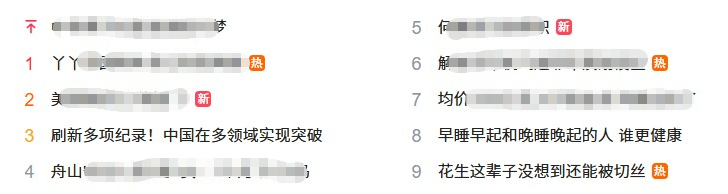
import re
html = """
<div id="s-hotsearch-wrapper" class="s-isindex-wrap s-hotsearch-wrapper s-hotsearch-wrapper-login s-hotsearch-wrapper-new-hot"><div class="s-hotsearch-title"><a class="hot-title" href="https://top.baidu.com/board?platform=pc&sa=pcindex_entry" rel="external nofollow" target="_blank"><div class="title-text c-font-medium c-color-t" aria-label="百度热搜"><img class="hot-title-icon" src="https://psstatic.cdn.bcebos.com/basics/aichat/hot_search_x3_1747880381000.png" alt=""><i class="c-icon arrow"></i></div></a><a id="hotsearch-refresh-btn" class="hot-refresh c-font-normal c-color-gray2"><i class="c-icon refresh-icon"></i><span class="hot-refresh-text">换一换</span></a></div><ul class="s-hotsearch-content" id="hotsearch-content-wrapper">
<li class="hotsearch-item odd" data-index="0"><a class="title-content c-link c-font-medium c-line-clamp1" href="https://www.baidu.com/s?wd=%e4%b8%ad%e9%9d%9e%e6%90%ba%e6%89%8b%e5%85%b1%e9%80%90%e5%8f%91%e5%b1%95%e6%8c%af%e5%85%b4%e6%a2%a6&sa=fyb_n_homepage&rsv_dl=fyb_n_homepage&from=super&cl=3&tn=baidutop10&fr=top1000&rsv_idx=2&hisfilter=1" rel="external nofollow" target="_blank"><div class="title-content-noindex title-content-noindex-new" style="display: none;"></div><i class="c-icon title-content-top-icon c-color-red c-gap-right-small" style="display: inline-block;"></i><span class="title-content-index c-index-single c-index-single-hot0 c-index-single-hot-new" style="display: none;">0</span><span class="title-content-title">中非携手共逐发展振兴梦</span></a><span class="title-content-mark ie-vertical c-text c-gap-left-small"></span></li>
<li class="hotsearch-item even" data-index="5"><a class="title-content c-link c-font-medium c-line-clamp1 tag-width" href="https://www.baidu.com/s?wd=%e4%bd%95%e7%8c%b7%e5%90%9b%e5%bd%93%e9%80%89%e6%96%b0%e8%81%8c&sa=fyb_n_homepage&rsv_dl=fyb_n_homepage&from=super&cl=3&tn=baidutop10&fr=top1000&rsv_idx=2&hisfilter=1" rel="external nofollow" target="_blank"><div class="title-content-noindex title-content-noindex-new" style="display: none;"></div><i class="c-icon title-content-top-icon c-color-red c-gap-right-small" style="display: none;"></i><span class="title-content-index c-index-single c-index-single-hot5 c-index-single-hot-new" style="display: inline-block;">5</span><span class="title-content-title">何猷君当选新职</span></a><span class="title-content-mark ie-vertical c-text c-gap-left-small c-text-new">新</span></li>
<li class="hotsearch-item odd" data-index="1"><a class="title-content c-link c-font-medium c-line-clamp1 tag-width" href="https://www.baidu.com/s?wd=%e4%b8%ab%e4%b8%ab%e5%9b%9e%e5%9b%bd%e4%b8%a4%e5%b9%b4%e5%a4%9a%e5%b7%b2%e5%88%a4%e8%8b%a5%e4%b8%a4%e7%86%8a&sa=fyb_n_homepage&rsv_dl=fyb_n_homepage&from=super&cl=3&tn=baidutop10&fr=top1000&rsv_idx=2&hisfilter=1" rel="external nofollow" target="_blank"><div class="title-content-noindex title-content-noindex-new" style="display: none;"></div><i class="c-icon title-content-top-icon c-color-red c-gap-right-small" style="display: none;"></i><span class="title-content-index c-index-single c-index-single-hot1 c-index-single-hot-new" style="display: ;">1</span><span class="title-content-title">丫丫回国两年多已判若两熊</span></a><span class="title-content-mark ie-vertical c-text c-gap-left-small c-text-hot">热</span></li>
<li class="hotsearch-item even" data-index="6"><a class="title-content c-link c-font-medium c-line-clamp1 tag-width" href="https://www.baidu.com/s?wd=%e8%a7%a3%e6%94%be%e5%86%9b%e5%86%9b%e6%9c%ba%e9%a3%9e%e8%bf%9b%e8%8f%b2%e5%86%9b%e6%bc%94%e5%88%92%e8%ae%be%e5%8c%ba&sa=fyb_n_homepage&rsv_dl=fyb_n_homepage&from=super&cl=3&tn=baidutop10&fr=top1000&rsv_idx=2&hisfilter=1" rel="external nofollow" target="_blank"><div class="title-content-noindex title-content-noindex-new" style="display: none;"></div><i class="c-icon title-content-top-icon c-color-red c-gap-right-small" style="display: none;"></i><span class="title-content-index c-index-single c-index-single-hot6 c-index-single-hot-new" style="display: ;">6</span><span class="title-content-title">解放军军机飞进菲军演划设区</span></a><span class="title-content-mark ie-vertical c-text c-gap-left-small c-text-hot">热</span></li>
<li class="hotsearch-item odd" data-index="2"><a class="title-content c-link c-font-medium c-line-clamp1 tag-width" href="https://www.baidu.com/s?wd=%e7%be%8e%e5%9b%bd%e6%94%bf%e5%ba%9c%e5%8f%88%e2%80%9c%e5%81%9c%e6%91%86%e2%80%9d%e4%ba%86&sa=fyb_n_homepage&rsv_dl=fyb_n_homepage&from=super&cl=3&tn=baidutop10&fr=top1000&rsv_idx=2&hisfilter=1" rel="external nofollow" target="_blank"><div class="title-content-noindex title-content-noindex-new" style="display: none;"></div><i class="c-icon title-content-top-icon c-color-red c-gap-right-small" style="display: none;"></i><span class="title-content-index c-index-single c-index-single-hot2 c-index-single-hot-new" style="display: ;">2</span><span class="title-content-title">美国政府又“停摆”了</span></a><span class="title-content-mark ie-vertical c-text c-gap-left-small c-text-new">新</span></li>
<li class="hotsearch-item even" data-index="7"><a class="title-content c-link c-font-medium c-line-clamp1" href="https://www.baidu.com/s?wd=%e5%9d%87%e4%bb%b7300%e5%85%83%2f%e5%85%8b%e5%85%a5%e6%89%8b%e7%9a%84%e9%87%91%e6%9d%a1+%e9%98%bf%e5%a7%a8%e5%85%a8%e5%8d%96%e4%ba%86&sa=fyb_n_homepage&rsv_dl=fyb_n_homepage&from=super&cl=3&tn=baidutop10&fr=top1000&rsv_idx=2&hisfilter=1" rel="external nofollow" target="_blank"><div class="title-content-noindex title-content-noindex-new" style="display: none;"></div><i class="c-icon title-content-top-icon c-color-red c-gap-right-small" style="display: none;"></i><span class="title-content-index c-index-single c-index-single-hot7 c-index-single-hot-new" style="display: ;">7</span><span class="title-content-title">均价300元/克入手的金条 阿姨全卖了</span></a><span class="title-content-mark ie-vertical c-text c-gap-left-small"></span></li>
<li class="hotsearch-item odd" data-index="3"><a class="title-content c-link c-font-medium c-line-clamp1" href="https://www.baidu.com/s?wd=%e5%88%b7%e6%96%b0%e5%a4%9a%e9%a1%b9%e7%ba%aa%e5%bd%95%ef%bc%81%e4%b8%ad%e5%9b%bd%e5%9c%a8%e5%a4%9a%e9%a2%86%e5%9f%9f%e5%ae%9e%e7%8e%b0%e7%aa%81%e7%a0%b4&sa=fyb_n_homepage&rsv_dl=fyb_n_homepage&from=super&cl=3&tn=baidutop10&fr=top1000&rsv_idx=2&hisfilter=1" rel="external nofollow" target="_blank"><div class="title-content-noindex title-content-noindex-new" style="display: none;"></div><i class="c-icon title-content-top-icon c-color-red c-gap-right-small" style="display: none;"></i><span class="title-content-index c-index-single c-index-single-hot3 c-index-single-hot-new" style="display: ;">3</span><span class="title-content-title">刷新多项纪录!中国在多领域实现突破</span></a><span class="title-content-mark ie-vertical c-text c-gap-left-small"></span></li>
<li class="hotsearch-item even" data-index="8"><a class="title-content c-link c-font-medium c-line-clamp1" href="https://www.baidu.com/s?wd=%e6%97%a9%e7%9d%a1%e6%97%a9%e8%b5%b7%e5%92%8c%e6%99%9a%e7%9d%a1%e6%99%9a%e8%b5%b7%e7%9a%84%e4%ba%ba+%e8%b0%81%e6%9b%b4%e5%81%a5%e5%ba%b7&sa=fyb_n_homepage&rsv_dl=fyb_n_homepage&from=super&cl=3&tn=baidutop10&fr=top1000&rsv_idx=2&hisfilter=1" rel="external nofollow" target="_blank"><div class="title-content-noindex title-content-noindex-new" style="display: none;"></div><i class="c-icon title-content-top-icon c-color-red c-gap-right-small" style="display: none;"></i><span class="title-content-index c-index-single c-index-single-hot8 c-index-single-hot-new" style="display: ;">8</span><span class="title-content-title">早睡早起和晚睡晚起的人 谁更健康</span></a><span class="title-content-mark ie-vertical c-text c-gap-left-small"></span></li>
<li class="hotsearch-item odd" data-index="4"><a class="title-content c-link c-font-medium c-line-clamp1" href="https://www.baidu.com/s?wd=%e8%88%9f%e5%b1%b1%e5%ae%88%e5%b2%9b%e4%ba%ba%e6%8b%9b2%e7%94%b72%e5%a5%b3%ef%bc%9a2%e4%b8%aa%e6%9c%88%e4%b8%8b1%e6%ac%a1%e5%b2%9b&sa=fyb_n_homepage&rsv_dl=fyb_n_homepage&from=super&cl=3&tn=baidutop10&fr=top1000&rsv_idx=2&hisfilter=1" rel="external nofollow" target="_blank"><div class="title-content-noindex title-content-noindex-new" style="display: none;"></div><i class="c-icon title-content-top-icon c-color-red c-gap-right-small" style="display: none;"></i><span class="title-content-index c-index-single c-index-single-hot4 c-index-single-hot-new" style="display: inline-block;">4</span><span class="title-content-title">舟山守岛人招2男2女:2个月下1次岛</span></a><span class="title-content-mark ie-vertical c-text c-gap-left-small"></span></li>
<li class="hotsearch-item even" data-index="9"><a class="title-content c-link c-font-medium c-line-clamp1 tag-width" href="https://www.baidu.com/s?wd=%e8%8a%b1%e7%94%9f%e8%bf%99%e8%be%88%e5%ad%90%e6%b2%a1%e6%83%b3%e5%88%b0%e8%bf%98%e8%83%bd%e8%a2%ab%e5%88%87%e4%b8%9d&sa=fyb_n_homepage&rsv_dl=fyb_n_homepage&from=super&cl=3&tn=baidutop10&fr=top1000&rsv_idx=2&hisfilter=1" rel="external nofollow" target="_blank"><div class="title-content-noindex title-content-noindex-new" style="display: none;"></div><i class="c-icon title-content-top-icon c-color-red c-gap-right-small" style="display: none;"></i><span class="title-content-index c-index-single c-index-single-hot9 c-index-single-hot-new" style="display: ;">9</span><span class="title-content-title">花生这辈子没想到还能被切丝</span></a><span class="title-content-mark ie-vertical c-text c-gap-left-small c-text-hot">热</span></li></ul></div>
"""
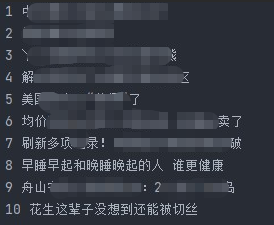
result = re.findall('class="title-content-title">(.+?)</span>', html)
for i, r in enumerate(result):
print(i+1, r)
案例二:错误日志
import re

log_text = """
2026-01-30 10:00:00 info 服务启动成功
2026-01-30 10:05:00 error 数据库连接失败,错误码:500
2026-01-30 10:06:00 info 用户登录成功,账号:user1
2026-01-30 10:08:00 exception 数组越界,位置:line 25
2026-01-30 10:10:00 error 接口请求超时,目标地址:/api/data"""

# 正则:匹配含error/exception的整行日志,re.m开启多行模式
error_pattern = r"^.*(?:error|exception).*$"
error_logs = re.findall(error_pattern, log_text, flags=re.m)

# 输出结果
print("提取的错误日志:")
for log in error_logs:
    print(log)
案例三:ip地址
import re

text = """服务器ip:192.168.1.1,备用ip:10.0.0.0,测试ip:255.255.255.255
无效ip:256.0.0.1、192.168.1、192.168.01.1、192.168.1.002
混杂内容:123456 172.16.5.88 abc.def.ghi.jkl"""

# 单段合法ip正则(0-255,无前置0)
ip_segment = r"(?:25[0-5]|2[0-4]\d|[01]?\d\d?)"
# 完整合法ipv4正则
ipv4_pattern = rf"{ip_segment}(?:\.{ip_segment}){{3}}"
# 提取所有合法ip
valid_ips = re.findall(ipv4_pattern, text)

print("提取的合法ipv4地址:")
for ip in valid_ips:
    print(ip)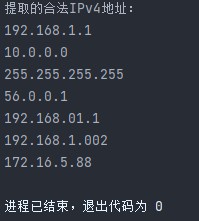
案例四:html文本
import re

html_text = """<h1>python正则表达式</h1>
<p>这是<b>正则</b>的<em>实战案例</em>,基于python <span style="color:red">re模块</span>。</p>
<a href="https://python.org" rel="external nofollow" >python官网</a>"""

pure_text = re.findall(r"<.*?>(.*?)<.*?>", html_text )

print(pure_text)
总结
到此这篇关于正则表达式与re模块的文章就介绍到这了,更多相关正则表达式与re模块内容请搜索代码网以前的文章或继续浏览下面的相关文章希望大家以后多多支持代码网!



发表评论