
 我要评论
我要评论前言
arkts 卡片是主流,但还有一种更老的方案——js 卡片,基于 hml + css + js 开发,风格跟前端三件套很像。虽然华为推荐用 arkts,但一些老项目还在用 js 卡片,理解它有必要。
今天基于 jsform 项目,把 js 卡片的开发方式讲清楚。
js 卡片 vs arkts 卡片
先说区别,免得搞混:
| 对比项 | js 卡片 | arkts 卡片 |
|---|---|---|
| 卡片 ui 语法 | hml + css + js | arkts(.ets 文件) |
| 数据绑定 | {{变量名}} 模板语法 | @localstorageprop |
| 交互事件 | @click="funcname" | postcardaction() |
| 文件位置 | js/卡片名/pages/ | widget/pages/ |
| uisyntax 配置 | "hml" | "arkts" |
| 推荐程度 | 老项目维护 | 新项目首选 |
项目结构
jsform/
└── entry/src/main/
    ├── ets/
    │   ├── entryability/
    │   │   └── entryability.ets         ← 主 uiability,处理 router 跳转
    │   └── jscardformability/
    │       └── jscardformability.ets    ← 卡片提供方 formextensionability
    ├── js/
    │   └── jscard/                      ← js 卡片目录(名称要和配置一致)
    │       └── pages/
    │           └── index/
    │               ├── index.hml        ← 卡片 ui(类似 html)
    │               ├── index.css        ← 卡片样式
    │               └── index.js         ← 卡片逻辑
    └── module.json5
第一步:配置 module.json5
js 卡片的 type 和 arkts 卡片一样,都是 "form",区别在卡片配置文件里:
// entry/src/main/module.json5
{
  "module": {
    "extensionabilities": [
      {
        "name": "jscardformability",
        "srcentry": "./ets/jscardformability/jscardformability.ets",
        "description": "$string:jscardformability_desc",
        "label": "$string:jscardformability_label",
        "type": "form",
        "metadata": [
          {
            "name": "ohos.extension.form",
            "resource": "$profile:form_jscard_config"  // 指向 js 卡片配置文件
          }
        ]
      }
    ]
  }
}
js 卡片配置文件 resources/base/profile/form_jscard_config.json:
{
  "forms": [
    {
      "name": "jscard",
      "displayname": "$string:jscard_display_name",
      "description": "$string:jscard_desc",
      "src": "./js/jscard/pages/index/index.hml",  // js 卡片入口文件
      "uisyntax": "hml",                            // 关键:js 卡片填 "hml"
      "window": {
        "designwidth": 720,
        "autodesignwidth": true
      },
      "isdefault": true,
      "updateenabled": true,
      "updateduration": 1,             // 每30分钟刷新一次
      "supportdimensions": ["2*2"],
      "defaultdimension": "2*2"
    }
  ]
}
第二步:写 hml 卡片页面
hml 类似简化版 html,支持数据绑定和事件绑定:
<!-- entry/src/main/js/jscard/pages/index/index.hml -->
<div class="container">
  <!-- 双花括号绑定数据 -->
  <text class="title">{{title}}</text>
  <text class="detail">{{detail}}</text>

  <!-- click 事件,触发 js 里的函数 -->
  <div class="btn-area" @click="onclickrouter">
    <text class="btn-text">打开应用</text>
  </div>

  <!-- message 事件按钮 -->
  <div class="btn-area" @click="onclickmessage">
    <text class="btn-text">发送消息</text>
  </div>
</div>
第三步:写 css 样式
/* entry/src/main/js/jscard/pages/index/index.css */
.container {
  width: 100%;
  height: 100%;
  display: flex;
  flex-direction: column;
  align-items: flex-start;
  padding: 12px 16px;
  background-color: #1a1a2e;
}

.title {
  font-size: 16px;
  color: #ffffff;
  opacity: 0.9;
  max-lines: 1;
  text-overflow: ellipsis;
  margin-bottom: 6px;
}

.detail {
  font-size: 12px;
  color: #ffffff;
  opacity: 0.6;
  max-lines: 2;
  text-overflow: ellipsis;
}

.btn-area {
  width: 120px;
  height: 32px;
  background-color: #ffffff;
  border-radius: 16px;
  margin-top: 12px;
  display: flex;
  align-items: center;
  justify-content: center;
}

.btn-text {
  font-size: 12px;
  color: #45a6f4;
}
第四步:写 js 逻辑
js 卡片里触发事件用的是 this.$app.$def.postcardaction,语法和 arkts 的 postcardaction 不同:
// entry/src/main/js/jscard/pages/index/index.js
export default {
  // 初始数据
  data: {
    title: 'titleoncreate',   // 和 formability 传的字段名对应
    detail: 'detailoncreate'
  },

  // 点击触发 router 事件,跳转到应用
  onclickrouter() {
    this.$app.$def.postcardaction({
      action: 'router',                  // 跳转到 uiability
      abilityname: 'entryability',       // 目标 uiability
      params: {
        info: 'router info',             // entryability.oncreate 里能拿到
        message: 'router message'
      }
    });
  },

  // 点击触发 message 事件,让 formability 处理
  onclickmessage() {
    this.$app.$def.postcardaction({
      action: 'message',
      params: {
        detail: 'message detail'         // jscardformability.onformevent 里能拿到
      }
    });
  }
}
第五步:formability 处理生命周期
js 卡片和 arkts 卡片共用同一个 formextensionability,生命周期回调完全一样:
// entry/src/main/ets/jscardformability/jscardformability.ets
import { common, want } from '@kit.abilitykit';
import { hilog } from '@kit.performanceanalysiskit';
import { formbindingdata, formextensionability, formprovider } from '@kit.formkit';
import { businesserror } from '@kit.basicserviceskit';
import { preferences } from '@kit.arkdata';

const tag = 'jscardformability';
const domain_number = 0xff00;
const data_storage_path = '/data/storage/el2/base/haps/form_store';

// 持久化卡片信息(formid -> formname)
let storeforminfo = async (
  formid: string,
  formname: string,
  tempflag: boolean,
  context: common.formextensioncontext
): promise<void> => {
  const forminfo: record<string, string | boolean | number> = {
    'formname': formname,
    'tempflag': tempflag,
    'updatecount': 0
  };
  try {
    const storage: preferences.preferences =
      await preferences.getpreferences(context, data_storage_path);
    await storage.put(formid, json.stringify(forminfo));
    await storage.flush();
    hilog.info(domain_number, tag, `卡片信息已持久化, formid: ${formid}`);
  } catch (err) {
    hilog.error(domain_number, tag, `持久化失败: ${json.stringify(err as businesserror)}`);
  }
};

// 删除持久化的卡片信息
let deleteforminfo = async (
  formid: string,
  context: common.formextensioncontext
): promise<void> => {
  try {
    const storage = await preferences.getpreferences(context, data_storage_path);
    await storage.delete(formid);
    await storage.flush();
    hilog.info(domain_number, tag, `卡片信息已删除, formid: ${formid}`);
  } catch (err) {
    hilog.error(domain_number, tag, `删除失败: ${json.stringify(err as businesserror)}`);
  }
};

export default class jscardformability extends formextensionability {

  // 卡片创建时调用
  onaddform(want: want): formbindingdata.formbindingdata {
    hilog.info(domain_number, tag, 'onaddform');

    if (want.parameters) {
      const formid = json.stringify(want.parameters['ohos.extra.param.key.form_identity']);
      const formname = json.stringify(want.parameters['ohos.extra.param.key.form_name']);
      const tempflag = want.parameters['ohos.extra.param.key.form_temporary'] as boolean;

      // 持久化,以便后续 updateform 时用到 formid
      storeforminfo(formid, formname, tempflag, this.context);
    }

    // 返回初始数据,字段名和 hml 里 {{title}} {{detail}} 对应
    const obj: record<string, string> = {
      'title': 'titleoncreate',
      'detail': 'detailoncreate'
    };
    return formbindingdata.createformbindingdata(obj);
  }

  // 卡片被移除时调用
  onremoveform(formid: string): void {
    hilog.info(domain_number, tag, 'onremoveform');
    deleteforminfo(formid, this.context);
  }

  // 定时/主动刷新时调用
  onupdateform(formid: string): void {
    hilog.info(domain_number, tag, 'onupdateform');

    const obj: record<string, string> = {
      'title': 'titleonupdate',   // 更新后的数据
      'detail': 'detailonupdate'
    };
    const formdata = formbindingdata.createformbindingdata(obj);

    formprovider.updateform(formid, formdata)
      .catch((error: businesserror) => {
        hilog.error(domain_number, tag, `updateform 失败: ${json.stringify(error)}`);
      });
  }

  // 卡片触发事件时调用(来自 js 里的 postcardaction message 事件)
  onformevent(formid: string, message: string): void {
    hilog.info(domain_number, tag, 'onformevent');

    const msg: record<string, string> = json.parse(message);
    if (msg.detail === 'message detail') {
      hilog.info(domain_number, tag, `收到卡片消息: ${msg.detail}`);
      // 在这里处理业务逻辑,比如更新卡片数据
    }
  }
}
entryability 处理 router 事件参数
js 卡片的 router 事件触发后,参数会通过 want.parameters.params 传给 entryability:
// entry/src/main/ets/entryability/entryability.ets
import { abilityconstant, uiability, want } from '@kit.abilitykit';
import { hilog } from '@kit.performanceanalysiskit';

const tag = 'entryability';
const domain_number = 0xff00;

export default class entryability extends uiability {
  oncreate(want: want, launchparam: abilityconstant.launchparam): void {
    if (want?.parameters?.params) {
      // params 是一个 json 字符串,要先 parse
      const params: record<string, object> =
        json.parse(json.stringify(want.parameters.params));

      // 读取 js 卡片传来的参数
      if (params.info === 'router info') {
        hilog.info(domain_number, tag, `收到 info: ${params.info}`);
        // 根据参数决定跳转哪个页面
      }

      if (params.message === 'router message') {
        hilog.info(domain_number, tag, `收到 message: ${params.message}`);
      }
    }
  }
}
完整生命周期和数据流
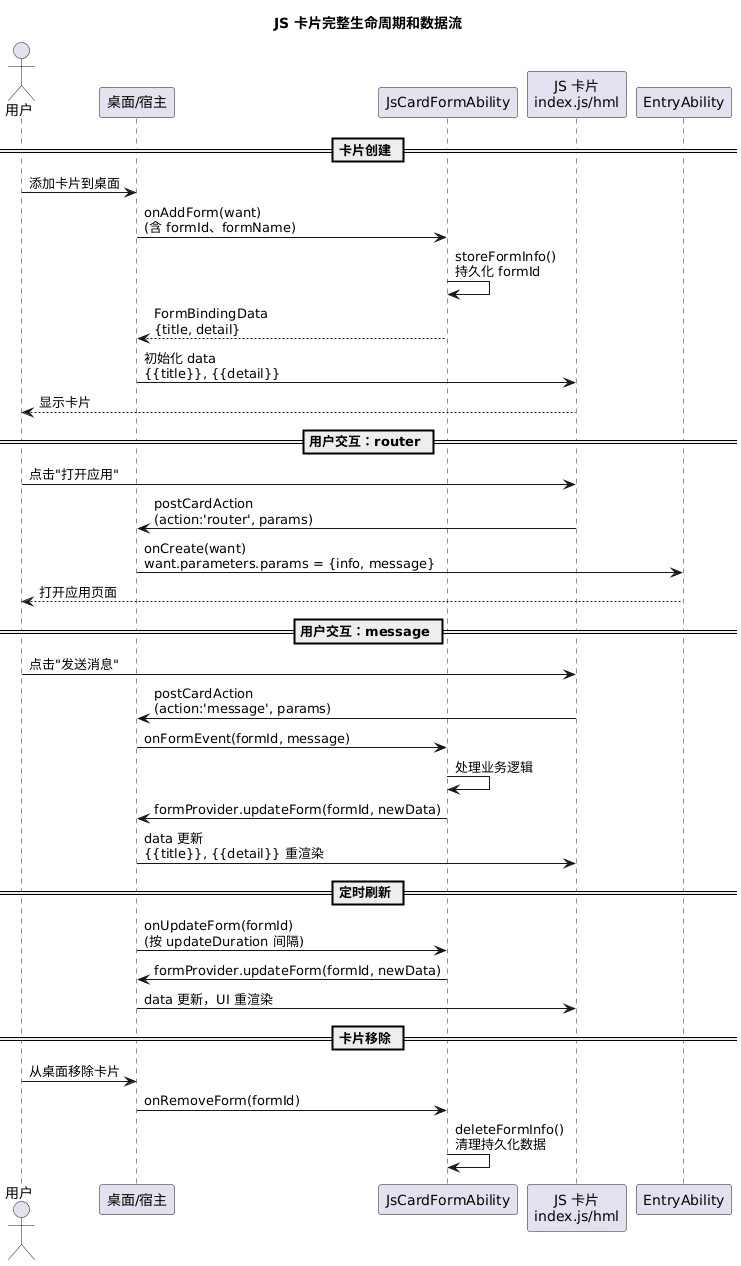
js 卡片常见坑
坑1:uisyntax 必须填 "hml" 而不是 "arkts"
这两个值不能混,写错了系统找不到卡片 ui,添加时直接报错。
坑2:hml 文件路径要和配置里的 src 完全一致
配置文件里 "src": "./js/jscard/pages/index/index.hml",就要在这个路径建文件,一个字母都不能错。
坑3:js 卡片不支持 import 语法
js 卡片运行在一个受限环境里,不支持 es6 的 import/export,也不支持 node_modules,只能用原生 js。
坑4:postcardaction 在 hml 里的写法不同
arkts 卡片直接调 postcardaction(this, {...}),js 卡片要用 this.$app.$def.postcardaction({...}),少了 this 参数。
写在最后
js 卡片说实话有点年代感了,能用 arkts 就别用 js 卡片。但如果你接手了一个老项目,或者需要维护 js 卡片代码,理解 hml + css + js 这套模式是必要的。
最核心的一点:数据绑定从 formbindingdata 到 hml 的 {{变量}} 是完全同步的,formprovider.updateform 推数据,hml 模板自动响应,这点和 arkts 的 @localstorageprop 逻辑是一样的。
到此这篇关于harmonyos服务卡片开发之js卡片开发的文章就介绍到这了,更多相关harmonyos js卡片开发内容请搜索代码网以前的文章或继续浏览下面的相关文章希望大家以后多多支持代码网!






发表评论