
 我要评论
我要评论一、基础用法:git log
克隆示例仓库并进入目录:
$ git clone https://github.com/schacon/simplegit-progit
$ cd simplegit-progit
直接运行 git log,默认会按 倒序 列出所有提交:
$ git log
commit ca82a6dff817……
author: scott chacon <schacon@…>
date:   mon mar 17 21:52:11 2008 -0700

    change version number

commit 085bb3bcb6……
author: scott chacon <schacon@…>
date:   sat mar 15 16:40:33 2008 -0700

    remove unnecessary test

commit a11bef06a3……
author: scott chacon <schacon@…>
date:   sat mar 15 10:31:28 2008 -0700

    initial commit
每条记录包括提交哈希(sha-1)、作者、日期和提交信息。
二、显示补丁与统计
2.1-p/--patch:显示补丁
跟随每次提交后直接输出该提交所引入的 diff:
$ git log -p -2
仅显示最近两次提交及其完整代码变更。
2.2--stat:文件修改统计
在每次提交下方汇总修改文件列表及插入/删除行数:
$ git log --stat
输出示例:
 rakefile | 2 +-
 1 file changed, 1 insertion(+), 1 deletion(-)
若只想看统计汇总行,可用 --shortstat。
三、多样化输出格式:--pretty
3.1 预定义格式
oneline:每个提交一行,配合 --abbrev-commit 可更简洁:
$ git log --pretty=oneline
short/full/fuller:分别对应不同程度的信息丰富度。
3.2 自定义格式
使用 format: 自定义输出字段,常用占位符如下:
| 占位符 | 含义 |
|---|---|
%h | 完整提交哈希 |
%h | 简短提交哈希 |
%an | 作者名称 |
%ae | 作者邮箱 |
%ar | 作者日期(相对,如 “2 weeks ago”) |
%cn | 提交者名称 |
%ce | 提交者邮箱 |
%cr | 提交者日期(相对) |
%s | 提交信息摘要 |
示例:
$ git log --pretty=format:"%h - %an, %ar : %s"
四、ascii 图形化分支:--graph
在日志前加上分支/合并结构的 ascii 图示:
$ git log --pretty=format:"%h %s" --graph
示例输出:
* 2d3acf9 ignore errors from sigchld on trap
* 5e3ee11 merge branch 'master' of …
|\
| * 420eac9 add method for current branch
* | 30e367c timeout code and tests
...
五、限制与过滤日志
5.1 限制条目数量
-n 或 -<n>:仅显示最近 n 条提交
$ git log -3 # 最近三次
5.2 时间范围
--since/--after:指定起始日期--until/--before:指定结束日期
支持多种格式,如 "2025-01-15"、"2 weeks ago"。
$ git log --since="2 weeks"
5.3 作者/提交者过滤
--author="用户名或邮箱"--committer="提交者"
$ git log --author="junio c hamano"
5.4 提交信息关键词:--grep
仅显示提交信息中匹配给定正则/字符串的记录:
$ git log --grep="bugfix"
添加 --all-match 要求同时匹配多个 --grep 或 --author 条件。
5.5 “挑选”改动内容:-s
查找改动中添加或删除某个字符串的提交:
$ git log -s function_name
5.6 按路径筛选
仅显示对指定文件或目录有改动的提交:
$ git log -- path/to/file
记得在路径前加 -- 来区分选项与路径。
六、实战示例
查询 2008 年 10 月由 junio hamano 修改 t/ 目录下文件的非合并提交:
$ git log \
  --pretty="%h - %s" \
  --author="junio c hamano" \
  --since="2008-10-01" \
  --before="2008-11-01" \
  --no-merges \
  -- t/
输出最近符合条件的若干提交。
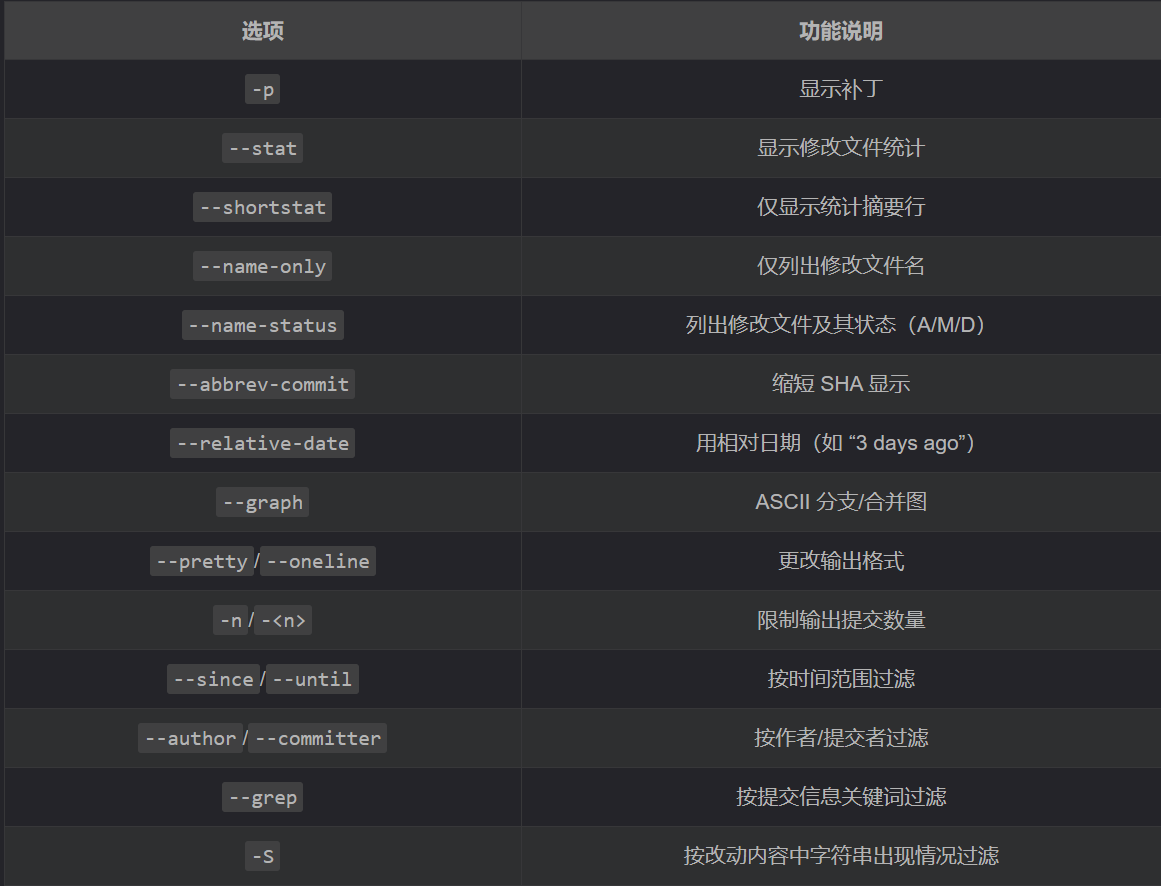
七、常用选项速览
八、总结
git log 是查看、分析项目历史的核心利器。掌握补丁输出、统计信息、格式定制、图形化分支、时间/作者/内容过滤等功能后,你可以:
- 快速定位引入某行代码的提交
- 按日期范围或作者筛选日志
- 以简洁或自定义格式输出,便于脚本处理
- 可视化分支与合并结构,理清历史脉络
以上就是git提交历史查看与日志筛选的全攻略的详细内容,更多关于git历史查看与日志筛选的资料请关注代码网其它相关文章!





发表评论