
 我要评论
我要评论1 ~> mysql 查看类命令大全
下面艾莉丝整理了超好用、考试/刷题都能直接上手使用的 mysql 查看命令速查表,记这些就够了。
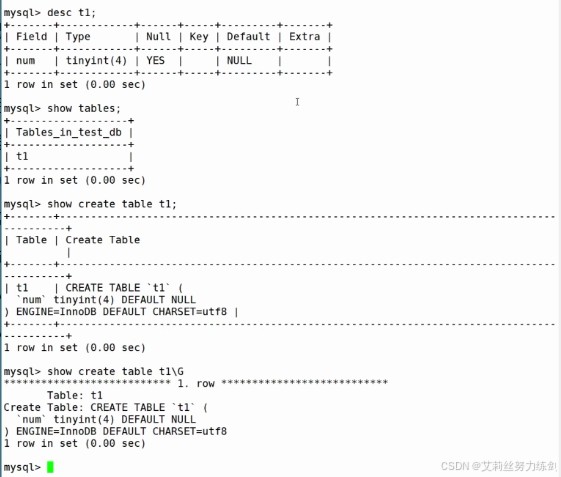
1.1 查看数据库
- 查看所有数据库
show databases;
- 进入某个数据库(必须先做这步)
use 数据库名;
- 查看当前正在用哪个库
select database();
1.2 查看表
- 查看当前库有哪些表
show tables;
- 查看表的结构(字段、类型、键、是否为空)
desc 表名;
- 这两个其实一模一样,只是写法不同
describe 表名; 和 desc
- 查看建表语句(包含引擎、字符集)
show create table 表名;
- 竖着显示,更好看
show create table 表名\g
1.3 查看数
- 查看表中所有数据
select * from 表名;
- 只看某一列
select 字段名 from 表名;
1.4 查看用户 / 权限
- 查看当前登录用户
select user();
1.5 最常用组合(截图里就是这套)
show databases;use test_db;show tables;desc t1;show create table t1;
2 ~> mysql常用核心命令速查表
2.1 mysql 常用核心命令速查表
下面艾莉丝整理了 mysql 最常用的核心命令,按数据库操作、表操作、数据操作、查询操作、权限管理五大类划分。
| 命令分类 | 功能描述 | 具体命令示例 | 关键说明 |
|---|---|---|---|
| 数据库操作 | 创建数据库 | create database <font color="red">if not exists</font> db_name; | if not exists 避免重复创建报错 |
| 数据库操作 | 删除数据库 | drop database <font color="red">if exists</font> db_name; | if exists 避免删除不存在的数据库报错 |
| 数据库操作 | 切换数据库 | use db_name; | 操作表前必须先切换到目标数据库 |
| 数据库操作 | 查看所有数据库 | show databases; | 列出当前mysql实例中所有数据库 |
| 表操作 | 创建表 | create table tb_name ( id int <font color="red">primary key</font> auto_increment, name varchar(50) <font color="red">not null</font>, age int <font color="red">default 0</font> ); | primary key主键、auto_increment自增、not null非空、default默认值 |
| 表操作 | 删除表 | drop table <font color="red">if exists</font> tb_name; | 同上,避免删除不存在的表报错 |
| 表操作 | 查看表结构 | desc tb_name; 或 describe tb_name; | 展示表的字段、类型、约束等信息 |
| 表操作 | 修改表名 | alter table old_tb_name <font color="red">rename to</font> new_tb_name; | rename to 是修改表名的核心关键字 |
| 表操作 | 添加字段 | alter table tb_name <font color="red">add column</font> email varchar(100); | add column 新增字段,可加约束(如not null) |
| 数据操作 | 插入数据 | insert into tb_name (name, age) <font color="red">values</font> ('张三', 20); | values 后接插入的具体值,字段和值需一一对应 |
| 数据操作 | 批量插入数据 | insert into tb_name (name, age) values ('李四', 22), ('王五', 25); | 批量插入比单条插入效率更高 |
| 数据操作 | 更新数据 | update tb_name <font color="red">set</font> age=21 <font color="red">where</font> name='张三'; | where 必须加,否则更新全表数据 |
| 数据操作 | 删除数据 | delete from tb_name <font color="red">where</font> id=1; | where 必须加,否则删除全表数据 |
| 查询操作 | 基础查询 | select <font color="red">name, age</font> from tb_name; | name, age 可替换为 * 查询所有字段(不推荐) |
| 查询操作 | 条件查询 | select * from tb_name where age <font color="red">between</font> 20 and 30; | between…and 范围查询,也可用 > < = != |
| 查询操作 | 排序查询 | select * from tb_name <font color="red">order by</font> age <font color="red">desc</font>; | order by 排序,desc降序(默认asc升序) |
| 查询操作 | 分页查询 | select * from tb_name <font color="red">limit</font> 0, 10; | limit 起始行, 行数,起始行从0开始 |
| 权限管理 | 创建用户 | create user 'user1'@'<font color="red">localhost</font>' identified by '123456'; | localhost 限制仅本地访问,% 表示任意主机 |
| 权限管理 | 授权用户 | grant <font color="red">all</font> on db_name.* to 'user1'@'localhost'; | all 可替换为 select/insert 等具体权限 |
| 权限管理 | 刷新权限 | flush <font color="red">privileges</font>; | 授权/改权限后必须执行,使权限生效 |
2.2 补充说明(高频实用命令)
1、查看当前数据库
select database();
2、查看表的创建语句
show create table tb_name; ---- 可查看表的完整创建逻辑(含索引、字符集等)
3、清空表数据(保留表结构)
truncate table tb_name; -- 比delete快,且重置自增主键
4、简单备份数据库(终端命令)
mysqldump -u root -p db_name > db_backup.sql ---- 备份整个数据库
2.3 总结
1、核心约束 / 关键字:where、if not exists、primary key、limit 是避免误操作、保证数据安全的关键,必须重点掌握;
2、数据修改类命令:update/delete 必须加 where 条件,否则会修改 / 删除全表数据,操作前建议先用 select 验证条件;
3、查询优化:尽量避免用 select *,只查询需要的字段;分页用 limit,排序用 order by,能大幅提升查询效率。
3 ~> 其它mysql常见命令
艾莉丝同样补充mysql日常开发 / 运维中高频且实用的其他核心命令,重点内容会标红,涵盖索引操作、数据校验、事务控制、性能优化、系统信息等场景,都是实际学习、工作中经常用到的:
3.1 mysql 补充常用命令速查表
| 命令分类 | 功能描述 | 具体命令示例 | 关键说明 |
|---|---|---|---|
| 索引操作 | 创建普通索引 | create <font color="red">index</font> idx_name on tb_name(name); | index 普通索引,提升查询速度(不唯一、非空) |
| 索引操作 | 创建唯一索引 | create <font color="red">unique index</font> idx_age on tb_name(age); | unique index 索引值唯一,可避免重复数据 |
| 索引操作 | 删除索引 | drop <font color="red">index</font> idx_name on tb_name; | 删除无用索引,减少写入性能损耗 |
| 索引操作 | 查看表索引 | show <font color="red">index</font> from tb_name; | 列出表中所有索引的名称、类型、关联字段等 |
| 事务控制 | 开启事务 | start <font color="red">transaction</font>; 或 begin; | 手动开启事务,用于保证多操作原子性 |
| 事务控制 | 提交事务 | <font color="red">commit</font>; | 确认事务内所有操作,永久生效 |
| 事务控制 | 回滚事务 | <font color="red">rollback</font>; | 撤销事务内未提交的所有操作,恢复到事务开始前状态 |
| 事务控制 | 设置保存点 | savepoint sp1; + rollback <font color="red">to</font> sp1; | 回滚到事务内指定保存点,而非整个事务 |
| 数据校验/修改 | 去重查询 | select <font color="red">distinct</font> name from tb_name; | distinct 过滤重复行,仅返回唯一值 |
| 数据校验/修改 | 批量替换字段值 | update tb_name set name = <font color="red">replace</font>(name, '张三', 'zhangsan'); | replace 替换字段中指定字符串 |
| 数据校验/修改 | 空值处理 | select * from tb_name where age <font color="red">is null</font>; | is null 判断空值(不能用 = null) |
| 聚合查询 | 统计计数 | select <font color="red">count(*)</font> from tb_name where age>20; | count(*) 统计行数,也可用 count(字段) 排除null |
| 聚合查询 | 求和/平均值 | select <font color="red">sum(age)</font>, <font color="red">avg(age)</font> from tb_name; | sum 求和、avg 求平均 |
| 聚合查询 | 分组查询 | select age, <font color="red">count(*)</font> from tb_name <font color="red">group by</font> age; | group by 按字段分组,常配合聚合函数 |
| 性能优化 | 查看sql执行计划 | explain <font color="red">select * from tb_name where name='张三';</font> | explain 分析sql是否走索引、扫描行数等 |
| 性能优化 | 查看慢查询日志状态 | show variables like '<font color="red">slow_query_log</font>'; | 检查慢查询日志是否开启,定位低效sql |
| 性能优化 | 查看当前连接数 | show <font color="red">processlist</font>; | 查看所有数据库连接,排查慢连接、锁等待问题 |
| 系统信息 | 查看mysql版本 | select <font color="red">version()</font>; | 确认mysql版本,适配不同版本的语法差异 |
| 系统信息 | 查看当前用户 | select <font color="red">user()</font>; | 查看当前登录的mysql用户及主机 |
| 系统信息 | 查看字符集配置 | show variables like '<font color="red">character_set%</font>'; | 检查数据库/表/连接的字符集,避免乱码问题 |
| 表结构修改 | 修改字段类型 | alter table tb_name <font color="red">modify column</font> name varchar(100); | modify column 修改字段类型/长度 |
| 表结构修改 | 删除字段 | alter table tb_name <font color="red">drop column</font> email; | drop column 删除表中无用字段 |
| 锁操作 | 查看表锁状态 | show <font color="red">open tables</font> where in_use>0; | 查看被锁定的表,排查锁阻塞问题 |
| 锁操作 | 手动锁表/解锁 | lock tables tb_name <font color="red">read</font>; + unlock tables; | read 读锁(仅读),也可用 write 写锁(独占) |
3.2 补充实用运维命令(终端 / 客户端)
| 场景 | 命令示例 | 说明 |
|---|---|---|
| 导入sql文件 | mysql -u root -p db_name < <font color="red">backup.sql</font> | 将备份的sql文件导入指定数据库(终端执行) |
| 修复损坏的表 | repair table tb_name; | myisam表损坏时修复(innodb表优先用事务回滚) |
| 设置自动提交事务 | set <font color="red">autocommit</font> = 0; | 关闭自动提交,需手动commit/rollback(默认1=开启) |
| 查看表占用空间 | select table_name, data_length/1024/1024 as size_mb from information_schema.tables where table_schema='db_name'; | 统计数据库中各表的大小(单位mb) |
3.3 总结
1、高频补充命令:索引操作(
create index/drop index)、事务控制(commit/rollback)、执行计划(explain)是优化查询的核心,必须掌握;2、运维必备:
show processlist(查连接)、explain(分析sql)、字符集检查(character_set%)能快速定位性能 / 乱码问题;3。数据安全:事务控制可避免多操作出错,
distinct去重、is null判空能保证数据校验的准确性。
4 ~> mysql 进阶高频命令速查表
4.1 mysql 进阶高频命令速查表
| 命令分类 | 功能描述 | 具体命令示例 | 关键说明 |
|---|---|---|---|
| 高级查询 | 多表关联查询(内连接) | select a.name, b.order_no from user a <font color="red">inner join</font> order b on a.id = b.user_id; | inner join 只返回两表匹配的数据,也可用 join 简写 |
| 高级查询 | 多表关联查询(左连接) | select a.name, b.order_no from user a <font color="red">left join</font> order b on a.id = b.user_id; | left join 保留左表所有数据,右表无匹配则为null |
| 高级查询 | 子查询(in) | select * from user where id <font color="red">in</font> (select user_id from order where amount>100); | in 子查询,适合小数据集;大数据集用join更高效 |
| 高级查询 | 条件过滤(having) | select age, count(*) from user group by age <font color="red">having</font> count(*)>5; | having 过滤分组后的数据(where过滤分组前) |
| 用户权限细化 | 回收用户权限 | revoke <font color="red">delete</font> on db_name.* from 'user1'@'localhost'; | revoke 撤销指定权限,需flush privileges生效 |
| 用户权限细化 | 修改用户密码 | alter user 'user1'@'localhost' <font color="red">identified by</font> 'new_password'; | mysql8.0+推荐用alter user,5.7可用set password |
| 用户权限细化 | 删除用户 | drop user <font color="red">if exists</font> 'user1'@'localhost'; | if exists 避免删除不存在的用户报错 |
| 表维护 | 优化表(整理碎片) | optimize <font color="red">table</font> tb_name; | 针对innodb/myisam表整理碎片,释放磁盘空间(需锁表,低峰执行) |
| 表维护 | 重命名字段 | alter table tb_name <font color="red">rename column</font> old_col to new_col; | mysql8.0+支持,低版本需先modify再drop旧字段 |
| 表维护 | 复制表结构(不含数据) | create table new_tb <font color="red">like</font> old_tb; | like 复制原表所有结构(索引、约束等) |
| 表维护 | 复制表结构+数据 | create table new_tb select * from old_tb <font color="red">where 1=2</font>; | where 1=2 只复制结构;去掉则复制结构+数据 |
| 日志管理 | 开启慢查询日志 | set global <font color="red">slow_query_log</font> = 1; | 临时开启(重启失效),永久生效需改my.cnf配置 |
| 日志管理 | 设置慢查询阈值 | set global <font color="red">long_query_time</font> = 1; | 执行时间超过1秒的sql会被记录到慢查询日志(默认10秒) |
| 日志管理 | 查看二进制日志(binlog) | show <font color="red">binary logs</font>; | 查看binlog文件列表,用于数据恢复/主从同步 |
| 变量配置 | 查看全局变量 | show <font color="red">global variables</font> like 'max_connections'; | 查看mysql全局配置(如最大连接数) |
| 变量配置 | 修改会话变量 | set <font color="red">session</font> sort_buffer_size = 1024*1024; | 仅对当前连接生效,不影响其他会话 |
| 变量配置 | 查看当前会话状态 | show <font color="red">session status</font> like 'threads%'; | 查看当前会话的资源使用、连接数等状态 |
| 数据导入导出 | 导出指定表数据(csv) | select * from tb_name into <font color="red">outfile</font> '/tmp/tb_data.csv' fields terminated by ','; | 导出为csv文件,需确保mysql有文件写入权限 |
| 数据导入导出 | 导入csv数据到表 | load <font color="red">data infile</font> '/tmp/tb_data.csv' into table tb_name fields terminated by ','; | 批量导入csv数据,比insert高效 |
| 锁与事务 | 设置事务隔离级别 | set <font color="red">transaction isolation level</font> read committed; | 常用级别:read committed(默认)、repeatable read、serializable |
| 锁与事务 | 查看事务等待锁 | select * from <font color="red">information_schema.innodb_lock_waits</font>; | 定位事务锁等待问题,排查死锁 |
4.2 补充:mysql 常用内置函数命令(高频)
| 函数类型 | 功能描述 | 命令示例 | 说明 |
|---|---|---|---|
| 日期函数 | 格式化日期 | select <font color="red">date_format</font>(create_time, '%y-%m-%d') from tb_name; | 按指定格式输出日期(%y年、%m月、%d日) |
| 日期函数 | 计算日期差 | select <font color="red">datediff</font>(now(), create_time) from tb_name; | 计算当前时间与create_time的天数差 |
| 字符串函数 | 截取字符串 | select <font color="red">substring</font>(name, 1, 2) from tb_name; | 截取name字段前2个字符(起始位置从1开始) |
| 字符串函数 | 拼接字符串 | select <font color="red">concat</font>(name, '-', age) from tb_name; | 拼接多个字段/字符串(null参与则结果为null) |
| 数值函数 | 四舍五入 | select <font color="red">round</font>(price, 2) from tb_name; | 将price保留2位小数 |
| 数值函数 | 取绝对值 | select <font color="red">abs</font>(amount) from tb_name; | 计算数值的绝对值 |
4.3 总结
1、高级查询核心:
inner join/left join是多表关联的基础,having补充分组后过滤,子查询适合简单场景、join适合大数据集;2、运维关键:
optimize table优化表碎片、慢查询日志(slow_query_log)定位低效 sql、innodb_lock_waits排查死锁,是日常维护必备;3、效率提升:
load data infile/into outfile批量导入导出数据,比单条insert/select高效数倍;内置函数(date_format/concat)能减少应用层数据处理工作量。
这些命令覆盖了从开发写复杂查询到运维排查问题的全链路,根据自己的使用场景(比如写报表 sql、排查锁问题、批量导入数据)重点记忆对应的命令。
结尾
到此这篇关于mysql查看命令速查表的文章就介绍到这了,更多相关mysql查看命令速查表内容请搜索代码网以前的文章或继续浏览下面的相关文章希望大家以后多多支持代码网!





发表评论