
 我要评论
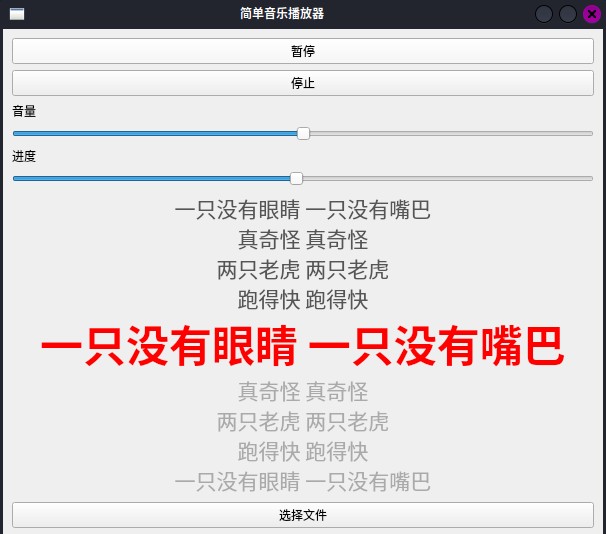
我要评论效果图
前言
在日常开发中,多媒体应用无疑是最常见的需求之一。音乐播放器作为其中的典型代表,不仅要求具备流畅的播放体验,还需提供丰富的功能,例如音量控制、进度调节以及歌词同步显示等功能。本文将带领你一步步学习如何使用 python 和 pyqt5 库开发一个功能全面的音乐播放器。我们将从基础的播放、暂停、停止功能开始,逐步扩展音量调节、进度控制以及自动同步歌词等实用功能。无论是初学者还是有一定经验的开发者,都能从中获得实用的开发技巧和知识。
环境安装
在开始之前,首先需要安装 pyqt5 库,它是我们开发音乐播放器的主要图形界面框架。在 python 环境中,可以使用 pip 来安装 pyqt5,执行以下命令:
pip install pyqt5
安装完成后,我们就可以开始编写代码,开发属于自己的多功能音乐播放器了。
技术栈
- 编程语言: python
- gui框架: pyqt5
- 多媒体处理: pyqt5.qtmultimedia
- 文件格式: 支持mp3、wav、ogg音频格式及lrc歌词文件
功能特性
- 播放/暂停/停止控制
- 音量调节滑块
- 播放进度控制
- 实时歌词同步显示
- 自动加载同名歌词文件
- 友好的用户界面
项目结构
我们的音乐播放器主要由以下几个核心组件构成:
- 主窗口类
musicplayer - 多媒体播放器
qmediaplayer - 用户界面布局管理
- 歌词解析与显示系统
核心代码实现
下面是完整的音乐播放器代码实现:
import sys
import os
import re
from pyqt5.qtwidgets import qapplication, qmainwindow, qvboxlayout, qpushbutton, qslider, qlabel, qfiledialog, qwidget
from pyqt5.qtmultimedia import qmediaplayer, qmediacontent
from pyqt5.qtcore import qt, qurl
from pyqt5.qtgui import qfont

class musicplayer(qmainwindow):
    def __init__(self):
        super().__init__()

        self.setwindowtitle("简单音乐播放器")
        self.setgeometry(100, 100, 600, 500)

        self.player = qmediaplayer()
        self.lyrics = []  # 存储歌词 [(timestamp, lyric), ...]

        self.setup_ui()

        # 连接信号
        self.player.durationchanged.connect(self.update_duration)
        self.player.positionchanged.connect(self.update_position)
        self.player.positionchanged.connect(lambda pos: self.update_lyrics())  # 歌词随进度更新

        self.show()

    def setup_ui(self):
        central_widget = qwidget(self)
        self.setcentralwidget(central_widget)
        layout = qvboxlayout()

        # 播放/暂停按钮
        self.play_pause_button = qpushbutton("播放")
        self.play_pause_button.clicked.connect(self.play_pause_music)
        layout.addwidget(self.play_pause_button)

        # 停止按钮
        stop_button = qpushbutton("停止")
        stop_button.clicked.connect(self.stop_music)
        layout.addwidget(stop_button)

        # 音量调节
        self.volume_slider = qslider(qt.horizontal)
        self.volume_slider.setrange(0, 100)
        self.volume_slider.setvalue(50)
        self.volume_slider.valuechanged.connect(self.set_volume)
        layout.addwidget(qlabel("音量"))
        layout.addwidget(self.volume_slider)

        # 进度条
        self.progress_slider = qslider(qt.horizontal)
        self.progress_slider.setenabled(false)
        self.progress_slider.slidermoved.connect(self.set_position)
        layout.addwidget(qlabel("进度"))
        layout.addwidget(self.progress_slider)

        # 歌词显示
        self.lyrics_label = qlabel("暂无歌词")
        self.lyrics_label.setalignment(qt.aligncenter)
        self.lyrics_label.setwordwrap(true)
        self.lyrics_label.setfont(qfont("microsoft yahei", 16))  # 美化字体
        self.lyrics_label.setstylesheet("color: #333333;")
        layout.addwidget(self.lyrics_label)

        # 选择文件按钮
        select_file_button = qpushbutton("选择文件")
        select_file_button.clicked.connect(self.select_music_file)
        layout.addwidget(select_file_button)

        central_widget.setlayout(layout)

    def play_pause_music(self):
        if self.player.state() == qmediaplayer.playingstate:
            self.player.pause()
            self.play_pause_button.settext("播放")
        else:
            self.player.play()
            self.play_pause_button.settext("暂停")
            self.progress_slider.setenabled(true)

    def stop_music(self):
        self.player.stop()
        self.play_pause_button.settext("播放")
        self.progress_slider.setenabled(false)
        self.lyrics_label.settext("暂无歌词")

    def set_volume(self, value):
        self.player.setvolume(value)

    def set_position(self, position):
        self.player.setposition(position)

    def update_duration(self, duration):
        self.progress_slider.setmaximum(duration)

    def update_position(self, position):
        # 当用户正在拖动进度条时不更新,防止跳动
        if not self.progress_slider.issliderdown():
            self.progress_slider.setvalue(position)

    def select_music_file(self):
        file_dialog = qfiledialog()
        file_dialog.setnamefilter("音频文件 (*.mp3 *.wav *.ogg)")
        if file_dialog.exec_() == qfiledialog.accepted:
            selected_file = file_dialog.selectedfiles()[0]
            self.player.setmedia(qmediacontent(qurl.fromlocalfile(selected_file)))
            self.player.setvolume(self.volume_slider.value())

            # 重置歌词
            self.lyrics = []
            self.lyrics_label.settext("加载中...")

            # 加载同名 lrc 文件
            lyrics_file = os.path.splitext(selected_file)[0] + ".lrc"
            if os.path.exists(lyrics_file):
                self.load_lyrics(lyrics_file)

            # 初始更新歌词显示(位置为0)
            self.update_lyrics()

    def load_lyrics(self, lyrics_file):
        self.lyrics = []
        try:
            with open(lyrics_file, "r", encoding="utf-8") as f:
                time_pattern = re.compile(r'\[(\d{1,2}:\d{2}\.?\d*)\]')
                for line in f:
                    line = line.strip()
                    if not line:
                        continue
                    times = time_pattern.findall(line)
                    lyric = time_pattern.sub('', line).strip()
                    if times and lyric:
                        for t in times:
                            try:
                                mm, ss = t.split(':')
                                timestamp = int(mm) * 60 + float(ss)
                                self.lyrics.append((timestamp, lyric))
                            except valueerror:
                                continue
        except exception as e:
            print(f"歌词加载失败: {e}")

        self.lyrics.sort(key=lambda x: x[0])
        print(f"成功加载 {len(self.lyrics)} 行歌词")

    def update_lyrics(self):
        if not self.lyrics:
            self.lyrics_label.settext("无歌词可用")
            return

        current_pos = self.player.position() / 1000.0

        # 找到当前行(时间戳 <= 当前位置 的最大索引)
        current_index = -1
        for i, (ts, _) in enumerate(self.lyrics):
            if ts <= current_pos:
                current_index = i
            else:
                break

        # 显示前后各4行(可调整)
        before = 4
        after = 4
        start = max(0, current_index - before) if current_index >= 0 else 0
        end = min(len(self.lyrics), current_index + after + 1) if current_index >= 0 else before + after + 1

        lines = []
        for i in range(start, min(end, len(self.lyrics))):
            lyric = self.lyrics[i][1]
            if current_index >= 0 and i == current_index:
                # 当前行:红色、加大、加粗
                lines.append(f'<font color="red" size="+3"><b>{lyric}</b></font>')
            elif i <= current_index:
                # 已唱:深灰
                lines.append(f'<font color="#555555">{lyric}</font>')
            else:
                # 未唱:浅灰
                lines.append(f'<font color="#aaaaaa">{lyric}</font>')

        if current_index == -1:
            lines.insert(0, '<font color="#888888">歌曲即将开始...</font>')

        self.lyrics_label.settext("<br>".join(lines))


if __name__ == "__main__":
    app = qapplication(sys.argv)
    player = musicplayer()
    sys.exit(app.exec_())
代码解析
1. 初始化部分
在 __init__ 方法中,我们设置了窗口标题、大小,并初始化了多媒体播放器和歌词存储列表。
2. ui界面设置
setup_ui 方法负责构建整个用户界面,包括:
- 播放/暂停按钮
- 停止按钮
- 音量调节滑块
- 播放进度条
- 歌词显示区域
- 文件选择按钮
3. 播放控制
播放/暂停功能通过 play_pause_music 方法实现,根据播放器当前状态切换播放/暂停状态。
4. 歌词处理
歌词功能是本播放器的一大亮点,主要包括:
load_lyrics方法:解析lrc格式歌词文件update_lyrics方法:根据播放进度实时更新歌词显示
扩展功能建议
- 播放列表管理:添加多首歌曲播放列表
- 均衡器:集成音频均衡器功能
- 皮肤主题:提供更多界面主题选项
- 音频可视化:添加频谱分析显示
- 快捷键支持:为常用功能添加键盘快捷键
总结
本文展示了如何使用pyqt5构建一个功能丰富的音乐播放器。通过这个项目,我们可以学到:
- pyqt5 gui界面设计
- 多媒体处理技术
- 文件格式解析
- 实时数据更新机制
这个播放器虽然功能相对基础,但代码结构清晰,易于扩展。读者可以根据自己的需求添加更多功能,比如播放列表、音效处理等。
以上就是使用python和pyqt5开发一个多功能音乐播放器的详细内容,更多关于python pyqt5多功能音乐播放器的资料请关注代码网其它相关文章!





发表评论