
 我要评论
我要评论一、调试前置条件
1、在编译之后,exe和pdb文件均需要发布给用户;
二、抓取异常的系统函数区分
addvectoredexceptionhandler和setunhandledexceptionfilter
addvectoredexceptionhandler 是“第一现场观察者”,
setunhandledexceptionfilter 是“最后兜底处理者”。
当一个异常发生时,windows 内部顺序是:
``1️⃣ vectored exception handlers (veh)
↓
2️⃣ 线程的 seh (__try / __except)
↓
3️⃣ c++ try / catch
↓
4️⃣ unhandledexceptionfilter (uef)
↓
5️⃣ windows 默认异常处理(弹框 / 进程终止)`
| 对比项 | veh | uef |
|---|---|---|
| 调用时机 | 最早 | 最后 |
| 是否能看到 first-chance | ✅ 能 | ❌ 不能 |
| 是否会被覆盖 | ❌ 不会 | ✅ 经常 |
| 稳定性 | ⭐⭐⭐⭐⭐ | ⭐⭐ |
| 使用难度 | 高 | 低 |
| 线上推荐 | ✅ | ❌ |
三、可直接复用的代码:
crashdump.h:
#pragma once
#include <windows.h>

class crashdump
{
public:
    static void install();

private:
    static long callback vectoredhandler(pexception_pointers ep);
    static void writedump(pexception_pointers ep);

private:
    static volatile long s_dumped;
};
crashdump.cpp
#include "crashdump.h"
#include <dbghelp.h>
#include <strsafe.h>

#pragma comment(lib, "dbghelp.lib")

volatile long crashdump::s_dumped = 0;

void crashdump::install()
{
    addvectoredexceptionhandler(1, vectoredhandler);
}

static bool isfatalexception(dword code, dword flags)
{
    // 明确忽略的异常(正常流程)
    switch (code)
    {
    case exception_breakpoint:
    case exception_single_step:
    case 0xe06d7363: // c++ exception
        return false;
    default:
        break;
    }

    // 不可继续异常 → 一定是致命的
    if (flags & exception_noncontinuable)
        return true;

    // 常见致命异常
    switch (code)
    {
    case exception_access_violation:
    case exception_array_bounds_exceeded:
    case exception_datatype_misalignment:
    case exception_illegal_instruction:
    case exception_in_page_error:
    case exception_stack_overflow:
        return true;
    default:
        return false;
    }
}

long callback crashdump::vectoredhandler(pexception_pointers ep)
{
    if (!ep || !ep->exceptionrecord)
        return exception_continue_search;

    dword code = ep->exceptionrecord->exceptioncode;
    dword flags = ep->exceptionrecord->exceptionflags;

    // ⭐ 只处理真正致命异常
    if (!isfatalexception(code, flags))
        return exception_continue_search;

    if (interlockedcompareexchange(&s_dumped, 1, 0) == 0)
    {
        writedump(ep);

        // ❗真正崩溃点,立即终止
        terminateprocess(getcurrentprocess(), code);
    }

    return exception_continue_search;
}

void crashdump::writedump(pexception_pointers ep)
{
    wchar_t dir[max_path] = { 0 };
    getmodulefilenamew(nullptr, dir, max_path);

    wchar_t* slash = wcsrchr(dir, l'\\');
    if (slash) *slash = 0;

    systemtime st;
    getlocaltime(&st);

    dword pid = getcurrentprocessid();
    dword tid = getcurrentthreadid();

    wchar_t path[max_path] = { 0 };

    stringcchprintfw(
        path,
        max_path,
        l"%s\\dumpfile-%04d%02d%02d-%02d%02d%02d-p%u-t%u.dmp",
        dir,
        st.wyear, st.wmonth, st.wday,
        st.whour, st.wminute, st.wsecond,
        pid, tid);

    handle hfile = createfilew(
        path,
        generic_write,
        0,
        nullptr,
        create_always,
        file_attribute_normal,
        nullptr);

    if (hfile == invalid_handle_value)
        return;

    minidump_exception_information mei = {};
    mei.threadid = tid;
    mei.exceptionpointers = ep;
    mei.clientpointers = false;

    minidump_type type = (minidump_type)(
        minidumpwithfullmemory |
        minidumpwiththreadinfo |
        minidumpwithhandledata |
        minidumpwithunloadedmodules);

    minidumpwritedump(
        getcurrentprocess(),
        pid,
        hfile,
        type,
        &mei,
        nullptr,
        nullptr);

    closehandle(hfile);
}
在main函数中调用:
 crashdump::install();

 qapplication a(argc, argv);
 ...
四、调试:
1、将dump文件放在对应的exe、pdb文件同级目录下;
2、
1)使用visual studio打开dump文件,然后设置符号路径,路径下需要有exe、pdb、dump;
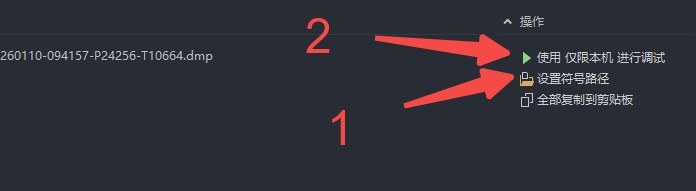
2)点击“使用仅限本机进行调试”,即可重新异常情况;
总结
到此这篇关于vs2019+qt工程中如何生成dump文件及调试的文章就介绍到这了,更多相关vs2019 qt生成dump文件及调试内容请搜索代码网以前的文章或继续浏览下面的相关文章希望大家以后多多支持代码网!





发表评论