
 我要评论
我要评论0 引言
在日常开发中,我们常常会遇到 git 推送失败的问题,尤其是在初次配置远程仓库或网络环境受限的情况下。
如会出现类似如下的报错:
fatal: unable to access 'https://github.com/username/repo.git/': recv failure: connection was reset
本文将详细介绍如何通过配置 ssh 协议解决 git 推送失败问题,并深入解析一个常见的错误场景:“fatal: refusing to merge unrelated histories”。
1 ssh 配置详解
1.1 为什么选择 ssh?
git 支持 https 和 ssh 两种协议进行远程通信:
- https:需要每次输入用户名和密码(或使用 token),容易受代理影响。
- ssh:基于密钥认证,安全高效,且不受部分代理干扰,适合长期开发使用。
1.2 生成 ssh 密钥对
如果你尚未配置 ssh 密钥,可以在 git bash 通过以下命令生成并配置 ssh 密钥:
ssh-keygen -t rsa -b 4096 -c "your_email@example.com"
-t rsa表示使用 rsa 算法。-b 4096表示密钥长度为 4096 位,更安全。-c后面是注释,建议填写注册 github 的邮箱。
系统会提示:
generating public/private rsa key pair.
enter file in which to save the key (/c/users/xxx/.ssh/id_rsa):
直接回车即可(使用默认路径 /c/users/xxx/.ssh/id_rsa)
接着会提示:
enter passphrase (empty for no passphrase):
可以选择输入一个密码(推荐),会要求二次输入确认,也可以直接按回车跳过。
成功后会显示:
your identification has been saved in /c/users/xxx/.ssh/id_rsa
your public key has been saved in /c/users/xxx/.ssh/id_rsa.pub
the key fingerprint is:
sha256:xxxxxxxxxxxxxxxxx your_email@example.com
the key's randomart image is:
xxxxxxxxxx
xxxxxxxxxx
xxxxxxxxxx
……
1.3 添加公钥到 github
执行以下命令显示公钥内容:
cat /c/users/xxx/.ssh/id_rsa.pub
输出类似如下内容(以 ssh-rsa 开头):
ssh-rsa aaaab3nzac1yc2eaaaadaqabaaacaqc7... your_email@example.com
完整复制输出内容,在 github ssh keys 设置页面 中添加新密钥。
点击new key,填写title,将复制的内容粘贴进 key 文本框,最后点击 add ssh key。
1.4 测试 ssh 连接
运行以下命令测试是否成功连接 github:
ssh -t git@github.com
如果返回如下提示,则表示 ssh 已配置成功:
hi username! you've successfully authenticated, but github does not provide shell access.
如果提示主机指纹未知,请确认是否为官方服务器,并输入 yes 继续连接。
当第一次尝试连接 github 的 ssh 服务,系统为了安全起见会提示你确认 github 的主机密钥指纹:
the authenticity of host 'github.com (20.205.243.166)' can't be established.
ed25519 key fingerprint is sha256:+diy3wvvv6tujjhbpzisf/zlda0zpmsvhdkr4uvcoqu.
this key is not known by any other names.
are you sure you want to continue connecting (yes/no/[fingerprint])?
输入yes即可。
然后会提示你输入 passphrase(如果你在生成密钥时设置了密码),否则直接回车即可。
1.5 修改远程仓库地址为 ssh 格式
如果之前用的是 https 地址,需要改成 ssh:
git remote set-url origin git@github.com:username/repo.git
验证当前远程地址:
git remote -v
接着就能进行clone或push等操作了。
2 远程仓库推送失败问题解决
2.1 报错信息示例
我在执行推送命令时报错:
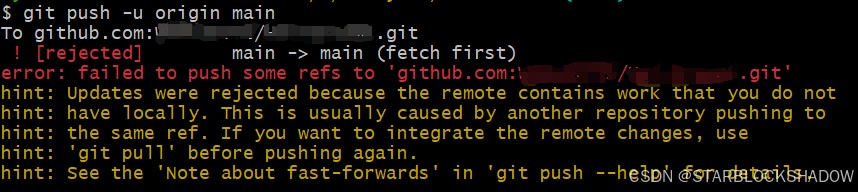
error: failed to push some refs to 'github.com:username/repo.git'
hint: updates were rejected because the remote contains work that you do not have locally.
2.2 原因分析
该错误通常表示远程分支存在本地没有的提交记录(unrelated histories) ,可能原因分析如下:
- 其他开发者在 github 上向 main 分支提交并推送了新的代码;
- 你在其他设备上提交过代码但没同步回来;
- 远程仓库初始化时已包含文件(如 readme.md)。
此时 git 无法直接合并两个不同历史起点的分支。
我的例子是我在本地初始化了一个新的 git 仓库(git init),接着添加了远程仓库地址;
然后我执行 git pull origin;
main 想要拉取远程分支内容; 但由于本地和远程是完全独立的仓库(没有任何共同提交历史),git 默认拒绝合并它们。
2.3 解决方法:拉取远程并合并不相关历史
2.3.1 允许合并不相关历史
git pull origin main --allow-unrelated-histories
此参数用于强制 git 合并两个没有共同祖先的提交历史。
2.3.2 解决冲突(如有)
如果提示冲突,检查状态并处理冲突:
git status
添加文件并提交:
git add .
git commit -m "合并远程仓库到本地"
2.3.3 推送至远程
git push origin main
到此这篇关于使用ssh协议解决git推送失败问题的具体操作方法的文章就介绍到这了,更多相关ssh协议解决git推送失败内容请搜索代码网以前的文章或继续浏览下面的相关文章希望大家以后多多支持代码网!





发表评论