
 我要评论
我要评论将验证码改为加法运算,比如验证码显示“25+64等于?”,那么输入“91”就能通过验证。
来看看效果图对比:字符验证码: → 加法验证码: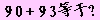
优点:
①与纯字符验证码相比,本程序效防止了绝大部分(99%以上)广告机的自动识别。即使是中文验证码, 也能被市面上的部分广告机识别。
②与中文验证码相比,避免了用户输入用户名密码验证码的时候需要切换输入法的麻烦。
说明:该程序需要网站空间支持aspjpeg组件、楷体_gb2312字体。
代码如下:
<%
const fontcolor = &h000000 ' 字体颜色
const bgcolor = &hffccff ' 背景颜色
call creatvalidcode("getcode")
sub creatvalidcode(psn)
  dim x, jpeg
  randomize
  x = array(1+int(rnd()*9), int(rnd()*10), 1+int(rnd()*9), int(rnd()*10), 0, 0, "+")
  x(4) = x(0)*10 + x(1)
  x(5) = x(2)*10 + x(3)
  'session(psn) = cstr(eval(x(4) & x(6) & x(5)))
  session(psn) = cstr(x(4) + x(5))
  set jpeg = server.createobject("persits.jpeg")
  jpeg.new 100,20,bgcolor
  jpeg.quality=100
  with jpeg.canvas
    .font.bold = true
    .font.size = 16
    .font.rotation = 0
    .font.family = "楷体_gb2312"
    .font.color = fontcolor
    .printtext 4, 3, cstr(x(0))
    .printtext 14, 3, cstr(x(1))
    .printtext 26, 3, x(6)
    .printtext 38, 3, cstr(x(2))
    .printtext 48, 3, cstr(x(3))
    .font.rotation = 15
    .printtext 55, 3, "等"
    .printtext 70, 3, "于"
    .printtext 85, 3, "?"
  end with
  '禁止缓存
  response.contenttype = "image/jpeg"
  response.expires = -9999
  response.addheader "pragma", "no-cache"
  response.addheader "cache-ctrol", "no-cache"
  response.addheader "content-disposition","inline; filename=vcode.jpg"
  jpeg.sendbinary
  jpeg.close
  set jpeg = nothing
end sub
%>
以上就是关于asp实现加法验证码的关键代码,有兴趣的朋友,还可以扩展为其他的运算,比如乘法,减法,乘方等,希望本文对大家的学习有所帮助。






发表评论